Reference
CCNA glossary
Short definitions across the blueprint: numbering, models and PDUs, switching and routing language, protocols, and automation touchpoints—a companion to the day chapters.
Showing 70 of 70 entries.
Units & numbering
- Bandwidth (IOS interface)
- On a Cisco router, the `bandwidth` interface subcommand sets an administrative cost hint used by routing protocols (EIGRP, OSPF) and some QoS calculations—it does not physically cap port speed. Changing `bandwidth` on a serial interface affects EIGRP metric and OSPF cost but leaves the actual line rate unchanged unless paired with a traffic-shaping policy. Exam trap: a 100 Mb/s FastEthernet port with `bandwidth 64` still runs at 100 Mb/s; only the routing metric reflects the configured value.
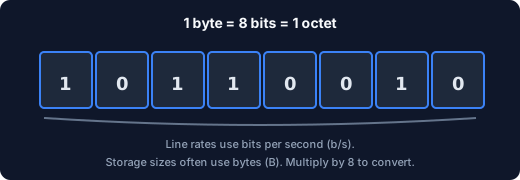
- Bit (b)
- The smallest binary digit in networking, representing either 0 or 1. Line rates and serialization speed are always expressed in bits per second (b/s)—for example, 1 Gb/s means one gigabit per second, not one gigabyte. On CCNA exams, confusing bits with bytes is one of the most common calculation traps; always check whether the question asks for b/s or B/s before doing math.
- Byte (B)
- A group of exactly eight bits, used to measure storage, file sizes, and protocol field sizes (KB, MB, GB). Throughput questions on the exam often mix Mb/s (megabits per second) with MB/s (megabytes per second); divide or multiply by eight to convert between them. IOS `show interface` reports both bit rate and packet sizes, so knowing which unit the question stem uses is essential before calculating transfer time or effective throughput.
- Jitter
- Variation in inter-packet delay arrival times—packets that should arrive evenly spaced instead arrive at irregular intervals. Jitter degrades voice and video quality because playout buffers must compensate for unpredictable gaps. QoS queuing, shaping, and priority scheduling on Cisco switches and routers aim to bound jitter for real-time traffic classes; CCNA expects you to recognize jitter as a QoS problem, not a bandwidth problem.
- Kilo / Mega / Giga (line rates)
- Ethernet bandwidth uses decimal SI prefixes: 1 kb/s = 1,000 b/s, 1 Mb/s = 1,000,000 b/s, and 1 Gb/s = 1,000,000,000 b/s. Do not assume 1,024-based (binary) prefixes for wire-speed questions unless the stem explicitly says so—storage math uses 1,024, but line-rate math uses 1,000. IOS interface speed labels (10, 100, 1000, 10000 Mb/s) follow this decimal convention, and EIGRP/OSPF reference bandwidth calculations also use decimal megabits.
- Latency
- The delay for a bit or packet to travel across a path, measured as one-way delay or round-trip time (RTT). High bandwidth with high latency still feels slow for interactive apps because each request waits for the full RTT before the next can begin. The bandwidth-delay product (bandwidth × RTT) determines how much data must be “in flight” to fill a long fat pipe—a concept tested indirectly in TCP window and QoS scenarios.
- Nibble
- Four bits—half of an octet—often written as a single hexadecimal digit (0–F). You encounter nibbles when reading MAC addresses and IPv6 addresses, where each hex pair represents one octet. CCNA subnetting rarely asks about nibbles directly, but understanding them helps when converting between binary, hex, and dotted decimal quickly under exam time pressure.
- Octet
- Exactly eight bits—the precise term RFCs and Cisco IOS use instead of “byte.” Historically, “byte” could mean different sizes on different hardware, so networking standards standardized on octet for unambiguous documentation. On the exam, treat octet and byte as interchangeable; when you see “octet” in a stem, it always means an 8-bit chunk (e.g., an IPv4 address is four octets).
- Throughput vs bandwidth
- Bandwidth is the nominal capacity of a link or the value set by a shaper—what the pipe could carry under ideal conditions. Throughput is what an application actually achieves after protocol overhead, retransmissions, congestion, and serialization delay eat into that capacity. On the exam, a 1 Gb/s link does not guarantee 1 Gb/s file transfer; TCP window size, RTT, and overhead all reduce real throughput below the headline bandwidth number.
OSI, PDUs & encapsulation
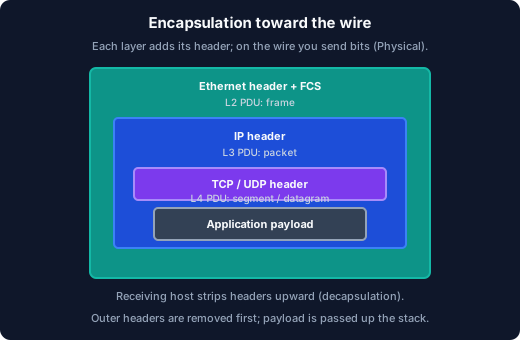
- Encapsulation
- The process where each layer adds its own header (and sometimes trailer) as data moves down the stack toward the physical wire for transmission. On receive, decapsulation strips headers layer by layer moving up the stack until the application payload is delivered. In IOS debug output and packet captures, you see encapsulation as nested headers—Ethernet outermost, then IP, then TCP/UDP, then payload—and CCNA troubleshooting often asks which header a device examines at each hop.
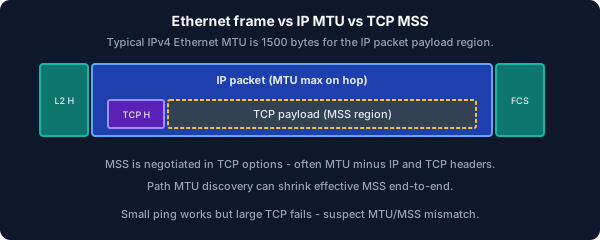
- MSS
- Maximum Segment Size: the largest TCP payload allowed in a single segment, typically negotiated during the three-way handshake as path MTU minus IP and TCP header overhead (often 1460 bytes on standard Ethernet). MSS is distinct from MTU—MSS applies to the TCP payload only, while MTU bounds the entire IP packet including headers. When troubleshooting TCP performance, a reduced MSS (seen in `show tcp brief`) often indicates a lower-MTU link or VPN tunnel in the path.
- MTU
- Maximum Transmission Unit: the largest IP payload an interface will send without fragmentation—Ethernet default is typically 1500 bytes for the IP packet, not counting the Layer 2 header and trailer. If a packet exceeds the outgoing interface MTU and the DF (Don't Fragment) bit is set, the router drops it and sends an ICMP “Fragmentation Needed” message back to the source. In labs, `show interface` displays MTU per interface, and mismatched MTUs across a VPN tunnel are a common cause of “small packets work, large transfers fail” symptoms.
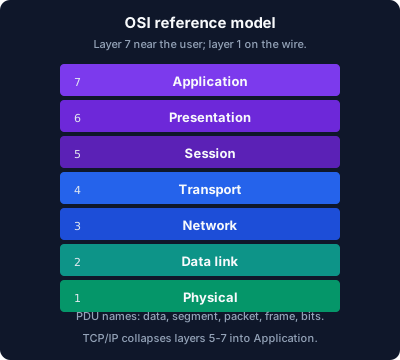
- OSI model
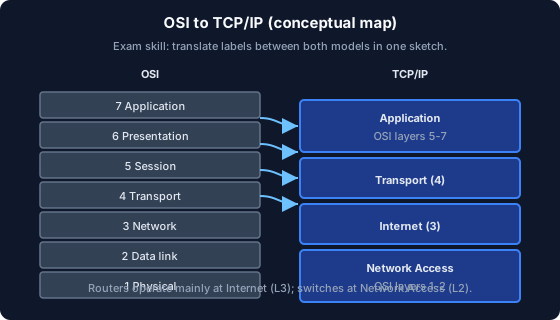
- The seven-layer reference model (Physical through Application) that teaches separation of concerns in networking. CCNA uses OSI vocabulary even though real TCP/IP stacks do not map perfectly—knowing layer numbers and functions is exam canonical. Memorize layers top-down (7 = Application) and bottom-up (1 = Physical) so either phrasing in a question works, and be able to place common protocols (HTTP, TCP, IP, Ethernet) at the correct layer.
- PDU (protocol data unit)
- The name for the data envelope at each layer of the stack: bits at Layer 1, frame at Layer 2, packet at Layer 3, segment (TCP) or datagram (UDP) at Layer 4, and data at Layers 5–7. CCNA exams test precise PDU vocabulary relentlessly—a TCP segment becomes an IP packet, which becomes an Ethernet frame as it descends the stack. Using the wrong PDU name for a layer (calling an IP packet a “frame”) is an instant wrong answer on encapsulation questions.
- TCP/IP model
- The practical four-layer model used in production networks: Network Access (OSI 1–2), Internet (OSI 3), Transport (OSI 4), and Application (OSI 5–7 collapsed). CCNA expects you to map OSI layers to TCP/IP layers in one diagram from memory—Application absorbs presentation and session, Network Access absorbs physical and data link. Exam questions may use either model; being fluent in both prevents confusion when a stem references “Layer 3” in OSI terms versus “Internet layer” in TCP/IP terms.
Ethernet & switching
- Broadcast domain
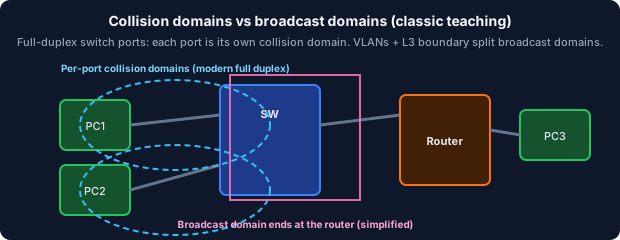
- The set of devices that receive each other's Layer 2 broadcasts—a single VLAN on a switch is one broadcast domain. Routers and Layer 3 SVIs separate broadcast domains because they do not forward broadcasts between subnets. CCNA inter-VLAN routing scenarios hinge on this concept: without a router or multilayer switch SVI, hosts in different VLANs cannot communicate even if physically connected to the same switch.
- CDP
- Cisco Discovery Protocol: a Layer 2 protocol that advertises device ID, platform, IP address, and capabilities to directly connected Cisco neighbors. Use `show cdp neighbors detail` in labs to discover topology without documentation—CDP is enabled by default on Cisco devices. Security best practice disables CDP on untrusted access ports (`no cdp enable` under the interface) to prevent information leakage; CDP is Cisco-proprietary and does not work with third-party switches.
- Collision domain
- A legacy half-duplex Ethernet segment where two stations transmitting simultaneously would collide and require CSMA/CD backoff. Modern full-duplex switch ports each operate in their own collision domain—collisions essentially do not occur on switched full-duplex links. On the exam, remember that a hub creates one large collision domain, while each port on a switch is a separate collision domain; routers also separate collision domains because they terminate Layer 2 segments.
- EtherChannel / port-channel / LAG
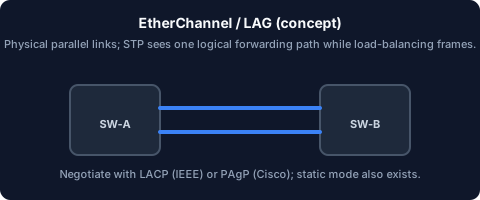
- Bundling two or more parallel physical links between two switches into one logical port-channel interface so STP treats the bundle as a single path while load-sharing frames across members. EtherChannel can be static (`mode on`) or negotiated via LACP (IEEE 802.3ad, `mode active/passive`) or PAgP (Cisco proprietary, `mode desirable/auto`). In IOS, all member ports must match speed, duplex, and VLAN/trunk settings; exam traps include mixing LACP and PAgP modes or allowing different VLAN lists on bundled ports.
- LLDP
- Link Layer Discovery Protocol (IEEE 802.1AB): a vendor-neutral neighbor discovery protocol that advertises device identity, capabilities, and management addresses to directly connected peers. LLDP is the multivendor equivalent of CDP—enable it with `lldp run` globally and verify with `show lldp neighbors`. On CCNA, know that LLDP and CDP serve the same documentation/troubleshooting purpose but LLDP works across vendor boundaries while CDP is Cisco-only.
- MAC address
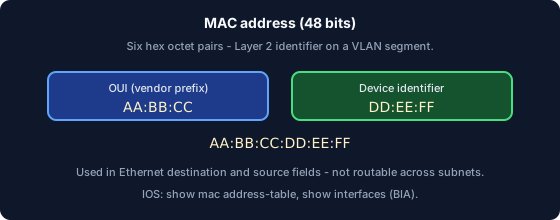
- A 48-bit link-layer address assigned to a NIC, expressed as six hex octet pairs separated by colons or dots (e.g., `aa:bb:cc:dd:ee:ff`). MAC addresses identify stations within the same Layer 2 segment—they are used for frame delivery on a VLAN but are not routable across IP networks. In IOS, `show mac address-table` and `show interfaces` reveal learned and burned-in addresses; exam traps include confusing MAC (Layer 2) with IP (Layer 3) when tracing how a frame reaches its next hop.
- MAC address table (CAM)
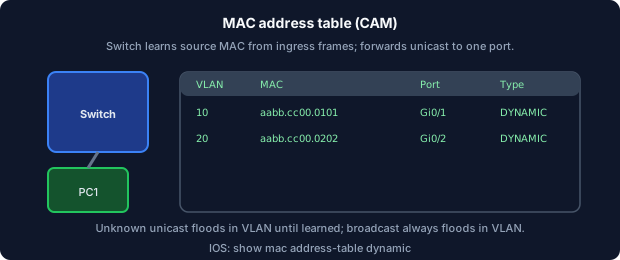
- The switch's Content Addressable Memory table that maps learned source MAC addresses to outbound ports and VLAN IDs. When a frame arrives, the switch looks up the destination MAC—if found, it forwards only to that port (known unicast); if not found, it floods the frame out all ports in the VLAN except the ingress port. In IOS, `show mac address-table` displays entries with age timers; exam topics include MAC flooding attacks and port security as defenses against CAM table overflow or unauthorized MAC learning.
- Native VLAN
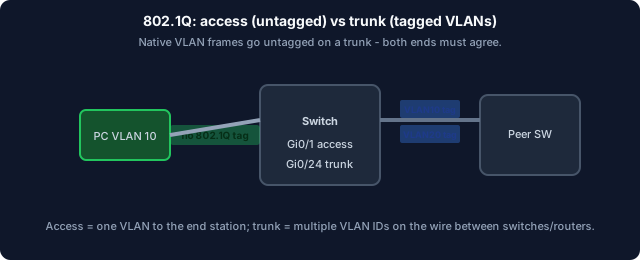
- The VLAN whose frames traverse an 802.1Q trunk without a tag—by default VLAN 1 on Cisco switches, though best practice is to change it. Both trunk ends must agree on the native VLAN ID; a mismatch causes untagged traffic from one side to be assigned to a different VLAN on the other, creating subtle black holes or security exposure. In IOS, configure with `switchport trunk native vlan <id>` and verify with `show interfaces trunk`; CDP can warn about native VLAN mismatches between Cisco peers.
- PoE
- Power over Ethernet: delivers DC electrical power over the same copper twisted-pair used for data, eliminating separate power cables for IP phones, wireless APs, and cameras. Standards include 802.3af (PoE, 15.4 W), 802.3at (PoE+, 30 W), and 802.3bt (PoE++, up to 90 W)—the switch and powered device negotiate class and wattage. In IOS, `show power inline` displays per-port power allocation; exceeding the switch's power budget causes lower-priority ports to shut down.
- STP (Spanning Tree)
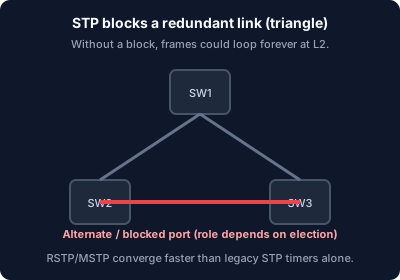
- The 802.1D family of protocols (including RSTP and MSTP) that logically blocks redundant Layer 2 paths to prevent bridging loops while keeping backup links available for failover. STP elects a root bridge, assigns port roles (root, designated, alternate/backup), and transitions ports through listening/learning/forwarding states. CCNA switching skills require knowing how to influence root bridge election (`spanning-tree vlan <id> priority`), reading `show spanning-tree`, and recognizing that blocked ports still carry BPDUs but do not forward user traffic.
- SVI
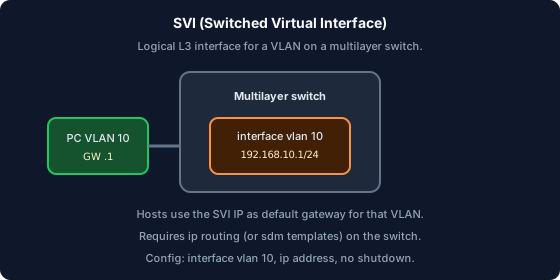
- A Switched Virtual Interface: a logical Layer 3 VLAN interface on a multilayer switch, configured as `interface vlan <id>` with an IP address. The SVI serves as the default gateway for hosts in that VLAN—when a PC sends traffic to another subnet, it ARPs for the SVI's MAC address. SVIs must be `no shutdown` and the corresponding VLAN must exist (`show ip interface brief` is the quick verification); without `ip routing` enabled on the switch, SVIs exist but cannot route between VLANs.
- Trunk
- A switch-to-switch or switch-to-router link that carries frames for multiple VLANs using 802.1Q tags embedded in the Ethernet header. Trunks are configured with `switchport mode trunk` and optionally `switchport trunk allowed vlan` to restrict which VLANs cross the link. The native VLAN carries untagged frames on a trunk—both ends must agree on the native VLAN ID or traffic can land in the wrong broadcast domain, a classic hard-to-spot lab fault.
- Unicast / multicast / broadcast
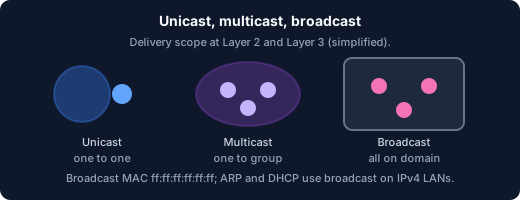
- Unicast delivers a frame to one specific destination MAC. Multicast delivers to a group of interested receivers (requires IGMP at Layer 3 and IGMP snooping or explicit L2 multicast forwarding). Broadcast (destination MAC `ff:ff:ff:ff:ff:ff`) reaches every device on the broadcast domain—IPv4 ARP requests, DHCP DISCOVER, and some routing protocols use broadcasts. Exam trap: broadcasts stop at Layer 3 router boundaries, while switches flood broadcasts within a VLAN; multicast requires explicit join and forwarding state, unlike broadcast which needs no subscription.
- VLAN
- A Virtual LAN: a switch-enforced broadcast domain identified by a numeric VLAN ID (1–4094) per IEEE 802.1Q. Access ports carry traffic for one VLAN untagged to the end device; trunk ports carry multiple VLANs with 802.1Q tags between switches. In IOS, `vlan 10`, `switchport mode access`, and `switchport access vlan 10` are the core config commands; exam traps include forgetting to create the VLAN (`vlan 10` in global config) before assigning it to a port.
IP, subnetting & routing
- Administrative distance (AD)
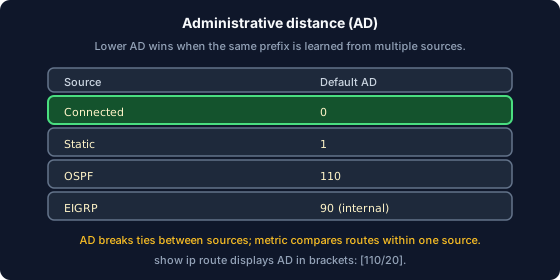
- Cisco's trust ranking for routing sources when the same prefix is learned from multiple protocols—the lower the AD, the more preferred. Common values: connected = 0, static = 1, eBGP = 20, EIGRP = 90, OSPF = 110, RIP = 120. AD is compared before metric: a static route (AD 1) beats an OSPF route (AD 110) to the same prefix even if OSPF's metric is lower; exam traps confuse AD (between sources) with metric (within one source).
- ARP
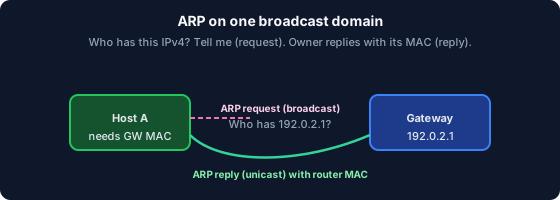
- Address Resolution Protocol: maps a known IPv4 address on the local broadcast domain to its corresponding MAC address via a broadcast request and unicast reply. ARP operates only within a single subnet—routers do not forward ARP requests, so a host ARPing a remote IP address targets its default gateway instead. In IOS, `show arp` displays the ARP cache; exam traps include confusing ARP (IPv4/Layer 2) with NDP (IPv6/Layer 2) or expecting ARP to resolve addresses across router boundaries.
- CIDR
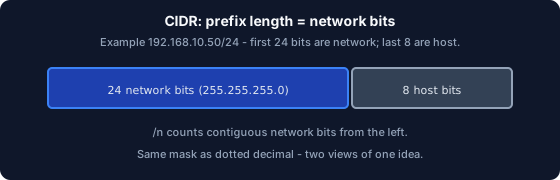
- Classless Inter-Domain Routing: notation that writes an IPv4 prefix as address/prefix-length (e.g., 192.0.2.0/24) instead of relying on rigid Class A/B/C boundaries. CIDR enables flexible address aggregation at internet boundaries and VLSM within organizations. On the exam, /n tells you exactly how many network bits to count from the left—no need to identify classful boundaries; route summarization questions depend on finding common prefix bits across multiple subnets.
- Default gateway
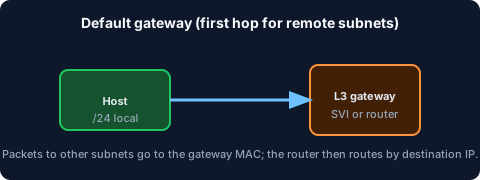
- The Layer 3 next-hop IP address a host uses to reach destinations outside its own subnet—typically the SVI or router interface on the host's VLAN. Hosts send off-subnet packets to the gateway's MAC (learned via ARP), and the router performs routing decisions from there. If the default gateway is wrong or unreachable, local subnet communication still works but all remote traffic fails—a common CCNA troubleshooting scenario tested with `show ip route` and ping/traceroute from both host and router.
- ICMP
- Internet Control Message Protocol: an IP-layer protocol for diagnostics and error reporting—not a transport protocol for user data. Echo Request/Reply (type 8/0) powers `ping`; Destination Unreachable and Time Exceeded (TTL expired) power `traceroute` path discovery. ACLs often filter ICMP, causing ping to fail even when TCP/UDP traffic passes; CCNA troubleshooting expects you to distinguish ICMP blocked by a firewall from a true routing failure.
- IPv4 address
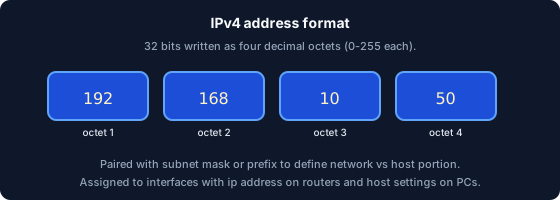
- A 32-bit identifier for a host or router interface on an IP network, written in dotted decimal as four octets (e.g., 192.168.1.10). An IPv4 address is meaningful only when paired with a subnet mask or prefix length that defines which bits identify the network versus the host. In IOS, configure with `ip address 192.168.1.1 255.255.255.0` or `ip address 192.168.1.1/24`; exam traps include using a host address (all host bits 0) or broadcast address (all host bits 1) as an interface address.
- Longest prefix match
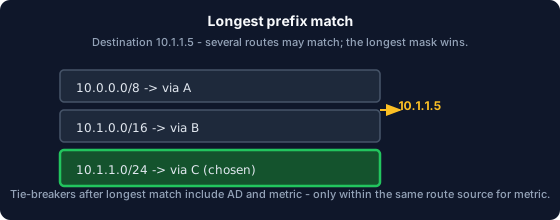
- The rule routers use to select a forwarding entry when multiple routes overlap the destination: the route with the longest (most specific) prefix mask wins. For example, a /32 host route beats a /24 subnet route, which beats a /16 summary, which beats a /0 default route. CCNA exam questions present overlapping entries in a routing table and ask which next hop is used—count prefix bits from the left and pick the longest match, not the first entry or lowest metric.
- Metric
- The cost a routing protocol assigns to reach a prefix—compared only among routes from the same source after administrative distance has already selected the preferred source. OSPF uses cost (based on reference bandwidth ÷ interface bandwidth), RIP uses hop count, and EIGRP uses a composite metric (bandwidth and delay by default). Exam trap: when two OSPF routes to the same prefix exist, lower cost wins; but an EIGRP route with metric 1 still loses to a static route because AD (1 vs 90) decides first.
- NAT
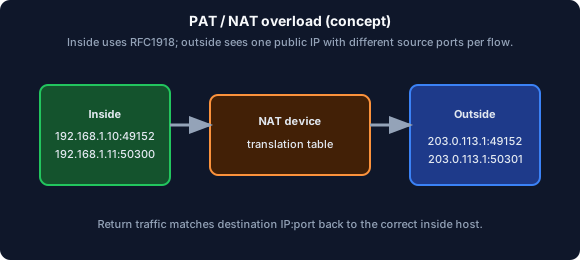
- Network Address Translation: rewrites source and/or destination IPv4 addresses (and sometimes port numbers) at a network boundary, most commonly translating private RFC 1918 addresses to a public address for Internet access. PAT (Port Address Translation) overload maps many inside hosts to one outside IP using unique source ports—a technique tested heavily on CCNA. In IOS, configure with `ip nat inside/outside` on interfaces and `ip nat inside source list <acl> interface <outside> overload`; verify with `show ip nat translations`.
- Subnet mask
- A bitmask that defines which bits of an IPv4 address belong to the network (and subnet) portion versus the host portion. Written in dotted decimal (255.255.255.0) or as a prefix length (/24), the mask determines the subnet boundary and valid host range. CCNA subnetting requires converting between dotted decimal, prefix length, and binary quickly—/24 means 24 network bits and 8 host bits, yielding 254 usable host addresses (2^8 − 2).
- TTL
- Time To Live (IPv4) or Hop Limit (IPv6): an 8-bit field decremented by one at each routed hop; when it reaches zero, the router drops the packet and sends an ICMP Time Exceeded message. TTL prevents packets from looping forever in a routing loop. Traceroute exploits TTL incrementing—sending packets with TTL=1, then TTL=2, etc.—to discover each hop along the path; CCNA expects you to recognize TTL expired as a normal traceroute mechanism, not necessarily a fault.
- VLSM
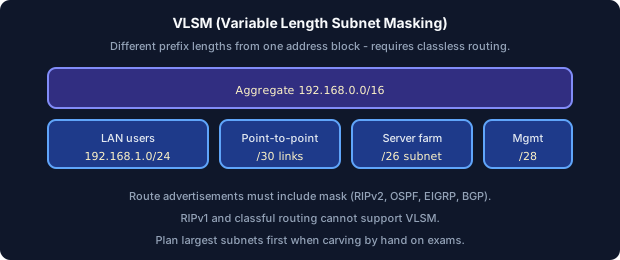
- Variable Length Subnet Masking: carving subnets of different sizes from the same address block to minimize wasted addresses—e.g., a /24 split into one /26, two /27s, and a /28. VLSM requires routing protocols that carry subnet mask information (RIPv2, OSPF, EIGRP, BGP)—classful RIPv1 and IGRP do not support VLSM. CCNA subnetting labs often give a scenario with varying host counts per subnet; always allocate largest subnets first from the top of the address block to avoid overlap.
Transport & applications
- DHCP
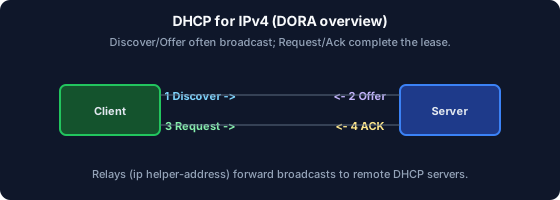
- Dynamic Host Configuration Protocol: automates assignment of IPv4/IPv6 addresses, subnet masks, default gateways, DNS servers, and other options to clients. Classic IPv4 lease acquisition follows DORA: Discover (broadcast), Offer (server), Request (client), Acknowledge (server). In IOS, configure a DHCP pool with `ip dhcp pool`, `network`, `default-router`, and `dns-server`; exam traps include the server offering a gateway outside the client's subnet or forgetting the `ip helper-address` on the router interface for relay across subnets.
- DNS
- The Domain Name System: a hierarchical distributed database that resolves human-readable names to IP addresses and other records (A, AAAA, MX, CNAME, NS). DNS failure modes split into reachability problems (can't reach the DNS server at all—check routing and ACLs) and record problems (server responds but returns wrong or missing records). CCNA expects basic awareness of forward vs reverse lookup and the role of DNS in DHCP option 6 (DNS server address handed to clients).
- NTP
- Network Time Protocol: synchronizes clocks across devices so logs, certificates, and authentication timestamps are consistent and correlatable. Stratum indicates how many hops a device is from a reference clock—stratum 1 is directly connected to a GPS/atomic source, stratum 2 syncs from stratum 1, and so on. In IOS, configure with `ntp server <ip>` and verify with `show ntp status`; without NTP, syslog timestamps across devices cannot be reliably compared during incident investigation.
- SNMP
- Simple Network Management Protocol: polls or receives traps from managed devices to collect MIB (Management Information Base) objects describing interface stats, CPU, memory, and more. SNMPv2c uses community strings (like passwords) in cleartext; SNMPv3 adds authentication and encryption for production security. CCNA expects you to distinguish SNMP (monitoring/collection) from Syslog (event logging)—they complement each other but serve different purposes in network management.
- Socket (IP + port)
- An endpoint identifier for transport-layer multiplexing, expressed as the tuple (protocol, source IP, source port, destination IP, destination port)—for example, (TCP, 192.0.2.10:49152 → 192.0.2.1:443). Two flows are distinct if any element of the tuple differs, allowing thousands of concurrent connections to the same server IP and port. CCNA troubleshooting uses socket information in `show ip sockets` or packet captures to identify which application owns a given port.
- Syslog
- A standard for sending event log messages from network devices to remote collectors, using severity levels from 0 (emergency) through 7 (debug). In IOS, configure with `logging host <ip>` and control verbosity with `logging trap <level>`—lower numbers are more severe. CCNA troubleshooting uses syslog timestamps (requires NTP for correlation) to reconstruct the sequence of interface down/up, routing neighbor changes, or ACL deny events.
- TCP
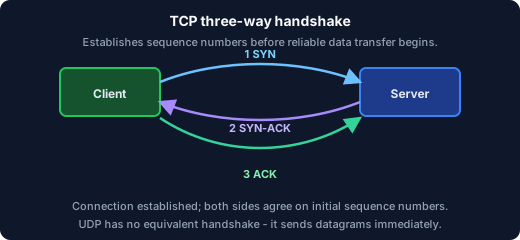
- Transmission Control Protocol: connection-oriented transport that establishes a session via a three-way handshake (SYN, SYN-ACK, ACK), then delivers data reliably with sequencing, acknowledgments, flow control, and congestion control. TCP multiplexes multiple application flows using port numbers—a web server listens on port 443 while the client uses an ephemeral high port. CCNA expects you to recognize TCP's role for HTTP, HTTPS, SSH, and FTP control, and to know that TCP retransmits lost segments while UDP does not.
- UDP
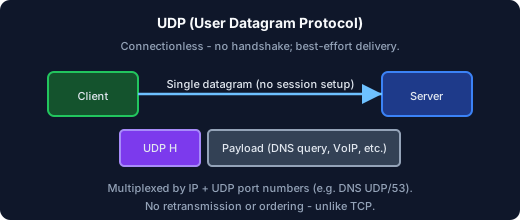
- User Datagram Protocol: connectionless transport with a minimal 8-byte header, providing best-effort delivery with no built-in retransmission, ordering, or flow control. UDP is chosen when low latency matters more than reliability—DNS queries, VoIP media (RTP), DHCP, and SNMP commonly use UDP. Exam trap: DNS uses UDP for queries (port 53) but switches to TCP for large zone transfers; do not assume all DNS traffic is UDP-only.
- Well-known ports
- IANA-registered port numbers in the range 0–1023 (historically requiring root/admin privilege on servers): 22 SSH, 23 Telnet, 53 DNS, 67/68 DHCP, 80 HTTP, 443 HTTPS, 161 SNMP. CCNA exams frequently test port identification in ACL, NAT, and security scenarios—memorize the common set because stems often describe an application without naming its port. Ephemeral ports (49152–65535 on modern systems) are used by clients, not servers.
Routing protocols & path selection
- BGP
- Border Gateway Protocol: the path-vector protocol that routes between autonomous systems (AS) on the Internet, selecting paths based on policies and AS-path length rather than simple metric. CCNA introduces BGP at a survey level—know that eBGP runs between different ASes (AD 20) and iBGP runs within the same AS (AD 200), and that BGP is the only exterior gateway protocol in the CCNA scope. Deep BGP policy (route maps, communities) is beyond CCNA but recognizing BGP's role at ISP edge routers is expected.
- EIGRP
- Enhanced Interior Gateway Routing Protocol: a Cisco advanced distance-vector protocol with rapid convergence using the DUAL algorithm, maintaining a topology table of feasible successors for instant backup routes. EIGRP's composite metric considers bandwidth and delay by default (K-values tunable) and supports VLSM and automatic summarization at classful boundaries. CCNA expects configuration with `router eigrp <as>`, `network` statements, and verification via `show ip eigrp neighbors` and `show ip eigrp topology`—EIGRP AD = 90.
- HSRP / VRRP / GLBP
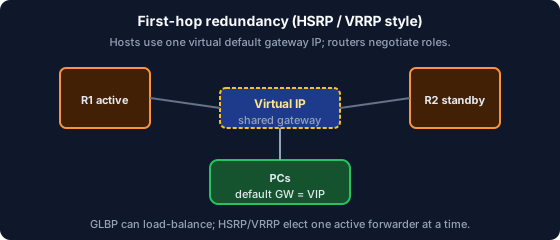
- First-hop redundancy protocols that provide a virtual IP and virtual MAC shared by two or more routers so hosts keep a single default gateway even if one router fails. HSRP (Cisco proprietary, active/standby) and VRRP (open standard, master/backup) are the most tested; GLBP (Cisco) adds load-balancing across gateways. CCNA expects you to know that hosts point to the virtual IP, only the active/master router forwards traffic, and `show standby` or `show vrrp` reveals current state and preemption settings.
- OSPF
- Open Shortest Path First: a link-state IGP that builds a common LSDB (Link-State Database) and runs Dijkstra's SPF algorithm to compute shortest paths. OSPF uses cost as metric (reference bandwidth ÷ interface bandwidth), requires area 0 (backbone) for multi-area designs, and forms adjacencies through Hello packets on shared segments. CCNA OSPF skills include configuring `router ospf <pid>`, `network <ip> <wildcard> area <id>`, verifying with `show ip ospf neighbor` and `show ip route ospf`, and knowing that OSPF AD = 110.
Security, access & management
- 802.1X
- IEEE 802.1X port-based network access control: authenticates a device before granting Layer 2 network access using three roles—the supplicant (client), authenticator (switch/AP port), and authentication server (RADIUS). Until authentication succeeds, only EAPOL frames are permitted on the port; upon success, normal traffic flows. CCNA expects you to recognize 802.1X as the enterprise Wi-Fi and wired port security mechanism, typically paired with RADIUS and certificates or credentials.
- AAA
- Authentication, Authorization, and Accounting: the framework for controlling who can access the network (Authentication), what they can do (Authorization), and recording what they did (Accounting). AAA often integrates with TACACS+ (device admin, TCP port 49) or RADIUS (network access, UDP ports 1812/1813) to centralize credentials on a server like Cisco ISE or ACS. CCNA expects you to configure `aaa new-model` with method lists for console, VTY, and enable authentication.
- ACL
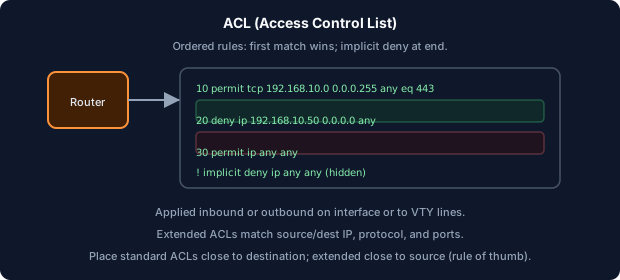
- An Access Control List: an ordered set of permit/deny rules matched top-down against traffic—standard ACLs (1–99, 1300–1999) match source IP only; extended ACLs (100–199, 2000–2699) match source/destination IP, protocol, and port. ACL placement matters critically: apply extended ACLs close to the source and standard ACLs close to the destination to avoid blocking legitimate traffic prematurely. In IOS, configure with `access-list` and apply with `ip access-group <num> in|out` on an interface; the implicit deny all at the end catches unmatched traffic.
- DHCP snooping
- A switch security feature that distinguishes trusted ports (legitimate DHCP servers or uplinks) from untrusted ports (access ports) and drops DHCP server messages arriving on untrusted ports. DHCP snooping builds a binding table mapping IP-MAC-VLAN-port that feeds IP Source Guard and Dynamic ARP Inspection (DAI). Enable globally with `ip dhcp snooping` and per-VLAN with `ip dhcp snooping vlan <id>`, then mark uplinks as trusted with `ip dhcp snooping trust`.
- Dynamic ARP Inspection (DAI)
- A switch feature that validates ARP packets against the DHCP snooping binding table, dropping ARP replies from hosts that claim an IP they were not assigned—mitigating ARP spoofing/poisoning attacks. DAI requires DHCP snooping to be enabled first because the binding table is its source of truth. Configure per-VLAN with `ip arp inspection vlan <id>` and mark trusted ports (routers, legitimate servers) with `ip arp inspection trust`; exam scenarios pair DAI with DHCP snooping as layered access-switch defense.
- Port security
- A switch access-layer feature that limits the number of MAC addresses allowed on a port and defines a violation action: protect (drop violator frames, no log), restrict (drop + increment counter + SNMP trap), or shutdown (err-disable the port). Configure with `switchport port-security`, `switchport port-security maximum <n>`, and `switchport port-security violation shutdown`. CCNA exam scenarios test sticky MAC learning (`switchport port-security mac-address sticky`) and recovering from err-disabled ports with `shutdown` then `no shutdown`.
- RADIUS
- Remote Authentication Dial-In User Service: a UDP-based AAA protocol (ports 1812/1813) commonly used for network access control—802.1X port authentication, VPN login, and wireless authentication. RADIUS combines authentication and authorization in an Access-Accept response that includes attributes (VLAN assignment, ACL, session timeout). CCNA distinguishes RADIUS (network access, UDP) from TACACS+ (device administration, TCP)—know which protocol fits which use case.
- SSH
- Secure Shell: encrypted remote CLI access and file transfer, replacing cleartext Telnet (port 23) for device management. IOS requires generating an RSA key pair (`crypto key generate rsa modulus 2048`), configuring a domain name, creating local users, and setting VTY lines to `transport input ssh`. CCNA labs expect you to verify SSH with `show ip ssh` and connect on port 22—Telnet should be disabled in production with `transport input ssh` and `no transport input telnet`.
- TACACS+
- A Cisco AAA protocol running over TCP port 49 that separately handles authentication, authorization, and accounting—unlike RADIUS which bundles auth and authz. TACACS+ is the preferred choice for device administration (console/VTY login, enable password, command authorization) because it can authorize individual CLI commands and provides detailed accounting logs. Configure with `tacacs server <name>`, `address ipv4 <ip>`, and `aaa authentication login default group tacacs+ local`.
Wireless & mobility
- BSSID
- The Basic Service Set Identifier: the MAC address of the AP radio serving a specific BSS, effectively identifying one wireless cell. While the SSID can be the same across many APs, each AP radio has a unique BSSID—clients use BSSID to distinguish between APs broadcasting the same SSID. CCNA wireless topics reference BSSID in roaming decisions and controller-managed AP identification; `show dot11 associations` on autonomous APs displays connected client BSSID information.
- CAPWAP
- Control And Provisioning of Wireless Access Points: the tunnel protocol between lightweight (LWAPP) APs and a Wireless LAN Controller (WLC) in a split-MAC architecture. CAPWAP carries control traffic (configuration, management) and optionally user data in encrypted tunnels—UDP ports 5246 (control) and 5247 (data). CCNA wireless at survey level expects you to recognize that lightweight APs cannot operate standalone without a WLC and that CAPWAP is the Cisco-standard tunnel for centralized wireless management.
- SSID
- The Service Set Identifier: the human-readable wireless network name that clients select when joining a Wi-Fi network (e.g., "Corp-WiFi"). The SSID is broadcast in beacons and probe responses—it is not a secret and provides no security by itself. Security comes from WPA2/WPA3 encryption and authentication; hiding the SSID (disable broadcast) is a weak deterrent that CCNA recognizes as insufficient for real protection.
- WPA2 / WPA3
- Wi-Fi security frameworks that encrypt wireless traffic: WPA2 uses AES-CCMP with either PSK (personal) or 802.1X (enterprise) authentication. WPA3 strengthens protection with SAE (Simultaneous Authentication of Equals) replacing WPA2-Personal's vulnerable 4-way handshake against offline dictionary attacks. CCNA expects you to recommend WPA2/WPA3 over legacy WEP or open networks, and to know that enterprise mode uses a RADIUS server while personal mode uses a shared passphrase.
Automation & modern ops
- Ansible (survey)
- An agentless automation tool that runs playbooks (YAML files) over SSH to configure network devices without installing client software on targets. Ansible uses modules (ios_config, ios_command) and inventory files to push consistent configuration across many devices. CCNA automation objectives focus on concepts—know that Ansible complements traditional CLI, uses idempotent playbooks, and fits into a larger toolchain alongside REST APIs and version control.
- JSON
- JavaScript Object Notation: a lightweight, human-readable text format for structured data using key-value pairs, arrays, and nesting—the de facto payload format for REST APIs and network programmability. JSON is easier to read and parse than XML for automation scripts and is used by Cisco APIs, Ansible modules, and Python `requests` libraries. CCNA expects basic literacy: recognize curly braces for objects, square brackets for arrays, and quoted strings for keys and values.
- REST API (survey)
- Representational State Transfer: an architectural style for APIs over HTTP using resources (URLs), verbs (GET to read, POST to create, PUT to update, DELETE to remove), and JSON payloads. Cisco DNA Center, SD-WAN controllers, and Meraki dashboards expose northbound REST APIs for provisioning, monitoring, and assurance. CCNA expects survey-level awareness—recognize REST as the modern programmatic interface to network controllers, distinct from CLI or SNMP.