Day 1
Network Devices
network-devices
At a glance
Learn the cast of characters: end devices vs intermediary devices (switch, router, firewall, AP/WLC) and physical/logical topology thinking. Packet Tracer orients you to building and testing topologies safely. Maps to CCNA v2.0 objective(s) 1.2.
Deep chapter
Long-form companion reading (original prose).
How to use this chapter with the real Day 1 lecture
Treat this document as a textbook-style companion that follows the same learning arc as Day 1 in a typical CCNA 200-301 course week: network devices first, then Packet Tracer orientation. Watch the official lecture first, pause where new nouns appear, and come here to read a slower, more linear explanation of the same ideas. When wording differs from what you heard on video, that is expected: this is not a transcript and cannot legally or ethically reproduce one.
Your measurable outcome for Day 1 should be practical: you can label each icon in a small topology, explain what breaks if each device disappears, and build a two-PC topology in Packet Tracer with correct cabling and basic addressing intent—even if IP details come sharper on later days.
What a network is, without buzzwords
A network is a system that lets independent computers exchange digital information under agreed rules. The rules are called protocols. The system includes physical pathways (copper, fiber, radio), logical identifiers (addresses), and devices that forward or enforce policy. Day 1 is mostly vocabulary and roles, but the vocabulary is load-bearing: every later chapter assumes you already know which device owns which problem.
When someone says “the network is slow,” they rarely mean the same thing twice. Sometimes they mean Wi-Fi airtime contention. Sometimes they mean DNS latency. Sometimes they mean a duplex mismatch on a switch port. Sometimes they mean a saturated uplink. Day 1’s hidden lesson is that “network” is an umbrella; your job is to learn to subdivide symptoms into the right subsystem.
End devices: where conversations start and end
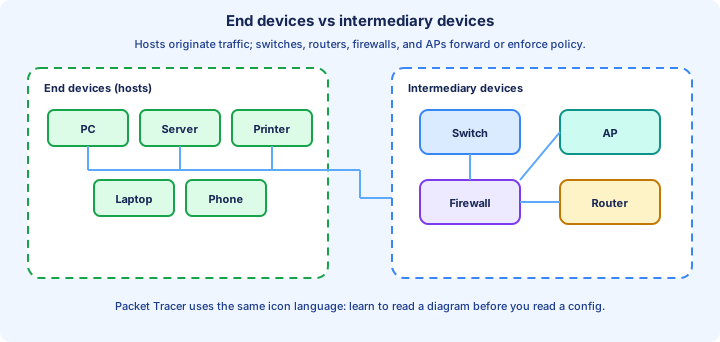
End devices are hosts: PCs, laptops, servers, printers, IP phones, cameras, mobile phones, and an exploding list of IoT gadgets. They run applications and use an operating system networking stack to send and receive data. Each host attaches to the network through one or more network interface cards (NICs). A NIC has a hardware address used at Layer 2 (the MAC address) and typically uses Layer 3 addresses (IPv4/IPv6) configured manually or via DHCP.
Hosts are not omniscient. A host usually knows: its own IP address, its subnet mask (or prefix length), its default gateway for off-subnet destinations, and one or more DNS resolvers for name resolution. If any of those is wrong, symptoms look like “the internet is broken” even when cables are fine. Day 1 introduces the cast of characters; Day 7 onward sharpens the math behind masks and subnets.
Servers are still end devices, even though they “serve” many clients. The classification “end device” is about whether the device primarily originates or terminates user/application traffic for that conversation, not about how important the machine is.
Intermediary devices: forwarders, choosers, and gatekeepers
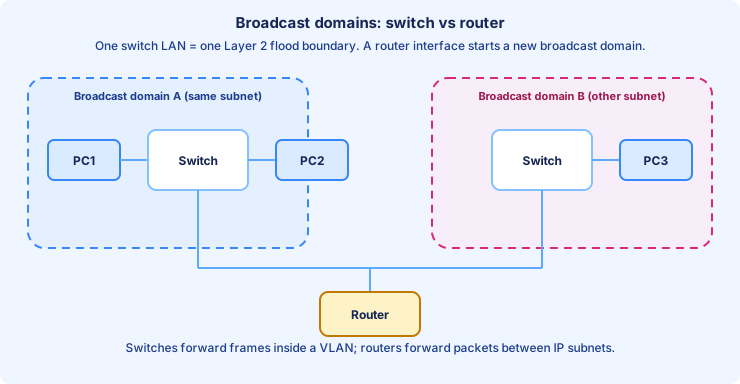
A switch’s primary job is to forward Ethernet frames within a LAN (or within a VLAN once you learn VLANs). Switches learn which MAC addresses are reachable off which ports by inspecting source MAC addresses in frames, building a MAC address table, and forwarding known unicasts out the correct port. Unknown unicasts and broadcasts flood within the VLAN boundary—behavior you will exploit and fear in later weeks when you study ARP, STP, and security.
A router’s primary job is to connect different IP subnets and forward IP packets based on destination IP addresses and its routing table. Routers decrease TTL, rewrite Layer 2 framing hop-by-hop, and make forwarding decisions using longest-prefix matching. If you remember only one sentence for the exam: switches move frames inside a broadcast domain; routers move packets between broadcast domains.
A firewall is often a specialized router-like platform whose first question is policy: allow, deny, inspect, log, rate-limit. On CCNA you may see firewalls as icons at the edge of a topology or as contexts for ACL thinking later. Do not blur “firewall” into “router”: many products combine them, but the responsibilities differ.
An access point bridges wireless 802.11 clients onto wired Ethernet. In small networks, an AP might be integrated into a home “router.” In enterprise networks, many lightweight APs tunnel or switch traffic to a wireless LAN controller (WLC) for centralized configuration, SSIDs, security, and roaming assistance. You do not need controller internals on Day 1; you need to recognize why “Wi-Fi” still ends up as Ethernet frames on the wire eventually.
LAN, WAN, and the idea of boundaries
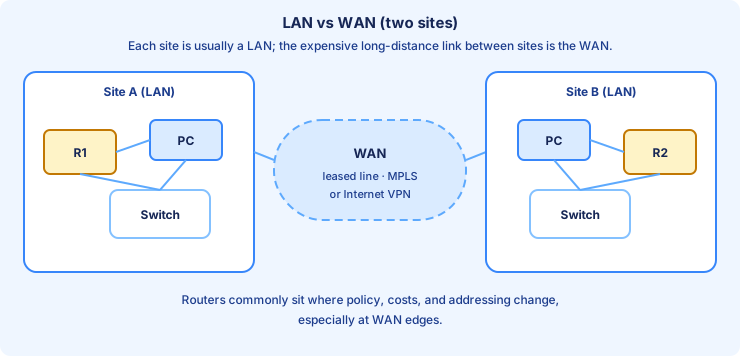
A LAN (local area network) is a geographically tight network: a site, a building, a floor—informal but useful. A WAN (wide area network) connects sites across cities or countries. CCNA will later show you WAN technologies at a survey level (MPLS vs internet VPN themes, broadband, etc.). Day 1 only needs you to recognize that WAN links appear in diagrams as long-distance connections and that routers typically sit at boundaries where costs and policies change.
A boundary is a recurring theme: subnet boundary, VLAN boundary, security zone boundary, autonomous system boundary in routing later. Day 1 plants the word “boundary” as a mental file folder.
Physical media: copper, fiber, wireless
Twisted-pair copper cabling is cheap and everywhere in offices. Ethernet standards define speeds and cable categories (Cat5e/Cat6/Cat6a) that support those speeds at required distances. Fiber uses light and supports longer runs and electrically noisy environments; campus cores and data center spine links often favor fiber for bandwidth and distance. Wireless trades cable convenience for variability: interference, airtime contention, and roaming complexity.
Media choice is an engineering tradeoff: cost, distance, bandwidth, reliability, security posture, and install time. CCNA will not make you terminate fiber, but it will show fiber in topology questions and expect basic literacy.
Physical vs logical topology
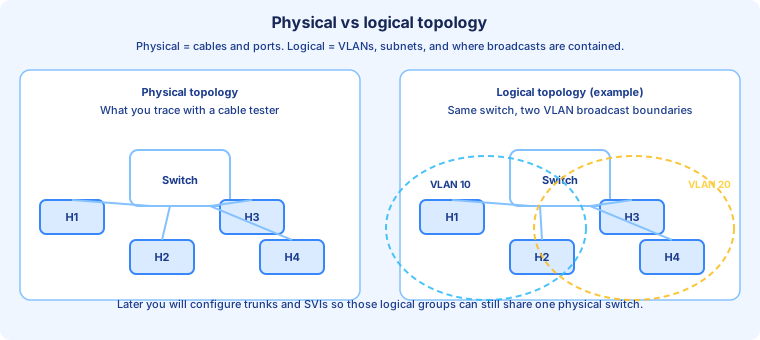
Physical topology is what you would see if you opened the ceiling tiles: which device plugs into which port with which cable. Logical topology is how traffic is supposed to flow given VLANs, subnets, and routing—even if two subnets share the same physical switch. This distinction prevents confusion later when one cable carries multiple VLANs on a trunk.
Traffic types you will keep meeting
Data traffic carries user applications (web, file shares, databases). Voice and video traffic are sensitive to delay, jitter, and loss; QoS exists because treating voice like bulk backup during congestion destroys call quality. Management traffic is how engineers configure and monitor devices (SSH, SNMP, syslog—later weeks). Routing protocol traffic is routers talking to routers to build reachability tables.
Day 1 awareness: different traffic types fail differently under stress. A backup can be slow but complete; a phone call can be unusable with the same average bandwidth.
Packet Tracer: the lab environment for Day 1
Packet Tracer (PT) simulates Cisco-ish devices well enough to learn CLI, addressing, switching, routing, and many services. It is not a perfect hardware emulator; some features differ or are simplified. For Day 1, focus on: adding devices from the device-type toolbox, connecting correct interface types, opening the console on routers and switches, powering devices on, and using the PC desktop (IP configuration utility, command prompt).
PT has real-time mode and simulation mode. Real-time behaves like a continuous network. Simulation lets you step events and watch simplified PDUs move—useful once you understand enough to interpret what you are seeing. On Day 1, do not obsess over every PDU animation detail; obsess over correctness of connections and basic ping outcomes.
A disciplined PT workflow: place devices, connect, verify link lights, configure addresses when the course introduces them, ping, then use show commands once the CLI days begin. Saving your PT file frequently is part of professional habit.
Day 1 exam-style checkpoints
You should be able to answer variations of: Which device reduces collision domains in switched Ethernet? Which device breaks up broadcast domains by default at Layer 3? What is the purpose of a default gateway? Why might a home “router” be multiple network functions in one box? What is the difference between a switch and a multilayer switch (preview: later weeks)?
If any question feels fuzzy, mark it and revisit after Day 4–6 when CLI verification makes the answers tangible.
End-of-day routine (30 minutes)
Rebuild the instructor’s starter topology from memory. Narrate aloud: “PC1 sends a frame to PC2; the switch learns MACs; ping succeeds because both PCs are on the same subnet in the lab scenario.” If you cannot narrate, rewatch only the segment that covers that hop. Close the day by writing five short self-check questions from memory and answering them again before your next study block.
Key ideas
- End devices originate/terminate conversations; intermediary devices forward or enforce policy.
- Switches focus on Ethernet/MAC learning inside a LAN context; routers connect IP subnets.
- Media tradeoffs: copper, fiber, wireless — distance, interference, cost, speed.
Self-check
- Can you name three end devices and three intermediary devices cold?
- Can you explain one reason homes use combo gear but enterprises separate roles?