Day 19
OSPFv3 & Neighbor Adjacencies
ospfv3-neighbor-adjacencies
At a glance
OSPFv2 design and verification, plus single-area OSPFv3: explicit router ID, interface-level area membership, link-local next hops, and broadcast DR election versus point-to-point. Authentication, virtual links, summarization, and E1/E2 remain part of the chapter’s OSPFv2 depth. Maps to CCNA v2.0 objectives 3.3.a through 3.3.d.
Deep chapter
Long-form companion reading (original prose).
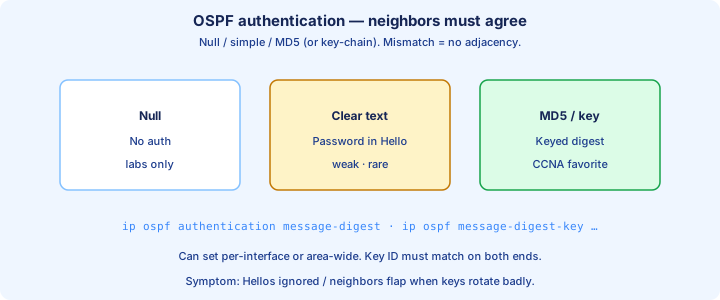
OSPF authentication
OSPF can authenticate Hellos and LSAs so a rogue router cannot join the area. Classic options are null (none), simple password, and MD5 (message digest). Modern exams still expect MD5-style interface or area authentication as the practical answer.
Interface style: `ip ospf authentication message-digest` and `ip ospf message-digest-key 1 md5 SECRET` on each side. Area style: `area 0 authentication message-digest` under the process, with keys still on the interfaces. Both neighbors must agree on method and key.
Mismatch looks like a silent adjacency failure—timers and MTU can be perfect while Hellos are dropped. `debug ip ospf adj` (lab only) or careful `show ip ospf interface` authentication lines expose it. Rotate keys with overlapping key IDs when you must change passwords live.
Exam trap: authentication mismatch does not always print a friendly syslog. Treat “should neighbor but does not” as area, timers, MTU, network type, and auth.
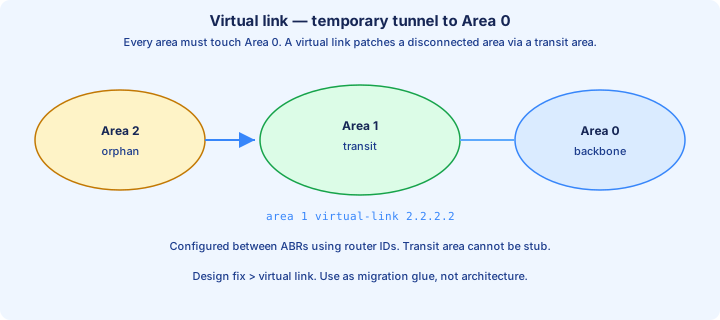
Virtual links overview
Every non-backbone area should touch Area 0. A virtual link tunnels Area 0 across a transit non-backbone area when a remote area cannot attach directly—repair tool, not a design goal.
Configure between two ABRs: `area <transit> virtual-link <remote-RID>` on each side. The transit area must not be stub. Endpoints use Router IDs, not interface IPs. Verify with `show ip ospf virtual-links`.
Virtual links carry Area 0 topology across the transit area so the disconnected area can exchange Type 3s correctly. If the transit path fails, the virtual link fails with it.
Exam trap: virtual links are a workaround for Area 0 discontinuity. Prefer redesigning so every area abuts the backbone.
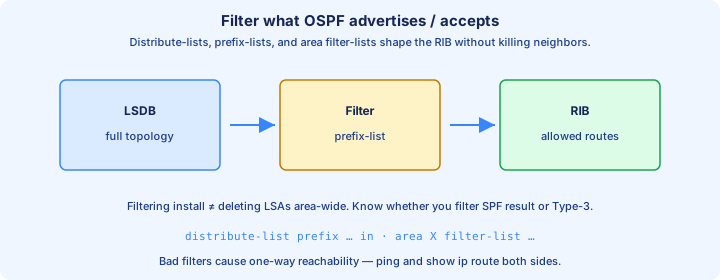
Route filtering preview
OSPF filtering is constrained: you generally do not filter Type 1/2 flooding inside an area the way distance-vector protocols filter updates hop-by-hop. Same-area routers must share a consistent LSDB for SPF to agree.
What you can influence at CCNA depth: ABR Type 3 filtering/summarization toward another area, distribute-list affecting what enters the local RIB (not removing LSAs from the area LSDB), and careful redistribution filters on an ASBR.
A distribute-list that hides a prefix from `show ip route` on one router does not delete that LSA from the database. Neighbors may still forward toward a next hop that knows the route. Filtering the RIB is not filtering the domain.
Exam trap: “filter OSPF like EIGRP offset lists everywhere” is wrong. Inside an area, the LSDB stays synchronized; filter at ABR/ASBR boundaries or at RIB install time with clear eyes.
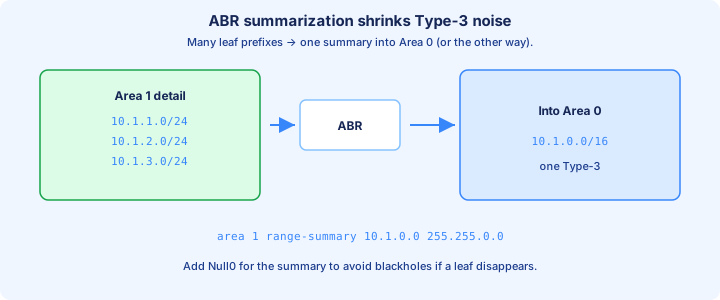
Summarization ABR
ABRs can summarize many Type 3 candidates into one (or few) summary prefixes with `area <area-id> range <prefix> <mask>`. Advertise a short aggregate into Area 0 instead of every leaf subnet from Area 1.
Summarization needs hierarchical addressing. If Area 1 is 10.1.0.0/16 worth of space, summarize cleanly. Scattered subnets force either many summaries or leaking specifics—planning beats clever masks after the fact.
Benefits: smaller LSDBs and RIBs in other areas, and less SPF churn when a single leaf flaps inside the summarized range (depending on how specifics are suppressed). Cost of the summary is typically the lowest cost to a component prefix.
Exam trap: summarizing on an internal (non-ABR) router does nothing useful for Type 3 generation. `area range` belongs on the ABR.
External routes E1 E2
Redistributed routes enter OSPF as externals, typically Type 5 LSAs from an ASBR. In the RIB they appear as O E1 or O E2. Default redistribution metric-type is E2 on Cisco IOS.
E2 keeps the redistributed metric end-to-end; internal OSPF cost to the ASBR is not added into that metric for comparison among E2s (forward metric / path to ASBR breaks ties). E1 adds internal cost to the external metric, so the path through the closer ASBR wins more intuitively.
Prefer E1 when multiple ASBRs inject the same external and you want topology-aware selection. Leave E2 for simple “exit anywhere toward this ASBR seed metric” designs. Seed metric matters: redistributing without a metric can yield surprise defaults.
Exam trap: O E2 is not “worse administrative distance.” AD is still OSPF. E1 vs E2 is metric calculation, and both lose to O and O IA for the same prefix.
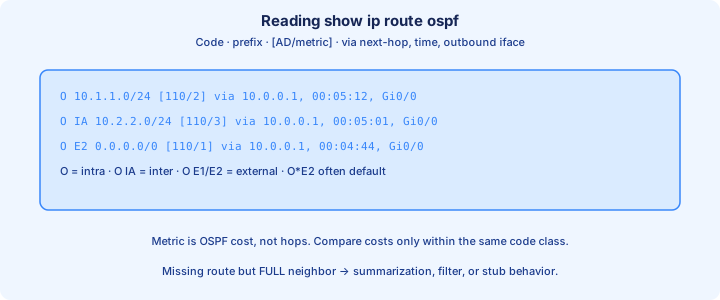
show ip route ospf
`show ip route ospf` filters the RIB to OSPF-learned prefixes. Codes: O intra-area, O IA inter-area, O E1 / O E2 external, O*E2 (or similar) for an OSPF-learned default. Each line shows AD/metric, next hop, and outbound interface.
Read the metric after the slash. For E2, that seed external metric may look identical on two paths while the forward metric to the ASBR differs—dig with `show ip ospf border-routers` and per-prefix detail when the “wrong” exit is selected.
Pair with `show ip route <prefix>` for the deciding path type and `show ip ospf database` when the route is missing. Empty OSPF RIB with Full neighbors usually means filtering, summarization holes, or area design—not “OSPF is down.”
Exam trap: connected and static routes can hide OSPF for the same prefix via better AD. Clear the competing route before you blame LSA types.
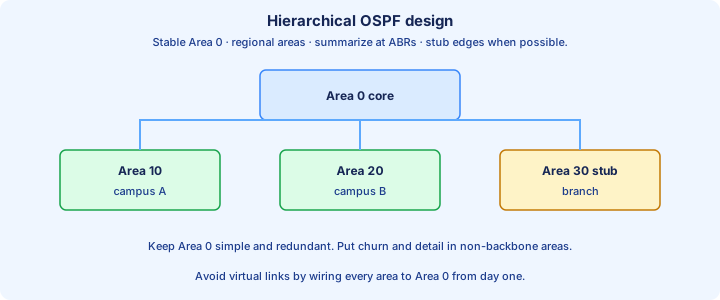
Design hierarchy
Healthy OSPF design is a hierarchy: Area 0 as backbone, non-backbone areas hung off ABRs, addressing that summarizes at area borders, and leaf areas that can be stub when they need no externals.
Keep ABRs few and intentional. Avoid areas that chain without touching Area 0. Put redistribution on clear ASBRs at the edge, not on every access router. Passive-interface default on user LANs keeps the LSDB honest without PC-facing Hellos.
Capacity story: more routers in one area means larger Type 1/2 databases and bigger SPF domains. Split areas when growth or failure domains demand it—not because “multi-area looks advanced.”
Exam trap: a triangle of three areas with no true backbone breaks inter-area rules. Draw Area 0 first, then attach.
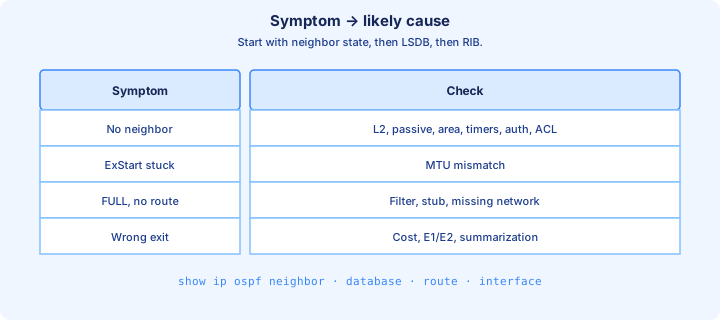
Troubleshooting matrix
Build a mental matrix. No neighbor: check link, IP/mask, area ID, timers, network type, auth, passive, ACL. Neighbor stuck ExStart/Exchange: MTU. Stuck 2-Way unexpectedly: DR election / priority / type. Full but no route: LSDB vs RIB, ABR path, filtering, path-type preference.
Commands map cleanly: `show ip ospf neighbor`, `show ip ospf interface`, `show ip ospf database`, `show ip route ospf`, `show ip ospf border-routers`. One symptom, one primary show, then one config check.
Change one variable at a time in labs. After each fix, confirm the matrix cell that failed now passes before you tune costs. Clearing the process is the last column, not the first.
Exam trap: “adjacency is Full” does not prove end-to-end. Always finish with a route lookup and a ping to the far prefix.
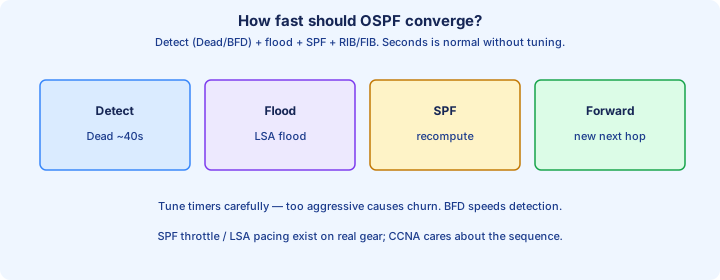
Convergence expectations
OSPF converges when failure detection, LSA flood, SPF, and RIB/FIB update complete. Detection may be Dead timer expiry (seconds) or faster link-down events. Tuned Hellos shrink detection at the cost of chatter.
After detection, the originating router floods an updated LSA, routers schedule SPF (with SPF throttling/timers on modern IOS), then install new next hops. Large areas and busy CPUs stretch that window.
Do not expect sub-second magic from default timers on a quiet lab. For CCNA, know the order of events and that stub/summarization reduce how many routers must process a leaf flap’s details.
Exam trap: shortening Hello without adjusting Dead, or micro-tuning SPF without fixing unstable links, creates flaps—not “faster convergence.”
Load balancing equal cost
When OSPF installs multiple equal-cost paths to the same prefix, IOS can ECMP—forward across those next hops. Unequal-cost load balancing is not a native OSPF feature the way classic EIGRP variance is.
Equal cost means equal OSPF metric for that path type. Twiddle interface costs until metrics match if you want two uplinks to share. Confirm with `show ip route` showing multiple vias, then test traffic (per-flow hashing still pins one conversation to one path).
Maximum paths is platform/IOS dependent (`maximum-paths` under the routing process on many images). If only one path appears, costs differ, path types differ, or max-paths is 1.
Exam trap: two paths with costs 10 and 20 do not ECMP in OSPF. Make costs equal, or accept single-path routing.
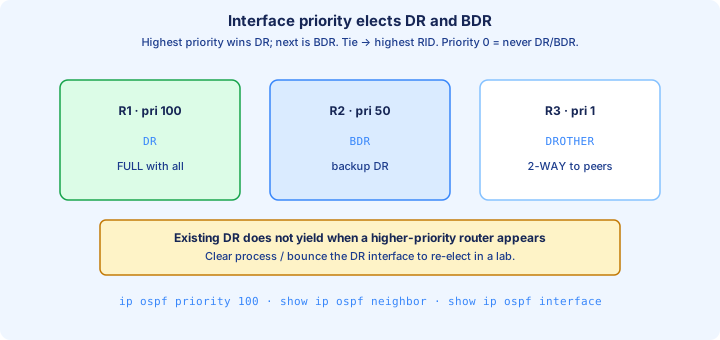
Priority for DR
On broadcast multi-access segments, interface priority influences DR/BDR election. Highest priority wins; Router ID breaks ties. `ip ospf priority 0` makes a router ineligible—it never becomes DR or BDR.
Set priority deliberately on routers you want as DR (stable, CPU-capable). Access routers facing a shared LAN can sit at 0 so they never take DR. Verify with `show ip ospf interface` and neighbor DR/BDR fields.
DR is sticky: a new higher-priority router does not preempt an existing DR just by appearing. Clear/bounce when labs need a re-election after priority changes.
Exam trap: priority matters on broadcast/NBMA styles that elect DR. Point-to-point has no DR; raising priority there changes nothing useful.
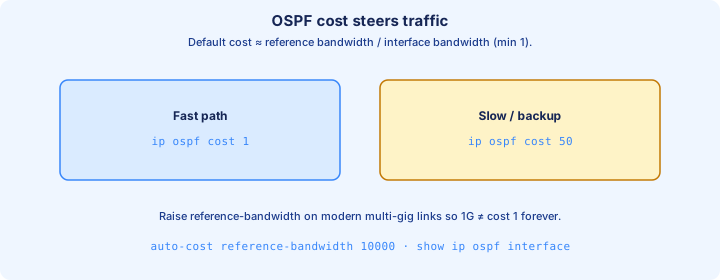
Interface cost tuning
OSPF path cost is the sum of outbound interface costs. Interface cost defaults from bandwidth (`reference-bandwidth / interface-bandwidth`). Gigabit and above often need `auto-cost reference-bandwidth` raised so costs are not all “1.”
Set an explicit cost with `ip ospf cost <1–65535>` on the interface to steer traffic without lying about bandwidth everywhere. Lower cost = more preferred within the same path type.
Tune on the outbound interfaces along the path you want. Remember preference order still puts O above O IA above E1 above E2—cost cannot overturn that hierarchy.
Exam trap: changing bandwidth for OSPF also affects other features that read bandwidth. Prefer `ip ospf cost` when you only mean to steer OSPF.
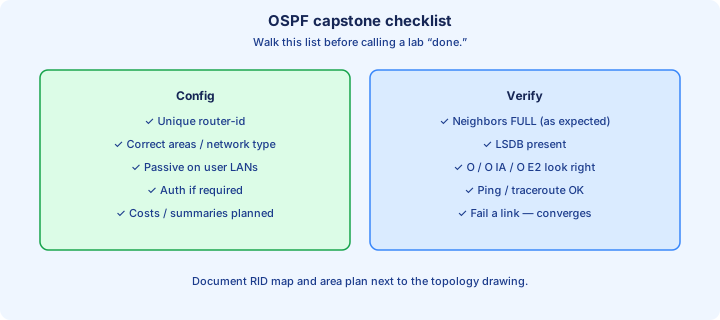
Capstone OSPF checklist
Capstone pass: every intended neighbor is Full, RIDs unique, areas correct, timers/MTU/network type/auth match, passive where Hellos should not speak, and `show ip route ospf` shows the prefixes you designed (O / O IA / E1 / E2 as intended).
LSDB sanity: Type 1/2 present in-area, Type 3s at ABRs for inter-area, externals only where ASBRs exist, stub areas free of Type 5s. Summaries match the addressing plan.
Steering sanity: DR on the right boxes, costs intentional, ECMP only where metrics are equal, default originate only on the edge you chose. Document the topology before the exam-style “what if this link dies.”
Exam trap: a green ping through a static override is not an OSPF win. Remove crutches and prove the OSPF route is the one in use.
Enabling single-area OSPFv3
v2.0 objective 3.3 includes single-area OSPFv3 for IPv6 beside OSPFv2. The process still needs a 32-bit router ID, even on a router that has no IPv4 interfaces. Set it explicitly. `ipv6 unicast-routing` turns on IPv6 forwarding. `ipv6 router ospf 1` creates the process, and `router-id 1.1.1.1` pins the ID. Interfaces join with `ipv6 ospf 1 area 0` under the interface that already has its IPv6 address. There is no `network` statement in this classic form. Membership is per interface.
Some IOS XE stems show `router ospfv3 1` with an `address-family ipv6 unicast` and `ospfv3 1 ipv6 area 0` on the interface. The facts you verify are the same: one process, an explicit router ID, and the interface in area 0. For this objective every link in the story is area 0. You are not building a multi-area design here.
Exam trap: OSPFv3 will refuse to run without a router ID. A router with only IPv6 addresses has nothing to elect from, so the process sits idle until you configure `router-id`. Duplicate router IDs between two routers break adjacency just as they do in OSPFv2.
What still has to match, and the link-local next hop
Adjacency rules you already use still apply, and authentication is outside this objective. Area number, hello and dead timers, and network type must match. The interface has to be in the process and must not be passive. MTU mismatches can stall the state at ExStart. Unique router IDs are required. What changes is the address the neighbor uses on the link. On Ethernet, OSPFv3 speaks to the neighbor’s link-local address. `show ipv6 ospf neighbor` lists that link-local, and the IPv6 routing table installs OSPF routes with a link-local next hop out the correct interface.
A global unicast on the interface is what you advertise into the area. The adjacency itself forms from the link-local. If the global address is missing or wrong, the neighbor can still be FULL while the prefix you care about is absent from the LSDB. Check both. `show ipv6 ospf interface` confirms the area, the timers, the network type, and the cost. `show ipv6 route ospf` is the proof that a prefix was installed, the same way `show ip route ospf` closes an OSPFv2 ticket.
Exam trap: pinging the neighbor’s global address and failing does not by itself mean the adjacency is down. Read the neighbor state first. A FULL neighbor with a missing route is a prefix, area, or SPF problem. A neighbor stuck below FULL is timers, type, MTU, passive, or the router ID.
Broadcast DR election versus point-to-point
Ethernet defaults to the broadcast network type, so OSPFv3 elects a DR and a BDR on that link. Highest interface priority wins. The router ID breaks a tie. `ipv6 ospf priority 0` makes the router ineligible, which is what you want on a router that should never be DR. Priority does not preempt a DR that is already elected. Clear or bounce the adjacency in a lab when you need the election to run again. `show ipv6 ospf interface` names the DR and BDR.
A transit Ethernet link that is really just two routers is cleaner as point-to-point: `ipv6 ospf network point-to-point`. There is no DR election, adjacency forms faster, and priority is irrelevant. Both ends must use the same network type or they will not proceed. This is the same design choice you already know from OSPFv2, applied with the `ipv6 ospf` interface commands.
Exam trap: raising `ipv6 ospf priority` on a point-to-point interface changes nothing you can see in an election, because there is no election. If the stem shows `network point-to-point` and asks who the DR is, the answer is that this link does not have one. Verify neighbors with `show ipv6 ospf neighbor` and expect FULL on a point-to-point link without a DR column that matters.
Bridge to FHRP
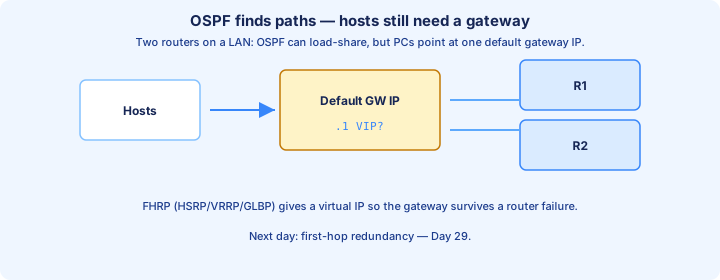
OSPF makes routers agree on how to forward between subnets. Hosts still point at one default gateway IP on their LAN. If that single router dies, OSPF elsewhere cannot save hosts that ARP for a dead gateway.
FHRP (HSRP, VRRP, GLBP) gives the subnet a virtual gateway IP shared by two or more routers. OSPF (or statics) can still run on those boxes for upstream routing; FHRP covers the first hop for PCs.
Design handoff: distribution SVIs run HSRP/VRRP for each VLAN; those same routers may be OSPF ABRs upstream. Keep VIP, OSPF RIDs, and interface addressing distinct in your drawings.
Exam trap: OSPF adjacency on the uplink does not replace FHRP on the access VLAN. Different problems, stacked solutions.
Key ideas
- OSPFv3 needs ipv6 unicast-routing, a process, an explicit 32-bit router-id, and ipv6 ospf process area on each interface. There is no network statement in the classic form.
- Neighbors use link-local addresses on Ethernet. Area, timers, network type, MTU, and a unique router ID still have to agree. show ipv6 ospf neighbor and show ipv6 route ospf close the ticket.
- Broadcast segments elect a DR/BDR. ipv6 ospf priority 0 keeps a router out of the election. Point-to-point has no DR; both ends must share that network type.
- MD5 key ID and key string must match on OSPFv2 when authentication is in the config you are given. A virtual link is a repair through a non-stub transit area.
- area range on an ABR summarizes Type 3. summary-address on an ASBR summarizes Type 5. E1 adds internal cost; E2 does not. Equal-cost paths of the same type can load-balance.
Self-check
- Which commands enable OSPFv3 on Gi0/0 in area 0, and why can a router with no IPv4 address still need a router ID?
- Two FULL OSPFv3 neighbors and a missing prefix. What do you check, and which address family is the next hop on Ethernet?
- You set ipv6 ospf network point-to-point. What election disappears, and what must the other end match?
- cisco versus Cisco as an OSPFv2 MD5 key: does the adjacency form?
- area range versus summary-address: which router, which LSA?