Day 9
Routing Fundamentals & Static Routing
routing-fundamentals-static
At a glance
A router forwards on longest prefix match, then uses administrative distance only when two sources offer the same prefix. You install those routes with ip route, choose a next-hop IP instead of a bare Ethernet exit interface, and prove both directions with show ip route, ping, and traceroute. The labs are Configuring Static Routes and Troubleshooting Static Routes. Maps to CCNA v2.0 objective(s) 3.1, 3.2.
Deep chapter
Long-form companion reading (original prose).
Introduction
Day 11 turns the destination address into a forwarding decision. The router matches it in the routing table and sends the packet toward a next hop. Hosts on the same subnet never get here: they ARP and deliver directly.
You will read `show ip route`, then type `ip route`. The labs are Configuring Static Routes and Troubleshooting Static Routes. They fail in a short list of ways: wrong mask, a next hop that will not resolve, an Ethernet exit interface with no next hop, or a return route nobody configured.
Longest prefix match chooses among overlapping prefixes. Administrative distance chooses among sources of the same prefix and mask. Metric breaks a tie inside one protocol. Use one picture for every example: R1 Gi0/0 10.1.1.1/24 faces R2 10.1.1.2/24, R1's LAN is 192.168.1.1/24, and R2's LAN is 192.168.2.1/24.
What a route table entry means
A table line answers which prefixes match, how the route was learned, how believable that source is, and where to send the packet. `show ip route` is that answer. `show running-config | include ip route` only shows what you typed, including statics that are not installed.
Read `S 192.168.2.0/24 [1/0] via 10.1.1.2` as code S, prefix 192.168.2.0/24, distance 1, metric 0, next hop 10.1.1.2. Connected lines look different: `C 10.1.1.0/24 is directly connected, GigabitEthernet0/0` and `L 10.1.1.1/32 is directly connected, GigabitEthernet0/0`.
C is the subnet. L is the router's own address. Packets to the L address are for this router. An asterisk marks a candidate default, and `Gateway of last resort` names where unmatched destinations go. No match and no default: the lookup fails, and IOS can return ICMP net unreachable to the source.
Connected vs static vs dynamic
A connected route appears when the interface is up/up and has an address. Shut it, or remove the address, and the C and L routes leave. Statics that resolved through that subnet leave with them. Connected distance is 0.
A static route is `ip route`. Default distance is 1. It does not repair itself when some other link fails, unless you pre-built a worse-distance backup. A dynamic route is learned: O OSPF, D EIGRP, R RIP, B BGP. Useful distances: EIGRP internal 90, OSPF 110, RIP 120.
For one exact prefix, connected beats static, and a normal static beats those IGPs. That is what you want when you mean to override OSPF, and it is an outage when you do not. If an S is sitting on a network you thought OSPF owned, distance 1 is why.
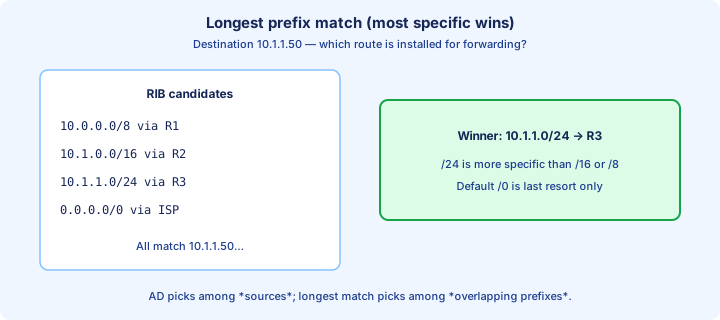
Longest prefix match
IOS compares the destination to every prefix and uses the longest match: the most network bits that still contain the address. Distance is not consulted until two routes describe the same prefix and mask.
Destination 10.1.1.50 matches 10.0.0.0/8, 10.1.0.0/16, 10.1.1.0/24, and 0.0.0.0/0. The winner is 10.1.1.0/24. The shorter matches are true and irrelevant. The default is only for destinations nothing longer covers.
A /32 beats a subnet route for that one host. A short static does not hide a longer prefix that is also installed. Prove the choice with `show ip route 10.1.1.50` and read the prefix length IOS actually selected. If a lab "ignored" your static, look for a longer match before you touch distance.
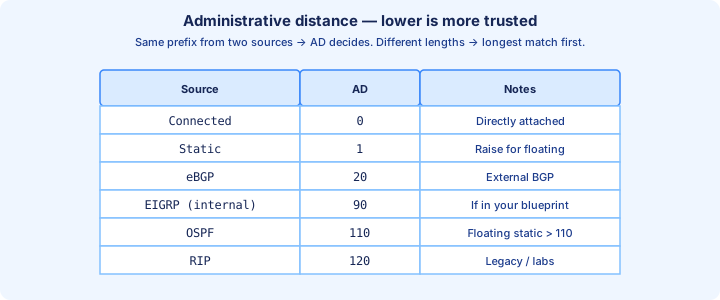
Administrative distance
Administrative distance ranks sources of the same prefix and mask. Lower wins. It does not beat a longer prefix. Memorize connected 0, static 1, eBGP 20, EIGRP 90, OSPF 110, IS-IS 115, RIP 120, EIGRP external 170, iBGP 200. Distance 255 means unused.
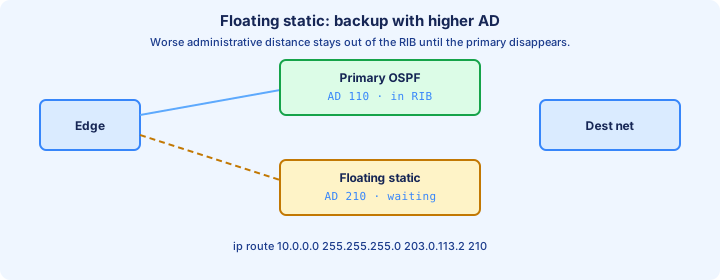
The same prefix via OSPF and via a static at distance 1 installs the static. Remove the static and OSPF returns. `ip route 10.0.0.0 255.255.255.0 203.0.113.2 210` sets distance 210, which loses to OSPF's 110, so the static waits. That number is not the metric. The metric is the second value in the brackets.
Exam trap: "lowest distance always wins, even against a longer prefix." Longest match runs first. Distance breaks a tie between sources. Metric breaks a tie inside one protocol. Say the three steps in that order.
Next hop vs exit interface
A static points at a next-hop IP, an exit interface, or both. On Ethernet, use the next hop. `ip route 192.168.2.0 255.255.255.0 10.1.1.2` makes R1 recurse to the interface and ARP for 10.1.1.2.
An exit interface alone is fine on a point-to-point serial link, where there is only one neighbor. On Ethernet, `ip route 192.168.2.0 255.255.255.0 GigabitEthernet0/0` makes IOS treat those destinations as directly connected and ARP for 192.168.2.x on the 10.1.1.0 LAN. That works only if R2 answers with proxy ARP (`ip proxy-arp` is often on by default).
The fully specified form avoids the surprise: `ip route 192.168.2.0 255.255.255.0 GigabitEthernet0/0 10.1.1.2`. IOS sends the packet out Gi0/0 and ARPs for 10.1.1.2. Use it whenever more than one interface could reach the next hop.
Static route syntax
The command is `ip route prefix mask {next-hop | interface [next-hop]} [distance]`. The mask is dotted decimal even though `show ip route` prints a prefix length. R1 needs `ip route 192.168.2.0 255.255.255.0 10.1.1.2`. R2 needs `ip route 192.168.1.0 255.255.255.0 10.1.1.1`. One direction is not connectivity.
Distance is the trailing number: `ip route 192.168.2.0 255.255.255.0 172.16.1.2 210`. `no ip route` with the same arguments removes the line. `permanent` keeps the static installed when the next hop is down, which black-holes traffic. Leave it off unless a question names it.
After each line, run `show ip route static` and `show ip route 192.168.2.10`. Then ping from a host on 192.168.1.0, not only from the router. A router-sourced ping often uses the transit address, which the neighbor already has as connected, so it can succeed while the PC's subnet is still unrouted.
Default routes
A default route is 0.0.0.0/0. Every address matches it, and every longer prefix beats it. On a stub, `ip route 0.0.0.0 0.0.0.0 10.1.1.2` produces `Gateway of last resort is 10.1.1.2 to network 0.0.0.0` and `S* 0.0.0.0/0 [1/0] via 10.1.1.2`.
The asterisk means candidate default. Adding a default does not move your connected LANs or a longer static. The cost is that a stub forwards packets for networks that do not exist, and the failure shows up farther along instead of as an immediate no-route on the stub.
The command to type is the quad-zero `ip route`. Classful `ip default-network` is the old mechanism. When both appear in a question, the quad-zero static is what puts S* in the table on modern IOS.
Static host routes
A host route uses mask 255.255.255.255. `ip route 192.168.2.50 255.255.255.255 10.1.1.2` matches only that address and, by longest match, beats 192.168.2.0/24. Use it when one host must leave by a different path than the rest of its subnet.
Point it at `null0` to discard on purpose: `ip route 192.168.2.50 255.255.255.255 null0`. Distance is still 1 unless you change it, so it overrides a dynamic /32 from a protocol with a worse distance. That is a deliberate black hole, not a typo you should leave in a lab.
Do not confuse a host route you typed with the L /32 IOS creates for the router's own interface address. `show ip route 192.168.2.50` shows which /32 actually won.
Recursive lookup basics
A next-hop static does not name an interface, so IOS looks up the next hop to find the exit. `S 192.168.2.0/24 [1/0] via 10.1.1.2` resolves because `C 10.1.1.0/24 is directly connected, GigabitEthernet0/0`. The packet leaves Gi0/0, and ARP asks for 10.1.1.2, not for 192.168.2.10.
If nothing covers the next hop, the static stays in the configuration and stays out of the table. `ip route 192.168.2.0 255.255.255.0 10.9.9.9` with no route to 10.9.9.9 is the usual "I typed it and ping still fails." `show ip route static` is empty. `show run | include ip route` still shows the line.
A chain that loops, or a next hop reachable only through the static you are installing, will not produce a usable route. Fully specifying the interface skips the hunt. When a static vanishes after you shut an interface, that interface's connected route was a step in the recursion.
Floating statics
A floating static has a worse distance than the route you want to prefer, so it stays out of the table until that route disappears. Copy the figure: OSPF at 110 is installed, and `ip route 10.0.0.0 255.255.255.0 203.0.113.2 210` waits, because 210 loses to 110.
Aim the backup at a different link, such as 172.16.1.0/30, so it still resolves when the primary dies. `show ip route` shows OSPF. `show run | include ip route` still shows the floating line. Shut the primary and the static appears as S with distance 210.
Exam trap: a distance lower than the IGP, or the default of 1, is not a backup. It is the route, all the time. The floating number must be numerically higher than the primary source.
Verification with show ip route
Start with `show ip route`, then narrow it. `show ip route static` lists only S routes. `show ip route 192.168.2.10` shows the entry IOS will actually use, which is the longest-match proof. `show ip route 192.168.2.0 255.255.255.0` asks about that exact prefix.
Read the code, prefix length, bracket, and next hop before you ping. A missing S that is still in the configuration did not resolve, or a better source owns that prefix. If 10.1.1.0/24 is not C, fix the link before you rebuild statics. `show ip interface brief` is the up/up check.
Finish with `show running-config | include ip route` on both routers so floating statics and broken next hops are visible. The lab is not done when one side looks right. The other side needs a route back.
Ping and traceroute as proof
`ping` needs a round trip. A perfect route on R1 toward 192.168.2.10 still fails when R2 has no route back to 192.168.1.10. Test from the PC when the question is about users. Extended ping with a source on the LAN interface makes the router imitate that PC.
`traceroute 192.168.2.10` lists forward hops by spending TTL. IOS sends UDP probes; each hop returns ICMP Time Exceeded. Stars can mean a filter or a missing return path, not a dead forward route. Compare the output with `show ip route` before you add another static.
A router ping sources the outgoing interface by default, often the transit address the neighbor already has as connected. The ping can succeed while a PC fails. Believe the PC, and look for a route to the PC's subnet.
Common misconfigs
The usual miss is one-way routing. R1 has a static to 192.168.2.0/24 and R2 has nothing back to 192.168.1.0. The request arrives; the reply dies. Fix the far router. Its `show ip route 192.168.1.10` is the command that proves it, not another edit on the router that already looks right.
Then mask and next-hop typos. 255.255.0.0 on a /24 plan swallows neighbors. Next hop 10.1.1.20 instead of 10.1.1.2 leaves the static out of the table. A next hop equal to the router's own address cannot be used. Read the line against the diagram.
Also watch an Ethernet static with no next hop, a floating distance that is too good, and a shutdown that removed the resolving connected route. A /32 to null0 black-holes one host. When the symptom and the table disagree, `show ip route` the address.
When statics beat dynamic
Use a static when the path should not move by itself. A stub toward an ISP gets a default static and does not need every remote network. A floating static is the backup you already chose for the day OSPF drops. A longer prefix is the exception you refuse to let a summary hide.
Use a static when you will not accept routes from that neighbor. Distance 1 then keeps a dynamic advertisement from replacing the prefix you typed. Prefer a protocol when many routers must agree and links fail often. A static whose next hop is still up will keep forwarding into a far LAN that is dead.
The configure lab ends with both directions in `show ip route` and a host-to-host ping. The troubleshoot lab ends when you can name which misconfig it was. Day 12 walks one of those packets so the table and the frame are one story.
Key ideas
- A table line is code, prefix, [distance/metric], and next hop. C and L come from an up/up addressed interface.
- Longest match beats a shorter prefix even when that shorter route has a better administrative distance.
- Connected is 0, static is 1, EIGRP 90, OSPF 110, RIP 120. A floating static uses a worse distance so it waits.
- On Ethernet, specify the next-hop IP. An exit interface alone ARPs for the remote host and leans on proxy ARP.
- A next hop that is not already in the table leaves the static in the running-config and out of show ip route.
- A default is 0.0.0.0/0 and loses to every longer prefix. Ping still needs a route back.
Self-check
- Longest prefix match: 10.1.1.50 matches a /8, a /16, a /24, and a default. Which route is used?
- Administrative distance: OSPF and a static at distance 1 offer the same /24. Which one is installed?
- Next hop vs exit interface: what goes wrong with an Ethernet static that names only the exit interface?
- Floating statics: what distance keeps a static as a backup to OSPF rather than the primary route?
- Common misconfigs: the near table looks right and the ping still times out. What do you check on the far router?