Day 10
Life of a Packet
life-of-a-packet
At a glance
One ping from PC-A on 192.168.1.10/24 to PC-B on 192.168.2.10/24 ties the header and the routing table together. The host ARPs for its gateway, each switch forwards by MAC, and each router rewrites the Ethernet header, decrements TTL, and does its own lookup. The echo reply is a new packet and needs a route home. Maps to CCNA v2.0 objective(s) 3.1, 2.4.
Deep chapter
Long-form companion reading (original prose).
Introduction
Day 12 follows one packet from a PC to a host on another subnet and back. Days 5, 6, 10, and 11 all show up: the subnet test, ARP, the MAC table, longest match, a new Ethernet header, and TTL.
Lock the topology. PC-A is 192.168.1.10/24, gateway 192.168.1.1, on SW1. R1 Gi0/1 is that gateway. R1 Gi0/0 10.0.0.1/30 faces R2 Gi0/0 10.0.0.2/30. R2 Gi0/1 192.168.2.1/24 serves PC-B 192.168.2.10/24 on SW2. PC-A pings PC-B.
Narrate before you click: destination IP, destination MAC of the first frame, which router does the lookup, and what must exist for the echo reply. Evidence is `ping`, `traceroute`, `show ip route`, `show ip arp`, and `show mac address-table dynamic`. An ARP failure means no frame left. A routing failure means a router had nowhere to forward, or the reply had no way home.
Host to default gateway
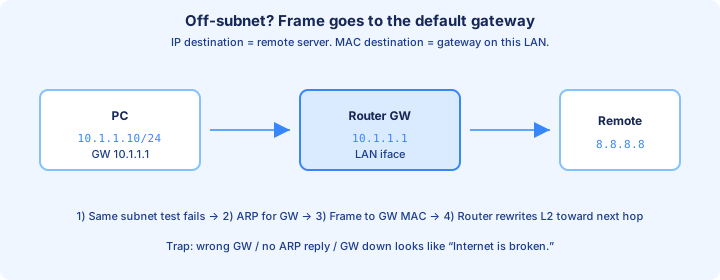
PC-A compares 192.168.2.10 with mask /24 and gets 192.168.2.0, not its own 192.168.1.0. The destination is remote. The host does not ARP for PC-B. It sends the packet to 192.168.1.1.
The IP header is for the real conversation: source 192.168.1.10, destination 192.168.2.10, protocol 1, TTL often 128 on Windows. The Ethernet header is only for the first hop: source MAC PC-A, destination MAC R1 Gi0/1. The figure's 8.8.8.8 example is the same decision with different numbers.
The gateway IP has to sit on the host's own subnet. Same-subnet traffic never uses it: two 192.168.1.x hosts ARP for each other. The moment the networks differ, the destination MAC becomes the gateway and the destination IP stays the far host. Say both addresses. They are different layers.
ARP on the first hop
PC-A needs R1's MAC before it can send. A cold cache produces an ARP request: Ethernet destination FF:FF:FF:FF:FF:FF, Ethertype 0x0806, "who has 192.168.1.1, tell 192.168.1.10." SW1 floods it in the VLAN. R1 replies unicast with the Gi0/1 MAC.
The first ping is often the one that pays for that exchange. `show ip arp` on R1 lists address, age, MAC, and interface. Incomplete means the request went unanswered. On the PC, `arp -a` should show 192.168.1.1 before you blame the routing table.
The ARP target is the gateway, not 192.168.2.10. A bad mask makes the host ARP for PC-B on the local LAN. Nobody answers, and R1 never sees an IP packet. Check mask, then ARP, then the route.
Broadcast vs unicast roles
Broadcast discovers. Unicast delivers. The ARP request is a broadcast because the MAC is still unknown. The ARP reply, and every ICMP echo after the cache is warm, is a unicast to one MAC.
SW1 floods the broadcast to the other ports in the VLAN and, once the gateway MAC is learned, forwards the echo out a single port. A router does not forward that ARP onto the next subnet. Each link has its own ARP: PC-A with R1, R1 with R2 on 10.0.0.0/30, and R2 with PC-B.
Exam trap: ARPing for PC-B from PC-A because "ARP finds any IP." ARP finds MACs on the local link. Remote IPs ride unicast frames addressed to the gateway that has the route.
What switches do on the path
SW1 does not show up in `traceroute`. It learns source MACs, forwards or floods by destination MAC, and does not decrement TTL. A management SVI does not turn the switch into a hop for PC-A's ping.
`show mac address-table dynamic` should show PC-A and R1 on different ports in the same VLAN. Unknown unicast is flooded once; the reply teaches the missing MAC. The switch does not rewrite IP addresses or the MACs of a frame it is merely forwarding.
A VLAN mismatch stops the path before routing. If PC-A is in VLAN 10 and R1's port is in VLAN 1, the ARP broadcast never arrives. `show vlan brief` and `show interfaces status` belong in the first minute. "The switch routed it to the other subnet" skipped the router.
Frame rewrite at each hop
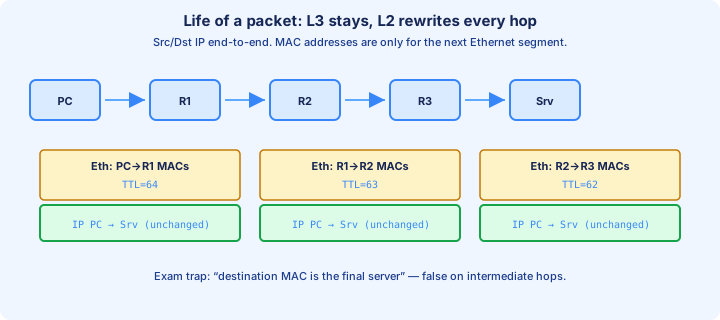
R1 accepts the frame because the destination MAC is its own, strips Ethernet, and checks the IP checksum. The destination IP is not R1, so this is a forward. TTL drops (128 becomes 127) and the checksum is recomputed.
The lookup for 192.168.2.10 must hit 192.168.2.0/24 via 10.0.0.2 out Gi0/0. R1 ARPs for 10.0.0.2 if needed and builds a new Ethernet header: source MAC R1 Gi0/0, destination MAC R2 Gi0/0. The IP addresses do not change.
R2 repeats the work. TTL drops again. The connected route on Gi0/1 points at PC-B's LAN. A third frame uses destination MAC PC-B and source MAC R2 Gi0/1. A capture on each segment shows different MACs. If all three captures show the same destination MAC, you are not looking at a routed path.
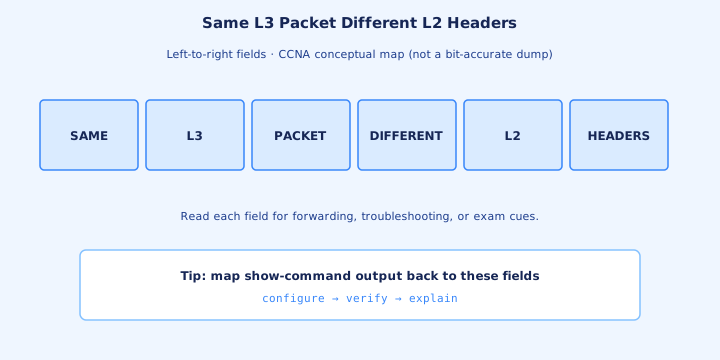
Same L3 packet, different L2 headers
From PC-A to PC-B, source 192.168.1.10 and destination 192.168.2.10 stay put, and so does the ICMP identity. Identification is how you prove three captures are the same datagram.
What changes is the frame, plus the fields a router must update: both MACs, the FCS, TTL, and the header checksum. DSCP stays unless a policy remarks it. You did not write a policy today.
The echo reply is a new packet. PC-B swaps the addresses, ICMP type 0, ARPs for 192.168.2.1 if needed, and depends on a route back to 192.168.1.0/24. The request arriving does not build the reply. NAT would rewrite an address. This day has no NAT.
Routing lookup per router
Each router looks up for itself. R1 does not encode R2's later decision into the packet. On the request, R2's destination is 192.168.2.10. On the reply, R2's destination is 192.168.1.10. Those are different lookups.
On R1, `show ip route 192.168.2.10` should show the static via 10.0.0.2. On R2 the same address should show the connected route on Gi0/1. On R2, `show ip route 192.168.1.10` must show a route via 10.0.0.1. If that third lookup fails, PC-B can receive the echo while the reply dies.
A specific 192.168.2.0/24 beats a default for PC-B. A default on R1 is a sloppy way to hide a missing static in a two-router lab. There is no source-route option here, so the path may be asymmetric. Verify both routers.
TTL decrement
Count routers, not switches. PC-A sends TTL 128. R1 forwards 127. R2 forwards 126. PC-B is the destination, so it does not forward and does not decrement. The reply starts at PC-B's own initial TTL and drops once at each router on the way home.
If R1 and R2 point the destination at each other, TTL falls until a router sees 0, drops the packet, and sends ICMP Time Exceeded to 192.168.1.10. Traceroute that repeats two addresses is a loop. Adding SW1 does not add a traceroute line. Replacing a router with a switch removes a hop and usually removes connectivity.
The TTL captured at PC-B should be the start value minus the number of forwarding routers. A TTL that never changed means you are still on PC-A's side of R1, or the device in between bridged. A drop larger than the routers you drew means a hop is missing from the diagram.
What routers keep and what they rewrite
Unchanged on a normal forward: source IP, destination IP, Protocol, Identification (unless this router fragments), and the ICMP payload. Rewritten: source MAC, destination MAC, FCS, TTL, and the header checksum. If DF allows and the MTU requires it, the router may also split the payload and set offset and MF.
ARP entries and MAC-table rows are not fields of the packet the host sent. The frame that leaves R1 Gi0/0 is new. IOS may use CEF to do the lookup quickly; the explanation you owe on the exam is still the `show ip route` result.
The router does not ARP for the final host on the wrong LAN, does not flood the packet out every interface, and does not reassemble fragments in order to route them. Destination hosts reassemble. NAT, ACLs, and policy routing change this list later. Today the list is short.
Delivery on the last subnet
R2's connected route means PC-B is on-link. `show ip arp` for 192.168.2.10 either has a MAC or R2 sends an ARP request out Gi0/1 only. PC-B replies. SW2 learns both MACs the way SW1 learned PC-A and R1.
The last frame uses destination MAC PC-B, source MAC R2 Gi0/1, Ethertype 0x0800, and destination IP 192.168.2.10. PC-B accepts it because both the MAC and the IP name this host. The echo reply is aimed at gateway 192.168.2.1, because 192.168.1.10 is not on PC-B's subnet.
R1 usually already learned PC-A from the request, so the final delivery on Gi0/1 may not need a new ARP. If R2's ARP entry for PC-B stays Incomplete, stop editing R1. The last subnet's VLAN, mask, or cable is where the packet is dying.
Failure at ARP
Nobody bound the next IP to a MAC, so the frame was never sent. PC-A has no cache entry for 192.168.1.1, or R1 shows Incomplete for 10.0.0.2. Pings time out. `show ip route` can look perfect, because a route does not create an ARP reply.
Check, in order: VLAN mismatch, gateway not on the host's subnet, a mask that makes the host ARP for the wrong address, and an interface that is down or notconnect. Later, Dynamic ARP Inspection can drop the reply. The first three explain almost every Day 12 lab.
Windows may say destination host unreachable when its own ARP for the gateway fails. That message is the PC giving up, not ICMP from R1. If a capture on the router shows no ARP request, the host never asked or the frame died in the wrong VLAN. Fix ARP before you add routes.
Failure at routing
The frame reached a router and the lookup failed. `show ip route 192.168.2.10` printing `% Network not in table` means the static is missing or unresolved. R1 should send ICMP Destination Unreachable, net unreachable (Type 3, Code 0) if it can route that error back.
The sneakier case is a missing return route. The echo arrives at PC-B, the reply has nowhere to go, and PC-A sees timeouts. A capture at PC-B shows the request. `show ip route 192.168.1.10` on R2 is the check. A loop is different ICMP: Time Exceeded, and traceroute repeats two hops.
Order the work: PC address, mask, and gateway; ARP on the PC and `show ip arp`; VLAN and interface status; `show ip route` for the destination and for the source on every router; then ping again. Stop at the first missing fact. A default on every router hides which fact was missing.
Capturing the story in Wireshark
Filter `arp` first: a request for the gateway, destination MAC ffff.ffff.ffff, then a unicast reply. Filter `icmp` next. The echo should show source 192.168.1.10, destination 192.168.2.10, and the host's starting TTL.
Past R1, the same Identification and the same IP addresses should appear with TTL one lower and with the transit MACs. If the destination IP has become 10.0.0.2, something rewrote the header. Echo request is ICMP type 8; echo reply is type 0. Type 8 at PC-B and no type 0 leaving means PC-B's gateway or mask is wrong.
Prefer captures and `show` commands over `debug ip packet`, which can overwhelm a busy router. In Packet Tracer, simulation mode is the capture: step until you see the ARP, then the echo, and read the outbound PDU at each router.
Teaching diagram walkthrough
Redraw four frames. Frame 1, PC-A to R1: gateway MAC, destination IP PC-B, TTL 128, after an ARP broadcast if the cache was empty. Frame 2, R1 to R2: WAN MACs, same IPs, TTL 127. Frame 3, R2 to PC-B: PC-B's MAC, TTL 126. Frame 4 is the reply with the addresses swapped.
Put a command under each box. Frame 1: `arp -a` and SW1's MAC table. Frame 2: R1's `show ip route 192.168.2.10` and `show ip arp` for 10.0.0.2. Frame 3: R2's ARP entry for 192.168.2.10. The reply: R2's route to 192.168.1.10. An empty box means the lab is not finished.
Then break one piece and predict. Remove R2's static: PC-B still receives the echo, PC-A times out. Shut SW1's port toward R1: ARP fails and R1 stays quiet. Change PC-A's mask to /16: PC-A ARPs for 192.168.2.10 locally and never asks the gateway. You are ready for subnetting when that walk fits on a blank page.
Key ideas
- Off-subnet traffic keeps the remote destination IP and uses the gateway MAC. The host does not ARP for the remote host.
- ARP requests are broadcasts on that VLAN only. A router does not forward them onto the next subnet.
- Switches learn and forward. They do not decrement TTL, so they do not appear in traceroute.
- Each router builds a new frame toward the next-hop MAC. Source and destination IP stay constant.
- An Incomplete ARP entry means the packet was never framed. A missing return route delivers the request and drops the reply.
- A capture should show the same IP addresses and Identification, with MACs and TTL changing at each router.
Self-check
- Host to default gateway: what is the destination IP and the destination MAC of PC-A’s first echo frame?
- ARP on the first hop: what is the Ethernet destination of the ARP request, and which IP is the target?
- What switches do on the path: why is the access switch missing from traceroute?
- Frame rewrite at each hop: which addresses stay the same, and what does R1 rewrite?
- Failure at routing: the echo arrives at PC-B and the reply never returns. Which lookup failed?