Day 11
Subnetting & VLSM
subnetting-vlsm
At a glance
Merged Parts 1–3 into one drill-heavy day. Day 13 turns a prefix into a network, a usable range, and a broadcast. The worked split is 192.168.10.0/24 into /27s: mask 255.255.255.224, block size 32, 8 subnets, 30 usable hosts each. You also size 172.16.4.0/26 (.1–.62, broadcast .63) and apply 2^h−2, with /31 called out as the exception. Day 14 makes the block-size method fast when the interesting octet is not the fourth. You subnet 172.16.0.0/16 into /20s, place 172.16.45.10/20 in 172.16.32.0/20, test whether two /27 hosts share a subnet, and prove the network by ANDing with the mask. Day 15 is VLSM on 192.168.10.0/24 for 60 hosts, 28 hosts, and two point-to-point links. Largest-first allocation produces 192.168.10.0/26, 192.168.10.64/27, 192.168.10.96/30, and 192.168.10.100/30. Free space starts at .104. Overlap and alignment are checked before any address is configured. Maps to CCNA v2.0 objective(s) 1.3.
Deep chapter
Long-form companion reading (original prose).
Subnetting & VLSM — consolidated study day
This day merges former Days 13, 14, 15 into one CCNA v2.0-aligned segment.
Read straight through; use the practice hub (subnetting / CLI) to drill the verbs Troubleshoot, Diagnose, Configure, and Interpret.
From former Day 13
Source material retained from the previous Day 13 chapter for continuity.
Introduction
Day 13 is the first day you stop *recognizing* a mask and start *computing* one. The skill is mechanical: given an address and a prefix, name the network, the first usable host, the last usable host, and the broadcast. Every VLAN, ACL, and static route later assumes you can do that without a calculator.
The worked block for this day is 192.168.10.0/24 cut into /27 subnets. A /27 is mask 255.255.255.224, block size 32, 8 subnets, 30 usable hosts each. You will also size 172.16.4.0/26 so the method is not glued to one octet pattern.
Day 13 is fixed-length subnetting. Mixed sizes — a /26 beside a /30 — wait until Day 15. Day 14 then makes the same arithmetic fast on third-octet masks such as /20.
Close the day on paper before any CLI. Write the eight /27 networks inside 192.168.10.0/24, circle 192.168.10.77, and only then open Packet Tracer. Prediction first, lab second.
Why we subnet
Subnetting takes one IPv4 block and cuts it into smaller prefixes that match real topology. A floor of 50 PCs, a server VLAN, and a router-to-router link should not share one giant broadcast domain or one routing entry that describes all of them.
Each router interface needs its own connected network. Without a plan, you either waste a whole /24 on two routers or you run out of addresses in the LAN that actually has users. Subnetting is how you right-size both.
Exam trap: “subnet” is not a synonym for “VLAN.” A VLAN is a Layer 2 flood domain. A subnet is a Layer 3 prefix. They are usually paired one-to-one in campus design, and you still calculate them separately.
Network vs host bits
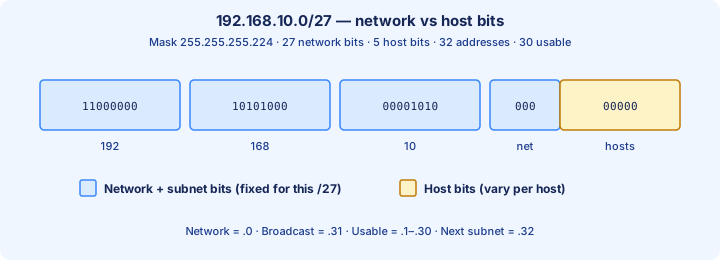
An IPv4 address is 32 bits. The prefix length /n says the first n bits are the network portion (including any subnet bits). The remaining h = 32 − n bits are host bits. For 192.168.10.0/27, that is 27 network bits and 5 host bits.
The fourth octet of that /27 is the picture to memorize: 000 stays with the subnet, 00000 identifies the host. Mask 255.255.255.224 is those 27 ones followed by 5 zeros. 2^5 = 32 addresses live in the subnet; classical usable hosts are 32 − 2 = 30.
On 192.168.10.0/27 the all-zero host field is the network address 192.168.10.0. The all-ones host field is the broadcast 192.168.10.31. Usable hosts run 192.168.10.1 through 192.168.10.30. The next subnet starts at 192.168.10.32.
Exam trap: do not count the borrowed 000 as host bits. Those three bits choose *which* /27 you are in. Only the last five bits change as you walk from host to host inside it.
Mask dotted decimal vs prefix
A prefix and a dotted-decimal mask are the same fact in two spellings. /24 is 255.255.255.0, /26 is 255.255.255.192, /27 is 255.255.255.224, /28 is 255.255.255.240, /30 is 255.255.255.252.
IOS configuration wants the dotted form: `ip address 192.168.10.1 255.255.255.224`. `show ip route` prints the prefix form: 192.168.10.0/27. You will translate both directions on every lab.
Build the fourth-octet masks from binary weights 128, 64, 32, 16, 8, 4, 2, 1. /27 turns on the first three of those weights: 128 + 64 + 32 = 224. /26 is 128 + 64 = 192. /28 is 224 + 16 = 240.
Exam trap: 255.255.224.0 is not a /27. That mask puts the interesting octet in the *third* position and means /19. The 224 of a /27 sits in the fourth octet: 255.255.255.224.
Powers of two
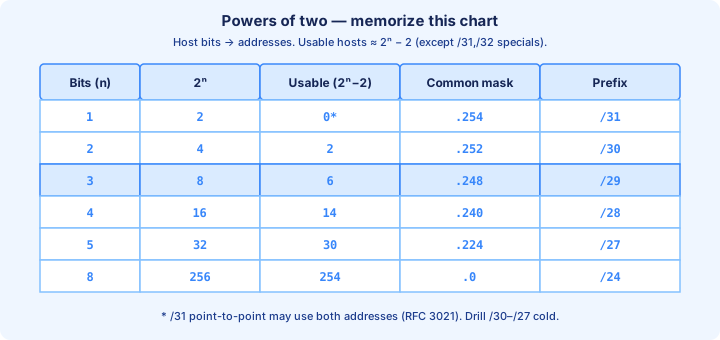
Subnet counts and host counts are powers of two. Drill these until they are instant: 2^1 = 2, 2^2 = 4, 2^3 = 8, 2^4 = 16, 2^5 = 32, 2^6 = 64, 2^7 = 128, 2^8 = 256.
Classical usable hosts are 2^h − 2. The chart you want cold: /30 has 2 usable, /29 has 6, /28 has 14, /27 has 30, /26 has 62, /25 has 126, /24 has 254. A need of 20 hosts fails a /28 (only 14) and fits a /27 (30).
/31 is the exception the chart marks with a star. 2^1 − 2 = 0, so the classical formula says a /31 has no usable hosts. RFC 3021 allows both addresses on a point-to-point link. Unless the stem says /31, use /30 for two routers.
Exam trap: “how many addresses” wants 2^h (32 on a /27). “How many hosts” wants 2^h − 2 (30). Read the noun before you subtract.
Finding network address
The network address is the first address of the block: every host bit is 0. With a /27, blocks in the fourth octet are multiples of 32: 0, 32, 64, 96, 128, 160, 192, 224.
Worked host: 192.168.10.77/27. Find the multiple of 32 at or below 77. 64 fits; 96 is already past 77. The network is 192.168.10.64. The host sits in 192.168.10.64/27, which covers .64 through .95.
The same move on the first block is why 192.168.10.0/27 is a legal subnet. Modern IOS uses the all-zeros subnet. Do not throw .0 away because an old textbook called it “subnet zero.”
Exam trap: zeroing only “the last octet you feel like” is not a method. 192.168.10.77 with a classful guess becomes 192.168.10.0/24. With the mask you were given, /27, the network is 192.168.10.64.
Finding broadcast
The broadcast address is the last address of the block: every host bit is 1. Shortcut: broadcast = next network − 1, which is the same as network + block size − 1.
For 192.168.10.64/27 the next multiple of 32 is 96, so the broadcast is 192.168.10.95. Check: 64 + 32 − 1 = 95. Usable hosts are .65 through .94. For the figure’s first subnet, 192.168.10.0/27, the broadcast is 192.168.10.31.
Exam trap: .96 is the next *network*, not the broadcast. .94 is the last *usable host*. The broadcast of the .64/27 is .95.
Usable host range
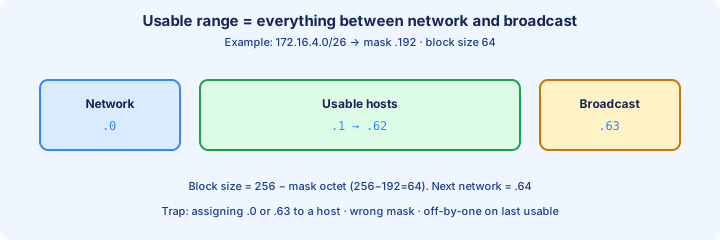
Usable hosts are every address strictly between the network and the broadcast. First usable = network + 1. Last usable = broadcast − 1. Count them with 2^h − 2, not by tapping your finger and dropping an endpoint.
Second worked example, matching the range figure: 172.16.4.0/26. Mask 255.255.255.192, block size 256 − 192 = 64. Network 172.16.4.0, usable 172.16.4.1–172.16.4.62, broadcast 172.16.4.63, next network 172.16.4.64. That is 62 hosts.
Put the two examples side by side until both feel the same. /27 on 192.168.10.0: .0 / .1–.30 / .31. /26 on 172.16.4.0: .0 / .1–.62 / .63. The mask changed the block size; the rule did not change.
Exam trap: assigning .0 or .63 to a PC on 172.16.4.0/26 looks like a normal host address and fails. Routers reject the network and the broadcast as interface addresses in classical subnetting.
Classful nostalgia vs CIDR
Classful addressing guessed the mask from the first octet. Class A (0–127) defaulted to /8, Class B (128–191) to /16, Class C (192–223) to /24. 192.168.10.0 is a Class C number, so the *classful* default is /24.
CIDR (classless inter-domain routing) throws that guess away. The mask in the question, the interface, or the routing update is the mask. 192.168.10.77/27 lives in 192.168.10.64/27, even though a Class C reflex wants 192.168.10.0/24.
Exam trap: RIPv1 was classful and did not send masks. RIPv2, EIGRP, and OSPF send the prefix length. If a stem gives you a mask, use it. Class is only a hint when the mask is missing.
Borrowed bits
Start from a parent prefix and borrow host bits to make subnet bits. Going from 192.168.10.0/24 to /27 borrows 27 − 24 = 3 bits. Subnet count is 2^3 = 8. Each new subnet is half the size of the previous prefix step, three times over: /24 → /25 → /26 → /27.
Host bits left are 32 − 27 = 5, so each /27 holds 32 addresses and 30 usable hosts. The eight networks are .0, .32, .64, .96, .128, .160, .192, .224. Borrowing multiplies the number of networks and divides the hosts in each one.
Exam trap: “borrowed bits” and “host bits” are different numbers. Three borrowed bits mean 8 subnets, not 3. Five host bits mean 30 usable hosts, not 5, and not 32 once the question says hosts.
Block size shortcuts
The block size (the magic number) in the interesting octet is 256 − mask octet. For /27, 256 − 224 = 32. For /26, 256 − 192 = 64. For /28, 256 − 240 = 16. For /30, 256 − 252 = 4.
When the interesting octet is the fourth, you increment that octet by the block size and the other three octets stay put: 192.168.10.0, .32, .64, and so on. The network address is always a multiple of the block size in that octet.
Exam trap: the block size is not the prefix number and not the mask octet. /27 does not increment by 27, and it does not increment by 224. It increments by 32.
Practice worksheet method
Use the same seven lines every time. (1) Write the prefix and the dotted mask. (2) Mark the interesting octet. (3) Block size = 256 − that octet. (4) List networks by adding the block size. (5) Broadcast = next network − 1. (6) Usable = network+1 through broadcast−1. (7) Place any host by finding which block contains it.
Full walk of 192.168.10.0/24 → /27. Mask 255.255.255.224, block 32, eight subnets. .0/27 usable .1–.30 broadcast .31. .32/27 usable .33–.62 broadcast .63. .64/27 usable .65–.94 broadcast .95. .96/27 usable .97–.126 broadcast .127.
Continue: .128/27 usable .129–.158 broadcast .159. .160/27 usable .161–.190 broadcast .191. .192/27 usable .193–.222 broadcast .223. .224/27 usable .225–.254 broadcast .255. Host 192.168.10.77 falls in .64–.95, so it is 192.168.10.64/27, usable .65–.94.
Do this sheet from a blank page twice. The second pass should take a few minutes. If .95 and .96 still swap places in your head, you are not ready for Day 14’s third-octet masks.
Common off-by-one errors
The errors that survive into the exam are small and consistent. People use 2^h as the host count, so a /27 becomes “32 hosts” instead of 30. People assign the network or the broadcast to a PC. People list the next network (192.168.10.32) as the broadcast of 192.168.10.0/27.
Another family: incrementing by the wrong block. /27 stepped by 16 invents networks at .16 and .48 that are not legal boundaries. Stepping by 64 (a /26 habit) skips .32 and .96 and silently merges two /27s.
Mask typos belong on the same list. Writing /27 in your notes and typing 255.255.255.192 configures a /26. The router will accept it. Neighboring devices with the real /27 will not share the subnet you think they share.
Exam trap: the last usable host of 192.168.10.224/27 is 192.168.10.254, and the broadcast is 192.168.10.255. That .255 is both the subnet broadcast *and* the parent /24 broadcast. It is still not a host address.
Binary comfort without fear
You do not convert all 32 bits on every question. You convert the interesting octet and AND it with the mask octet. For 192.168.10.77 against 224: 77 is 64 + 8 + 4 + 1 = 01001101. 224 is 11100000. AND keeps 01000000 = 64.
That single AND is the whole network calculation: 192.168.10.64. The bits the mask zeroed are the host field. Five host bits max out at 31, so the broadcast is 64 + 31 = 95, which is 192.168.10.95.
Exam trap: if the choices are adjacent blocks (.32, .64, .96), binary is the tie-break. Do not “feel” which block a host belongs to. AND the interesting octet or divide by the block size.
Checkpoint problems
Solve these before Day 14, and write every answer as network / first / last / broadcast. (1) 192.168.10.0/27. (2) 192.168.10.96/27. (3) 172.16.4.0/26. (4) Which subnet contains 192.168.10.200/27?
Answers: (1) .0 / .1 / .30 / .31. (2) .96 / .97 / .126 / .127. (3) 172.16.4.0 / .1 / .62 / .63. (4) 200 sits between 192 and 224, so the subnet is 192.168.10.192/27, usable .193–.222, broadcast .223.
Two more, still without notes. How many subnets and usable hosts when you slice a /24 into /28s? 2^4 = 16 subnets, 14 usable hosts, block size 16, mask 255.255.255.240. Smallest prefix for 20 hosts? /27 (30 usable). /28 only offers 14.
From former Day 14
Source material retained from the previous Day 14 chapter for continuity.
Introduction
Day 14 makes Day 13’s method fast when the numbers are ugly. You still find the block size, the network, the broadcast, and the usable range. The new pressure is the interesting octet, which is no longer always the fourth one.
You will subnet a /16, reverse a host address back to its block, test whether two hosts share a subnet, and prove the network with a bitwise AND. The running /27 example stays in view: 192.168.10.40 and 192.168.10.50 share a subnet; 192.168.10.30 does not.
Part 2 is also where exam wording starts to bite. “Addresses,” “hosts,” “subnets,” and “the smallest mask” are different questions. A correct block size with the wrong noun is still a miss.
More mask practice
Translate both directions until the pairs are reflexes. /25 = 255.255.255.128, /26 = 255.255.255.192, /27 = 255.255.255.224, /28 = 255.255.255.240, /29 = 255.255.255.248, /30 = 255.255.255.252.
Third-octet masks show up the moment the prefix is shorter than /24. /20 = 255.255.240.0, /21 = 255.255.248.0, /22 = 255.255.252.0, /23 = 255.255.254.0. The non-255 octet is where the block size lives.
Exam trap: 255.255.255.224 and 255.255.224.0 both contain 224. Only the first is /27. The second is /19. Read the octet position before you celebrate.
Interesting octet focus
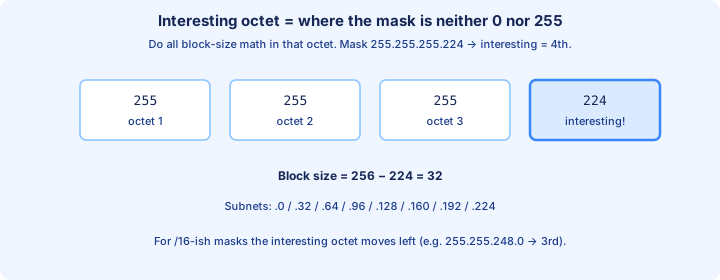
The interesting octet is the mask octet that is neither 0 nor 255. Every block-size addition happens in that octet. Octets to the left stay fixed. Octets to the right run through their full 0–255 range inside one subnet.
For mask 255.255.255.224 the interesting octet is the fourth. 256 − 224 = 32, so /27 networks step .0, .32, .64, .96, .128, .160, .192, .224. That is the whole /24 → /27 chart from Day 13, seen as a mask fact.
Move the interesting octet left and the same arithmetic still holds. Mask 255.255.248.0 (/21) is interesting in the third octet. 256 − 248 = 8, so networks step by 8 in that octet: 10.1.0.0/21, 10.1.8.0/21, 10.1.16.0/21.
Exam trap: doing fourth-octet math on a /20 produces nonsense like 172.16.45.0 as the network of 172.16.45.10/20. The fourth octet of a /20 is entirely host bits. The network’s fourth octet is 0.
Increment charts
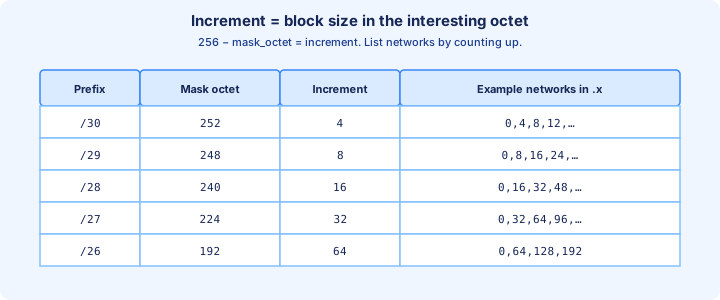
Write the increment chart once and then use it under a timer. /30 mask octet 252, increment 4, networks 0, 4, 8, 12…. /29 → 248 → 8. /28 → 240 → 16. /27 → 224 → 32. /26 → 192 → 64 (only 0, 64, 128, 192 inside a /24).
A legal network address is a multiple of the increment in the interesting octet, with all host octets at 0. 192.168.10.48/28 is legal (48 is a multiple of 16). 192.168.10.50/28 is not a network address; 50 falls inside 192.168.10.48/28.
Exam trap: memorizing increments without the mask octet that produces them. If you remember “/27 steps by 32” but type mask 255.255.255.240, you configured a /28 and your chart no longer matches the router.
Subnetting a /16
172.16.0.0/16 subnetted to /20 borrows 4 bits and creates 2^4 = 16 subnets. The mask is 255.255.240.0. The interesting octet is the third. Block size 256 − 240 = 16. Networks: 172.16.0.0, 172.16.16.0, 172.16.32.0, 172.16.48.0, continuing through 172.16.240.0.
Host bits left: 32 − 20 = 12. Total addresses per subnet: 2^12 = 4096. Usable hosts: 4094. You will not count them one by one. You will place a host by the third octet and then write the ends.
Worked host: 172.16.45.10/20. Third octet 45 sits between 32 and 48. Network 172.16.32.0. Broadcast is one less than the next network: 172.16.47.255. First host 172.16.32.1. Last host 172.16.47.254.
Exam trap: 172.16.45.0 is not the network, and 172.16.45.255 is not the broadcast. Both still have host bits set or cleared in the wrong octet. The block owns the entire third-octet span 32–47.
Subnetting a /24
Return to the parent you can draw from memory: 192.168.10.0/24 into equal /27s. Eight subnets, mask 255.255.255.224, 30 hosts each. This is the speed drill. You should list .0 .32 .64 .96 .128 .160 .192 .224 without looking back at Day 13.
Pick one row and finish it in a single line. Subnet 192.168.10.160/27: first .161, last .190, broadcast .191, next network .192. Subnet 192.168.10.224/27: first .225, last .254, broadcast .255. The .255 is the broadcast of that eighth /27, not a sign that the mask secretly became /24.
Exam trap: a question that says “subnet 192.168.10.0/24 into networks of at least 30 hosts” wants /27 if it also wants as many subnets as possible. /26 also fits 30 hosts, but you only get four of them. Read whether the goal is hosts per subnet, number of subnets, or minimum waste.
Reverse engineering a host IP
Most exam items hand you a host, not a network. Reverse the worksheet: identify the interesting octet, find the block size, floor the host octet down to a multiple of that size, then build broadcast and usable range from that network.
192.168.10.130/26. Block size 64. Multiples are 0, 64, 128, 192. 130 lives in the 128 block, which ends just before 192. Network 192.168.10.128, broadcast 192.168.10.191, usable .129–.190. Do not start at .0 and walk four blocks if you can jump straight to 128.
Same habit on the Day 13 host, now under a clock: 192.168.10.77/27 → block 32 → network .64 → broadcast .95 → usable .65–.94. Last usable is .94, not .95.
Exam trap: the distractors are almost always the neighboring blocks. For .130/26 those are 192.168.10.64/26 (too low) and 192.168.10.192/26 (too high). Compute the floor; do not pick the choice that “looks close.”
Same subnet test
Two hosts are on the same subnet when they share a network address under the same mask. Compute each network (or AND both addresses with the mask) and compare. If the results differ, a router is required between them even when the numbers look close.
Worked /27 test. 192.168.10.40 and 192.168.10.50: both floor to 32, so both are in 192.168.10.32/27 (usable .33–.62, broadcast .63). 192.168.10.30 floors to 0, so it is in 192.168.10.0/27. .30 and .40 need a router. .40 and .50 do not.
The test is only valid if both hosts are configured with the same mask. A PC with /27 and a PC with /26 can disagree about whether they are local. That mismatch is a classic “they should ping and they do not” lab fault.
Exam trap: proximity is not membership. .30 and .32 differ by two and sit in different /27s. .33 and .62 differ by a lot and sit in the *same* /27.
Summarization preview
Subnetting splits one prefix into several longer ones. Summarization combines several prefixes into one shorter one. The bit skill is related; the question is the opposite direction. Do not answer a split question with a summary, or the reverse.
The eight /27s from 192.168.10.0 through 192.168.10.224 fill 192.168.10.0/24 exactly, so they summarize back to that /24. The first four — .0, .32, .64, .96 — cover .0–.127 and summarize to 192.168.10.0/25. The last four summarize to 192.168.10.128/25.
A legal summary’s boundaries are themselves legal subnet boundaries for that shorter prefix. 192.168.10.32/25 is not a legal /25 network, because /25 blocks start at .0 and .128 only. You cannot summarize “the middle” just because it would be convenient.
Exam trap: a summary that includes addresses you do not actually have will black-hole traffic if you advertise it toward someone else who owns those addresses. Day 15’s allocation order is how you keep future summaries honest.
Designing for host counts
Given a host count, find the smallest h such that 2^h − 2 is at least that count, then the prefix is 32 − h. Need 20 hosts: 2^4 − 2 = 14 fails, 2^5 − 2 = 30 fits, h = 5, prefix /27.
Need 50 hosts: 30 is not enough, 2^6 − 2 = 62 fits, prefix /26. Need exactly 14: /28. Need 2 (a router link): /30. When the stem also asks for several subnets, check that the parent is big enough for that many blocks.
Exam trap: “at least 30 hosts” is satisfied by /27, /26, and /25. If the question says *smallest subnet* or *least waste*, choose /27. If it says *maximum hosts*, choose the shortest prefix among the choices.
Wasted addresses
Waste is usable addresses you assigned to a subnet and will not use. A /24 on a point-to-point link has 254 usable addresses and needs 2, so 252 sit idle. A /30 has 2 usable addresses and wastes nothing you needed.
Inside a LAN the waste is smaller and still real. Ten hosts on a /26 leave 62 − 10 = 52 usable addresses idle. Ten hosts on a /28 leave 14 − 10 = 4 idle. Fixed-length designs pay that waste on every subnet so the mask stays easy. Day 15 stops paying it.
Exam trap: do not “save waste” by putting 20 hosts on a /28. Fourteen usable is not twenty, no matter how tidy the block looks. Fit first, then minimize leftover.
Exam timing strategy
On a timed item, spend the first fifteen seconds only on the mask. Write the interesting octet and the block size in the margin. Every later number is wrong if that line is wrong, so rushing it does not save time.
Answer the noun the stem used. Circle hosts, addresses, subnets, or broadcast before you look at the choices. A /26 is 64 addresses, 62 hosts, and it creates 4 subnets from a /24. All three numbers are “about” the same problem and only one is asked.
Exam trap: changing your block size halfway through because a choice looks familiar. If you started with /27 and block 32, stay there unless you find an arithmetic error. Do not switch to the /26 ladder because .64 appears in both.
Mental math drills
Run sets of five. Accuracy is the gate: a set only “counts” at 5/5. Then tighten the clock. Mix one fourth-octet host, one third-octet host, one host-count design, one same-subnet pair, and one mask conversion.
Speak the block size before you write a network. “/27, block 32.” That one spoken check catches the error where your hand still wants /26 from the previous question. Redo every miss until you get it right twice.
A fair five-pack for tonight: network of 192.168.10.77/27; broadcast of 172.16.45.10/20; smallest prefix for 14 hosts; do 10.1.5.20 and 10.1.9.20 share a /21; dotted mask of /28.
Answers to check yourself: 192.168.10.64; 172.16.47.255; /28; no, because /21 blocks are 0–7 and 8–15 in the third octet (10.1.0.0/21 versus 10.1.8.0/21); 255.255.255.240.
Verify with ANDing
ANDing the address with the mask clears every host bit and leaves the network. You only need it in the interesting octet. 192.168.10.77 AND 255.255.255.224: the first three octets stay 192.168.10. In the fourth, 77 = 01001101 and 224 = 11100000, so AND is 01000000 = 64. Network 192.168.10.64. The same AND on .94 is 64; on .96 it becomes 96.
Use AND when the block-size story and your instinct disagree, and use it to settle same-subnet questions. 192.168.10.40 AND 224 = 32. 192.168.10.50 AND 224 = 32. 192.168.10.30 AND 224 = 0. Equal results mean same subnet.
Exam trap: OR and AND are not interchangeable. OR with the mask turns host bits *on* in the masked positions and is not how you find a network. The network operation is AND.
Lab: assign three subnets
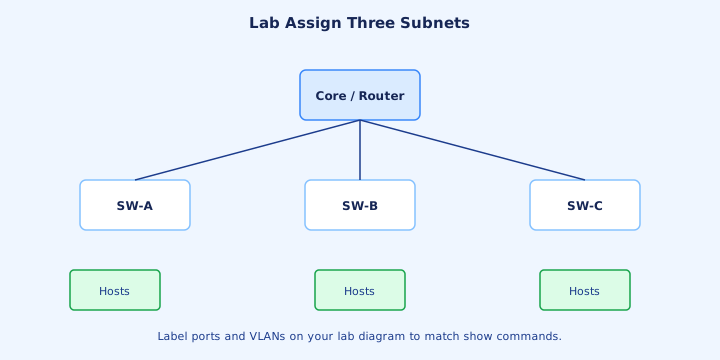
Build three LANs from 192.168.10.0/24, each a /27, before you touch VLSM. LAN1 192.168.10.0/27, gateway 192.168.10.1. LAN2 192.168.10.32/27, gateway .33. LAN3 192.168.10.64/27, gateway .65. Mask on every device: 255.255.255.224.
Router side, one interface each: `ip address 192.168.10.1 255.255.255.224`, then .33 and .65 with the same mask. A PC on LAN1 can use 192.168.10.2. A PC on LAN2 can use 192.168.10.34. A PC on LAN3 can use 192.168.10.66. None of those is a network or a broadcast.
Verify with `show ip interface brief` and `show ip route connected`. You want three connected routes: 192.168.10.0/27, 192.168.10.32/27, 192.168.10.64/27. Ping the gateway from each PC, then ping across LANs. A cross-LAN failure with a correct route usually means a host mask or default gateway typo.
Exam trap: 192.168.10.32 is LAN2’s *network*, so it cannot be the gateway. 192.168.10.63 is LAN2’s broadcast. The first legal gateway on that subnet is 192.168.10.33.
From former Day 15
Source material retained from the previous Day 15 chapter for continuity.
Introduction
Day 15 is VLSM — variable-length subnet masking. Real sites do not use one mask everywhere. A user LAN, a smaller LAN, and two router links want different sizes, and they must come out of one parent without overlap.
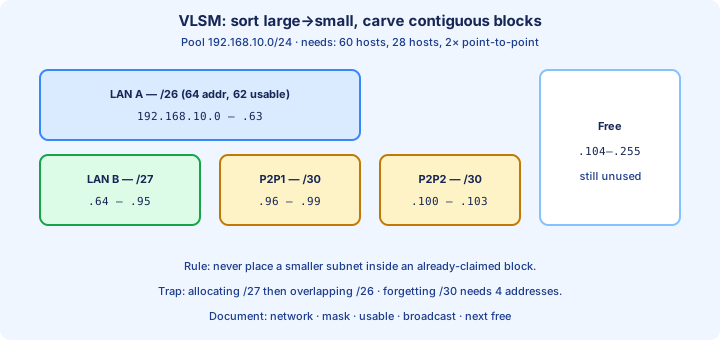
The carve you will be able to redraw from memory uses the pool in the figure: 192.168.10.0/24, with 60 hosts, 28 hosts, and two point-to-point links. Largest first, that is 192.168.10.0/26, 192.168.10.64/27, 192.168.10.96/30, and 192.168.10.100/30. Free space begins at .104.
The arithmetic is Day 13 and Day 14. What is new is the order and the documentation. A correct /27 placed on top of an existing /26 is still a broken design. The router may accept both connected routes; hosts will not.
Fixed-length vs VLSM
Fixed-length subnetting picks one mask for every subnet. Splitting 192.168.10.0/24 into /26s gives exactly four networks: .0, .64, .128, .192, each with 62 usable hosts. It is simple, and it spends 62 addresses on a link that needed 2.
VLSM lets those subnets use different lengths. The 60-host LAN still needs a /26 (a /27 has only 30 usable). The 28-host LAN fits a /27 (30 usable). Each router link fits a /30 (2 usable). The mix occupies .0–.103 and leaves .104–.255 free.
Four equal /26s would fill the entire /24, so a fifth subnet would be impossible. The VLSM plan already has four subnets *and* spare space. That is the point of variable length: you meet the largest requirement without forcing every other link to the same size.
Exam trap: if the stem says “divide into four equal networks,” stay fixed-length. If the host counts differ a lot, or a point-to-point link is in the list, the expected design is VLSM.
Sort requirements large to small
Sort by addresses required, largest first, and carve from the bottom of the pool. Large blocks have few legal starting points. Small blocks can tuck into what remains. The reverse order strands a hole that is too small, or too poorly aligned, for the big LAN.
Size each row before you assign numbers. 60 hosts: 2^5 − 2 = 30 is short, 2^6 − 2 = 62 fits → /26, block 64. 28 hosts: 14 is short, 30 fits → /27, block 32. Each point-to-point link: /30, block 4, 2 usable hosts.
Order for the figure’s pool: /26, then /27, then /30, then /30. Write that order in the margin before any address. If you place a /30 at 192.168.10.0 first, you can no longer start the /26 at .0, and the next legal /26 jumps to .64. You just lost a quarter of the /24.
Allocate without overlap
Carve 192.168.10.0/24 in that order, always starting the next subnet at the next *legal* boundary at or after the first free address. LAN A, 60 hosts: 192.168.10.0/26, range .0–.63, usable .1–.62, broadcast .63.
LAN B, 28 hosts: next free is .64, which is a legal /27 boundary. 192.168.10.64/27, range .64–.95, usable .65–.94, broadcast .95. P2P1: next free .96, legal for a /30. 192.168.10.96/30, range .96–.99, usable .97–.98, broadcast .99.
P2P2: next free .100, also a multiple of 4. 192.168.10.100/30, range .100–.103, usable .101–.102, broadcast .103. The next free address is 192.168.10.104. Nothing in .0–.103 is shared by two rows.
Exam trap: 192.168.10.32/27 looks like “a /27 near the start,” and it overlaps LAN A, because .32–.63 is inside the /26. A later /27 must start at .64 or beyond. Never place a smaller subnet inside a block you already claimed.
Documenting VLSM maps
Write the plan in a table before anyone configures a router. Columns that prevent labs from drifting: name, prefix, network, first host, last host, broadcast, next free. Optional and worth adding: VLAN id, gateway, and whether DHCP will run there.
Filled in for this carve: LAN A 192.168.10.0/26, .1–.62, broadcast .63. LAN B 192.168.10.64/27, .65–.94, broadcast .95. P2P1 192.168.10.96/30, hosts .97 and .98, broadcast .99. P2P2 192.168.10.100/30, hosts .101 and .102, broadcast .103. Next free .104.
Configure from the table. Do not re-derive a mask while you are typing `ip address`. The usual lab bug is a correct network in the spreadsheet and 255.255.255.224 typed on a /26 interface, or the reverse.
Exam trap: a documented broadcast that is not “next network minus one” means the row is already wrong. Check .63, .95, .99, .103 against the following network before you call the sheet done.
Point-to-point /30 and /31
A classical point-to-point subnet is a /30: 4 addresses, 2 usable, mask 255.255.255.252, block size 4. On 192.168.10.96/30 the network is .96, the two routers use .97 and .98, and .99 is the broadcast. The next /30 may start at .100.
/31 (mask 255.255.255.254, RFC 3021) uses both addresses as hosts and has no separate broadcast. It is valid on many Cisco point-to-point links. The CCNA default when the stem does not mention /31 is still the /30, because that is the classical 2^h − 2 answer with two usable hosts.
Exam trap: a /30 consumes four addresses, not two. Forgetting the network and broadcast makes the next link start at .98, which is not a legal /30 boundary and overlaps .96–.99.
Summary routes after VLSM
VLSM does not forbid summaries. It demands that you know what the summary includes. This site owns all of 192.168.10.0/24, so an upstream router can advertise that one /24 and cover LAN A, LAN B, both links, and the free space you may still assign.
A tighter summary of the *used* space is not automatically 192.168.10.0/25. That /25 covers .0–.127, which does include .0–.103 and also the still-free .104–.127. Advertising it is honest only if those free addresses stay at this site. It is a black hole if some other site owns .112/28.
You cannot summarize LAN B and the two /30s as 192.168.10.64/26 without also claiming .64–.127, including free space past .103. Contiguous blocks summarize only when they fill one legal shorter prefix.
Routing protocol concerns
VLSM only works when the routing protocol advertises the mask with the prefix. RIPv2, EIGRP, and OSPF do. RIPv1 does not: it is classful, and a mix of /26 and /27 inside 192.168.10.0 is exactly the design it cannot describe.
Connected routes appear with the mask you configured. After this lab, `show ip route` should include C 192.168.10.0/26, C 192.168.10.64/27, C 192.168.10.96/30, and C 192.168.10.100/30. If a line shows /24 or /27 where the table says /26, the interface mask is wrong.
Exam trap: choosing RIPv1 in a VLSM scenario, or assuming every routing protocol “just handles masks.” If the stem says classful, mixed prefix lengths are unsupported.
Common VLSM mistakes
The expensive mistake is overlap. 192.168.10.0/26 owns .0–.63. 192.168.10.32/27 owns .32–.63. Every address from .32 through .63 has two owners. Ping and routing then depend on which interface the router thinks is connected, and both answers are bad.
The quiet mistake is an unaligned start. 192.168.10.100/28 is not a network: 100 is not a multiple of 16. The /28 that contains .100 is 192.168.10.96/28 (.96–.111), and that block swallows both /30s. The first legal /28 at or after .104 is 192.168.10.112/28.
The third mistake is sizing from total addresses instead of usable hosts. “28 hosts” does not fit a /28 (the names rhyme and the math does not). A /28 has 14 usable hosts. 28 hosts need a /27.
Practice design scenario
Repeat the carve from a blank sheet. Parent 192.168.10.0/24. Needs: 60, 28, 2, 2. Your sheet should match the figure exactly: .0/26, .64/27, .96/30, .100/30, next free .104.
Then change one requirement and re-carve, so you are not memorizing a picture. Suppose LAN B needs 10 hosts instead of 28. Ten hosts fit a /28 (14 usable). After the /26 ends at .63, the next legal /28 is 192.168.10.64/28 (.64–.79). The first /30 can then start at .80, the second at .84. Next free becomes .88.
Exam trap: when you change LAN B from /27 to /28, do not leave the old /30s parked at .96. They are still valid, but you invented a hole from .80 to .95. The practice goal is a fresh contiguous carve, not a patch on yesterday’s numbers.
Check contiguous free space
After the original carve, free space is 192.168.10.104 through 192.168.10.255. “Free” does not mean “any prefix may start at .104.” The start must be a multiple of that prefix’s block size.
A new LAN of 10 hosts needs a /28, block 16. 104 ÷ 16 = 6.5, so .104 is not aligned. The next multiple of 16 is 112. 192.168.10.112/28 covers .112–.127, usable .113–.126 (14 hosts), broadcast .127. It fits, and it does not touch .0–.103.
Starting that /28 at .96 would be aligned and would be wrong: .96–.111 contains both point-to-point subnets. Alignment prevents illegal networks. The overlap test prevents legal networks placed on top of each other.
Exam trap: 192.168.10.104/28 is a popular distractor because it is “the next free address.” Next free is where you *look*. The block size decides where you are *allowed* to start.
Revisiting wasted space
Count what the VLSM plan actually spends. LAN A uses 64 addresses, LAN B 32, each link 4. Total 104 addresses, through .103. A fixed /26 for all four subnets would spend 256 addresses and leave zero free. The variable plan leaves 152 addresses (.104–.255) for the next requirement.
When you add the 10-host /28 at .112, notice the gap .104–.111. Those eight addresses are real and currently too small for a /28. They can still hold two /30s (.104 and .108) if a future link needs them. Document the gap so nobody thinks the space vanished.
Exam trap: “no waste” is not the goal. “No overlap, requirements met, large blocks preserved” is the goal. A two-address spare inside the 60-host LAN is healthy.
Exam-style multi-step question
Stem you should be able to finish in a few minutes: a company has 192.168.10.0/24. LAN A needs 60 hosts, LAN B needs 28, and two serial links need 2 hosts each. Give each subnet’s network, mask, and usable range, and name the first free address.
Work it in order. /26 at 192.168.10.0, mask 255.255.255.192, usable .1–.62. /27 at 192.168.10.64, mask 255.255.255.224, usable .65–.94. /30 at 192.168.10.96, mask 255.255.255.252, usable .97–.98. /30 at 192.168.10.100, same mask, usable .101–.102. First free: 192.168.10.104.
A follow-up that shows up constantly: which subnet contains host 192.168.10.70? 70 is between 64 and 95, so LAN B, 192.168.10.64/27. And which of these overlaps LAN A: 192.168.10.32/27 or 192.168.10.64/27? Only .32/27, because .32 is inside .0–.63.
Exam trap: the follow-up changes the question from “design” to “locate a host” without changing the mask family. Recompute the block. Do not assume .70 is in the /26 just because 70 is numerically close to 64 and the /26 was the first row you wrote.
Verification checklist
Before you configure, confirm four facts on every row. The network is a multiple of the block size. The broadcast is network + block − 1, with the right octet carrying the overflow. The usable count is 2^h − 2 (or both addresses, if you truly chose /31). The range does not intersect the previous row.
On the router, `show ip interface brief` should show up/up and the gateway addresses you chose — .1, .65, .97, .101 are legal examples — and `show ip route connected` should show /26, /27, /30, /30. A connected /24 means the mask never made it onto the interface.
Ping the far side of each /30, then ping a host on LAN B from LAN A. When that fails, check overlap and masks before you debug routing protocols. A successful ping inside one LAN only proves that those hosts agree with each other.
Bridge to VLANs next
Each LAN subnet you just carved wants its own broadcast domain. On a modern switch that domain is a VLAN, not a separate physical switch. Day 16 starts that story: a VLAN is a Layer 2 flood boundary, and inter-VLAN traffic needs a router or a Layer 3 switch.
The pairing you are heading toward is one VLAN, one subnet, one gateway. LAN A’s 192.168.10.0/26 might become VLAN 10 with gateway 192.168.10.1. LAN B’s 192.168.10.64/27 might become VLAN 20 with gateway 192.168.10.65. Hosts in different VLANs do not ARP for each other directly.
The point-to-point /30s usually have no user VLAN at all. They are routed links. Do not drop .97 and .101 into an access VLAN “so they can be reached.” They are reached because the routers own those connected routes. Take this table into Day 16 unchanged.
Key ideas
- Merged Parts 1–3 into one drill-heavy day.
- A /27 has 27 network bits and 5 host bits: 32 addresses, 30 usable, mask 255.255.255.224, block size 32.
- 192.168.10.0/24 becomes eight /27s at .0, .32, .64, .96, .128, .160, .192, and .224.
- 192.168.10.0/27 is network .0, usable .1–.30, broadcast .31. 192.168.10.77/27 is network .64, usable .65–.94, broadcast .95.
- Block size in the interesting octet is 256 minus the mask octet. For /27, 256−224=32.
- Classical usable hosts are 2^h−2. /30 has 2, /28 has 14, /27 has 30, /26 has 62. /31 can use both addresses (RFC 3021).
- A Class C number does not override the mask in the question. 192.168.10.77/27 is not the classful network 192.168.10.0/24.
- The interesting octet is the mask octet that is neither 0 nor 255. 255.255.255.224 means the fourth octet and a block of 32.
Self-check
- List network, first host, last host, and broadcast for 192.168.10.0/27 and for 192.168.10.96/27.
- Convert /26, /27, /28, and /30 into dotted masks and block sizes.
- Place 192.168.10.77/27 and 192.168.10.200/27 into their subnets.
- For 172.16.4.0/26, explain why .0 and .63 are not host addresses and name the next network (.64).
- Pick the longest prefix that fits 20 hosts (/27, 30 usable) and reject /28 (14 usable).
- Give network, first host, last host, and broadcast for 172.16.45.10 with mask 255.255.240.0.