Day 12
VLANs & Trunks
vlans-and-trunks
At a glance
Merged VLAN Parts 1–2. Day 16 treats a VLAN as a Layer 2 broadcast domain. An access port maps untagged host frames into one VLAN, a trunk carries many VLANs with 802.1Q, and the native VLAN is the one left untagged. show vlan brief lists access ports, while the allowed list and show interfaces trunk are what prove the trunk. Day 17 stays on the trunk. The 802.1Q tag is 4 bytes inserted after the source MAC, with TPID 0x8100 and a 12-bit VLAN ID, and show interfaces trunk separates VLANs that are allowed from VLANs that are forwarding. A voice port keeps the PC untagged in the data VLAN and tags the phone, while an extended VLAN or a one-sided allowed list is how that trunk drops a single VLAN. Maps to CCNA v2.0 objective(s) 2.1.b, 2.2.
Deep chapter
Long-form companion reading (original prose).
VLANs & Trunks — consolidated study day
This day merges former Days 16, 17 into one CCNA v2.0-aligned segment.
Read straight through; use the practice hub (subnetting / CLI) to drill the verbs Troubleshoot, Diagnose, Configure, and Interpret.
From former Day 16
Source material retained from the previous Day 16 chapter for continuity.
VLAN purpose
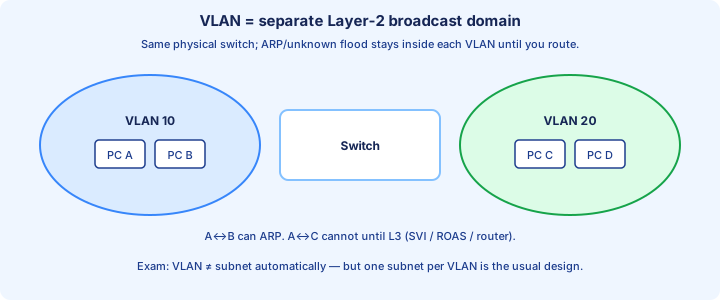
A VLAN is a Layer 2 broadcast domain defined in software. VLAN 10 hosts on a switch share ARP, broadcasts, and unknown-unicast floods. VLAN 20 hosts on the same chassis do not. The box is shared; the flood stops at the VLAN ID.
Pair one VLAN, one subnet, one gateway. From Day 15: 192.168.10.0/26 is VLAN 10 with gateway 192.168.10.1, and 192.168.10.64/27 is VLAN 20 with gateway 192.168.10.65. The VLAN number is not a mask. You keep that pairing honest.
Cisco switches ship with VLAN 1. IDs 1002–1005 stay reserved for legacy FDDI and Token Ring. Create user VLANs in 2–1001, name them (`USERS`, `STAFF`), and keep PCs and management off VLAN 1.
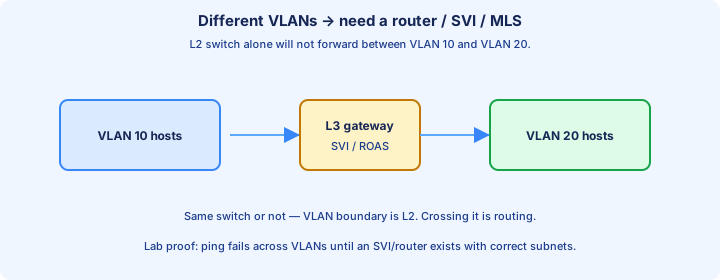
Exam trap: two VLANs sharing one subnet still cannot ARP. Crossing VLANs needs a router or multilayer switch.
Access ports
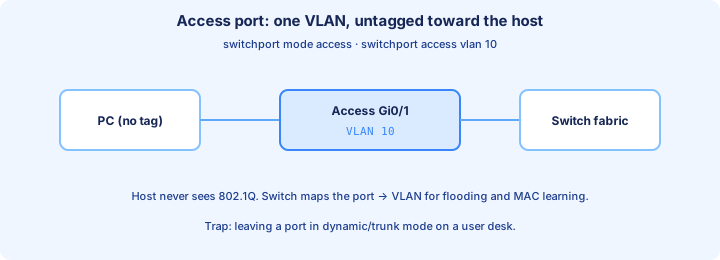
An access port belongs to one data VLAN and sends untagged frames to the host. The PC never sees 802.1Q. The switch maps the port into that VLAN for MAC learning and flooding. The lines are `switchport mode access` and `switchport access vlan 10`.
The factory access VLAN is VLAN 1, so a new switch is one flat broadcast domain. Move the port when you address the host. The host IP, mask, and gateway must sit in that VLAN’s subnet, or the ping fails at Layer 3 while the VLAN looks fine.
Learning is per VLAN. `show mac address-table` has a VLAN column; a MAC on Gi0/2 in VLAN 10 is not a VLAN 20 entry. A full-duplex access port is its own collision domain. It shares a broadcast domain only with the same VLAN.
Exam trap: dynamic auto on a desk port can negotiate a trunk. Lock user ports with `switchport mode access`.
Trunk ports
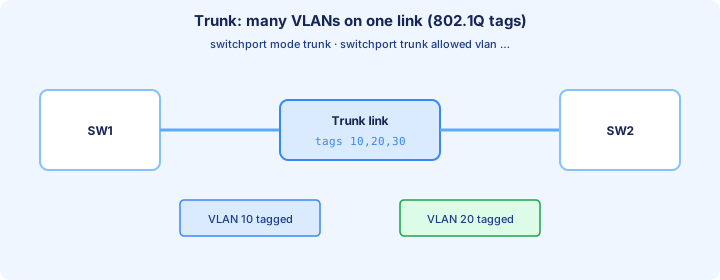
A trunk carries many VLANs on one link by tagging with 802.1Q. Switch uplinks and router-on-a-stick links are trunks. Hosts stay on access ports. One cable, many broadcast domains, each identified by a VLAN ID in the tag.
Set both ends: `switchport mode trunk`. If the platform still accepts ISL, add `switchport trunk encapsulation dot1q` first. Many access switches are 802.1Q-only and hide that command. Then set the native VLAN and the allowed list before you call the link done.
The far access port strips the tag. Both switches must allow the same IDs. A trunk can be up/up and still black-hole VLAN 20 when one allowed list omits 20. `show interfaces trunk` is the check, not link lights.
Exam trap: two access ports never form a trunk. Confirm Operational Mode with `show interfaces switchport`.
Native VLAN
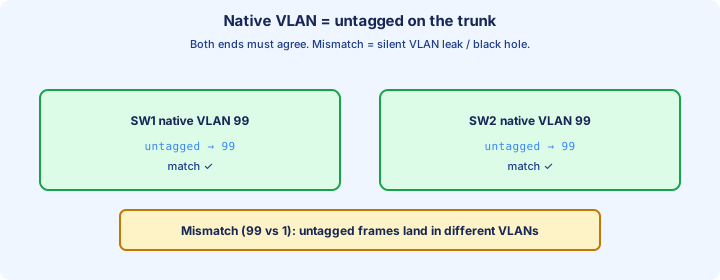
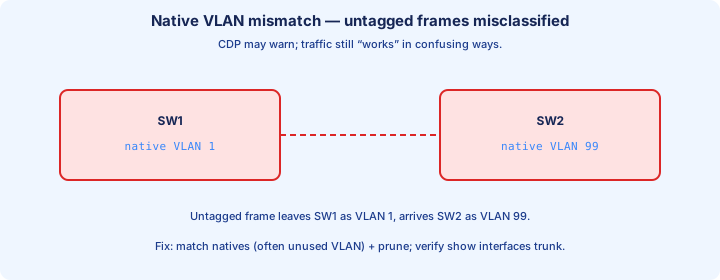
The native VLAN crosses an 802.1Q trunk untagged. The default on both ends is VLAN 1. Move it with `switchport trunk native vlan 99`. The two switches must match. If they do not, each side files the same untagged frame under a different VLAN.
CDP logs `%CDP-4-NATIVE_VLAN_MISMATCH` when it is on. Tagged VLANs can keep working, so the fault looks intermittent. Use an unused native (99 or 999) with no access ports and no user subnet, and include that ID in the allowed list.
Confirm with `show interfaces trunk` and compare the native column on both ends before you touch host masks. Day 17 covers the security side. Today’s habit is an empty native and identical config on the two ends of every trunk.
Exam trap: the native VLAN rides untagged, and it is not VLAN 0. Only 802.1Q has a native VLAN.
VLAN database
A VLAN exists when it is in the VLAN database. In config mode: `vlan 10` then `name USERS`. `show vlan brief` should show 10 active before you trust the port. `no vlan 10` deletes it, and ports still assigned to 10 go inactive.
Normal-range VLANs (1–1005) on a VTP server or client live in vlan.dat in flash, not only in startup-config. `erase startup-config` does not wipe VLANs or the VTP revision. A clean rebuild also needs `delete flash:vlan.dat` and a reload. Check the filename before you confirm.
Prefer config-mode `vlan` / `name` over the legacy `vlan database` mode. Extended IDs 1006–4094 wait until Day 17: VTP v1/v2 creates them only in transparent mode (v3 can advertise them), and they are stored in the running config.
Exam trap: startup-config does not restore VLANs when vlan.dat is empty. Those access ports stay inactive.
show vlan brief
`show vlan brief` is the first VLAN command. Columns are VLAN, Name, Status, Ports. You want your ID, your name, status active, and the right access ports. VLAN 1 and 1002–1005 are factory rows. act/unsup on 1002–1005 means those legacy VLANs are unused on Ethernet.
Trunk ports do not appear in the Ports column. Gi0/1 absent from every row is correct when Gi0/1 is a trunk. Prove it with `show interfaces trunk`. An access port missing from VLAN 10 is in another VLAN, down, or inactive because the VLAN was deleted. `show interfaces status` shows that inactive state.
A VLAN whose only members are trunks has an empty Ports column. That is normal. An empty column on a VLAN you filled with PCs means the access commands never landed. Re-read `show running-config interface` for one of those ports.
Exam trap: `show vlan brief` does not prove a trunk allows VLAN 10. Read the allowed list in `show interfaces trunk`.
switchport access
Memorize the access stanza. `interface GigabitEthernet0/2`, then `switchport mode access`, `switchport access vlan 10`, `description PC-A users`, `no shutdown`. Mode locks access. The VLAN line picks the broadcast domain. The description should name the VLAN and the host.
On a VTP server or transparent switch, a new access VLAN ID is often created for you. Still run `show vlan brief`. If VLAN 10 is deleted later, Gi0/2 keeps the interface command and stops forwarding until you recreate the VLAN or move the port.
`interface range GigabitEthernet0/2 - 12` paints one access VLAN across desk ports. IOS usually wants spaces around the hyphen. Spot-check `show running-config interface gi0/2` so a range typo did not hit the uplink.
Exam trap: `switchport access vlan 10` does not turn a trunk into an access port. Set `switchport mode access` too.
switchport trunk
A trunk you can defend: `interface GigabitEthernet0/1`, `switchport mode trunk`, `switchport trunk native vlan 99`, `switchport trunk allowed vlan 10,20,99`, `description Trunk to SW2 Gi0/1`, `no shutdown`. Mode is static, native is explicit, and the native ID is in the allowed list.
Where ISL is still in the CLI, `switchport trunk encapsulation dot1q` comes before `switchport mode trunk`. Skip it on 802.1Q-only switches. DTP keeps speaking on a static trunk until `switchport nonegotiate` (Day 19). This lab only needs static trunk mode on both ends.
The link fails when the neighbor is access, or when both sides remain dynamic auto. Two autos do not trunk, and dynamic auto is the default on many Catalyst switches. `show interfaces gi0/1 switchport` must say Operational Mode: trunk on each side.
Exam trap: up/up is only the link. VLAN 10 crosses when both ends trunk, both have the VLAN, and both allow it.
Allowed VLAN list
A new trunk allows 1–4094. Every VLAN’s broadcasts may cross. Tighten with `switchport trunk allowed vlan 10,20,99`. The VLAN can still exist on the switch; it simply does not ride this link.
That command replaces the list. `switchport trunk allowed vlan 30` leaves only 30. Append with `switchport trunk allowed vlan add 30`, and drop one ID with `switchport trunk allowed vlan remove 20`. `all`, `none`, and `except` exist; `add` and `remove` are the safe edits.
`show interfaces trunk` prints Vlans allowed on trunk and Vlans allowed and active in management domain. Missing from the first line means the list never got it, or a later command replaced it. Allowed but not active means this switch has no such VLAN.
Exam trap: a bare `allowed vlan` list replaces the old one. Removing the native VLAN also drops untagged frames.
Broadcast domains per VLAN
Each VLAN is one broadcast domain, stretched across trunks that allow it. An ARP in VLAN 10 floods VLAN 10 access ports and those trunks only. Unknown unicasts obey the same boundary. Day 5’s flood rule now carries a VLAN ID.
A collision domain is separate. Each full-duplex port is its own collision domain even inside a large VLAN. “A VLAN is a collision domain” mixes hub-day language with this chapter. Say broadcast domain for the VLAN.
The MAC table key is VLAN plus MAC. PVST+, when you reach it, runs a spanning tree per VLAN, so a VLAN 10 loop is not automatically a VLAN 20 topology. That split is why VLANs exist.
Exam trap: a healthy trunk does not merge VLANs into one broadcast domain. Floods stay inside each VLAN ID.
Inter-VLAN need for L3
Different VLANs do not ARP for each other. A VLAN 10 PC aimed at 192.168.10.70 is off-subnet under a /26, so it ARPs for the default gateway and frames the packet to the gateway MAC. Destination IP stays the far host. Routing builds a new frame on the way out.
The gateway is an SVI, a router-on-a-stick subinterface, or a physical router port in that VLAN. Day 18 builds the first two. Today’s correct score is same-VLAN ping across the trunk working, and cross-VLAN ping failing until each subnet has a Layer 3 address.
Keep the masks: VLAN 10 gateway 192.168.10.1/26, VLAN 20 gateway 192.168.10.65/27. One VLAN must not hold both subnets, and the two blocks must not overlap or the router’s connected routes lie.
Exam trap: crossing VLANs is routing. Each subnet needs a gateway, and a multilayer switch needs `ip routing`.
Common VLAN mistakes
Most outages are dull. The port is still in VLAN 1 while the PC is numbered for VLAN 10. The allowed list was replaced instead of `add`. Native is 99 on one side and 1 on the other. VLAN 10 exists on SW-A and was never created on SW-B.
Host errors wear a VLAN costume: wrong mask, wrong gateway, or a gateway that lives in the other VLAN. Ping a same-VLAN neighbor first. If that works and the gateway ARP fails, fix the host or the gateway address before you rebuild the trunk.
An uplink shutdown, or one end still dynamic auto, looks like “VLAN 10 is dead everywhere.” Read `show interfaces status` and operational mode before you touch vlan.dat. Deleting a VLAN takes every access port in it inactive.
Exam trap: `erase startup-config` leaves vlan.dat behind. Deleting vlan.dat leaves those access ports inactive.
Lab topology
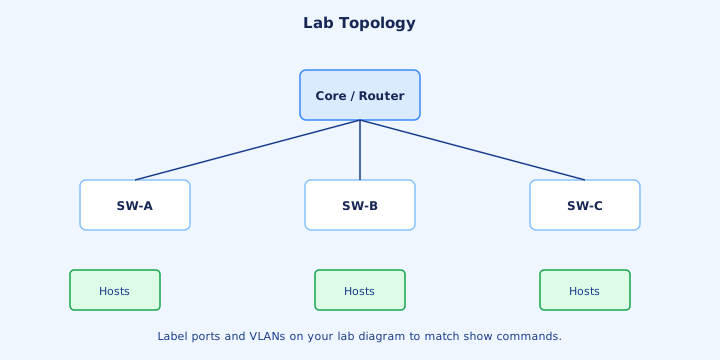
Build the figure: a core on top, SW-A, SW-B, and SW-C below, hosts on each. On every switch, `vlan 10` name `USERS` and `vlan 20` name `STAFF`. Number VLAN 10 from 192.168.10.0/26 and VLAN 20 from 192.168.10.64/27.
Trunk each uplink both ways: `switchport mode trunk`, `switchport trunk native vlan 99`, `switchport trunk allowed vlan 10,20,99`. Access ports get `switchport mode access` and `switchport access vlan 10` or `20`. Leave routing off. This lab proves Layer 2.
Pass: a VLAN 10 host on SW-A pings a VLAN 10 host on SW-C, and does not ping VLAN 20. That cross-VLAN failure means the flood domains are real. Predict `show mac address-table dynamic` before you open it.
If same-VLAN ping fails across switches, check the VLAN, operational trunks, allow lists, and host subnet before you add a router.
Verification set
Run this in order. `show vlan brief` for name, active, and access ports. `show interfaces status` for up/down and VLAN — inactive means the VLAN is missing. `show interfaces trunk` for encapsulation, native, and allowed VLANs. `show interfaces gi0/1 switchport` when admin mode and operational mode disagree.
`show mac address-table dynamic` should show the VLAN you just pinged. Read it before any clear. A MAC in the wrong VLAN is a bad access port or a bad tag. No MAC after the ping means the frame never arrived.
Ping VLAN 10 across two switches, then VLAN 20, then across VLANs. Cross-VLAN failure next to working same-VLAN pings is the right Day 16 score. `copy running-config startup-config` saves the interfaces; vlan.dat already holds the normal-range VLANs.
Exam trap: a same-switch ping never tests the trunk. Ping a host on another switch so the frame uses the uplink.
From former Day 17
Source material retained from the previous Day 17 chapter for continuity.
Trunk encapsulation
Trunk encapsulation is how several VLANs share one Ethernet link. The CCNA standard is IEEE 802.1Q. Cisco’s legacy method was ISL, which wrapped the whole original frame in a 26-byte header and its own FCS. ISL tagged every VLAN. You will not build ISL in a modern lab, but stems still name it.
802.1Q inserts a 4-byte tag and leaves one VLAN untagged: the native VLAN. That single difference is why native mismatch exists. On a switch that still offers both encapsulations, set `switchport trunk encapsulation dot1q` before `switchport mode trunk`. `negotiate` let DTP pick; do not leave that choice to the neighbor.
Many Catalyst access switches are 802.1Q-only, so the encapsulation command is missing and dot1q is already the answer. Both ends of a trunk must use the same encapsulation. A dot1q neighbor and an ISL neighbor never form a forwarding trunk.
Exam trap: ISL does not have a native VLAN. Only 802.1Q sends one VLAN untagged. If the command is rejected, the platform is already dot1q.
802.1Q tags
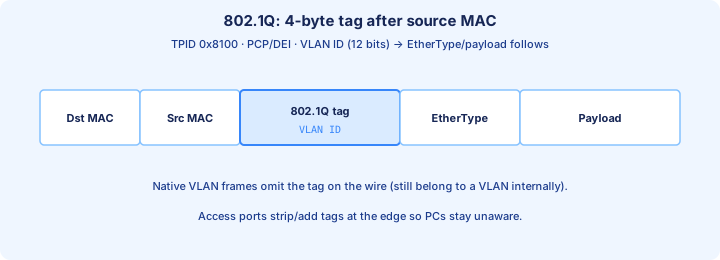
The 802.1Q tag sits after the source MAC and before the original EtherType. The first two bytes are the TPID `0x8100`, meaning a tag follows. The next two are the TCI: 3-bit PCP (Class of Service), 1-bit DEI, and 12-bit VID, the VLAN ID.
Twelve bits number 0–4095. 0 and 4095 are reserved, so usable IDs are 1–4094. The trunk switch files the frame under that VID. The access port toward the PC removes the tag, so the host still sees a normal untagged frame and a normal EtherType.
Four extra bytes can make a max-size frame 1522 bytes on the wire. Trunks must accept that baby giant, and the FCS is recomputed because the frame changed. A SPAN of the trunk shows the tag in Wireshark; a capture on the PC NIC usually does not.
Exam trap: the tag is not in front of the destination MAC, and `0x8100` is the TPID, not the VLAN number. Order is destination, source, tag, then the original type.
DTP preview
DTP (Dynamic Trunking Protocol) lets two Cisco switches decide whether a link becomes a trunk. Administrative modes are access, trunk, dynamic auto, and dynamic desirable. Many Catalyst switches default to dynamic auto. Operational mode is what forwards frames; the default is only a wish.
Learn the pairs. Auto + auto = access. Desirable + auto, desirable + desirable, trunk + auto, and trunk + desirable all become trunks. Access opposite another access or a dynamic mode stays access. Access opposite a hard-coded trunk is a mismatch: one side tags, the other does not.
`show interfaces gi0/1 switchport` shows Administrative Mode and Operational Mode. Two new switches cabled together often stay access, and then “VLANs do not cross.” A user port left dynamic will trunk if the neighbor is desirable or already a trunk. Day 19 turns this into a hardening lab.
Exam trap: two dynamic auto ends do not trunk. Trunk plus auto does. Read operational mode before you rewrite the VLAN database.
Pruning ideas
Pruning means “do not flood this VLAN on this trunk.” The manual tool is the allowed VLAN list. If SW-C has no VLAN 20 users, the uplink toward SW-C does not need VLAN 20 broadcasts: `switchport trunk allowed vlan 10,99`. The VLAN still exists. It just does not ride that cable.
VTP pruning, finished on Day 19, tries to automate that. Switches advertise which VLANs they need, and flooded traffic for the others is pruned. VLAN 1 is not VTP-pruned. Pruning never deletes a VLAN. Your manual list still wins: if you omit VLAN 10, VTP cannot put it back.
`show interfaces trunk` separates three lines: allowed, allowed and active, and forwarding and not pruned. A VLAN on the first line and missing from the third may be pruned or sitting in a spanning-tree state that is not forwarding. Read the line that matches the symptom.
Exam trap: pruning the VLAN that is only a transit path. Local `show vlan brief` still looks healthy while far hosts go quiet. Prune where you know there are no downstream members.
Voice VLAN intro
An IP phone often shares a jack with a PC. The phone bridges the PC and tags its own packets. Configure an access VLAN for data and a voice VLAN for the phone, and leave the operational mode as access:
`switchport mode access`, then `switchport access vlan 10`, then `switchport voice vlan 20`. The PC sends untagged frames into VLAN 10. The phone sends 802.1Q frames in VLAN 20. CDP, on by default, tells a Cisco phone which voice VLAN to use. `show interfaces switchport` lists Voice VLAN: 20.
Give voice its own subnet and gateway. This is not `switchport mode trunk`, and it is not permission to allow every VLAN on a desk. QoS marking comes later; today the port just carries one untagged data VLAN and one tagged voice VLAN.
Exam trap: turning every phone port into a full trunk. That exposes the allowed list on a wall jack. `switchport voice vlan` is the narrow command that adds one tagged VLAN.
Extended VLANs
Normal-range VLANs are 1–1005, and 1002–1005 stay reserved. Extended VLANs are 1006–4094, which is why the 12-bit VID tops out at 4094. Large campuses use them so they are not stuck near a thousand IDs. Hosts and trunks treat an extended ID like any other VLAN once it exists.
On VTP version 1 or 2, server and client modes cannot create extended VLANs. Set `vtp mode transparent` (or use VTP version 3, which can advertise them) and then `vlan 2000` / `name EDGE`. Extended VLANs are stored in the running-config, not only in vlan.dat, so they show up in `show running-config` and `show vlan brief`.
Every switch that must carry VLAN 2000 has to be able to hold it. A v1/v2 client in the path will not learn 2000 from a server. If you standardize on extended IDs, transparent or version 3 is part of the design, not an afterthought on one closet switch.
Exam trap: `vlan 2000` on a default VTP server is rejected or useless. Check `show vtp status` before you pick an ID above 1005.
VTP transparent preview
VTP transparent means this switch does not install VLAN changes from advertisements and does not push its own VLAN list into the domain. You create VLANs locally and they stay local. `vtp mode transparent` is also the v1/v2 door to extended VLANs, and the safe mode before a lab switch is cabled into anything that speaks VTP.
Version 2 transparent switches forward VTP ads so servers and clients elsewhere still hear each other. Version 1 transparent forwards only when domain and version match. The configuration revision stays 0, which matters when Day 19 explains how a higher revision overwrites a domain. Transparent is not “no trunks.”
Client mode is the one people confuse with transparent. A client rejects local `vlan` commands and accepts the domain list. Transparent keeps its own database. `vtp mode off`, on IOS that has it, neither originates nor forwards ads. A one-switch lab is safe in transparent or off; the factory default is server.
Exam trap: “transparent synchronizes but cannot create VLANs.” That sentence describes client. Transparent creates locally and does not take the domain’s list.
show interfaces trunk
`show interfaces trunk` is the trunk table. For each port read mode, encapsulation, status, and native vlan, then the VLAN lists. A port missing from this output is not operationally trunking, whatever `switchport mode trunk` says in the config.
The lists are layered. Vlans allowed on trunk is your list, or 1–4094 if you never set one. Vlans allowed and active in management domain drops IDs missing from this switch’s database. Vlans in spanning tree forwarding state and not pruned drops IDs that STP is not forwarding or that pruning removed.
Compare both ends in one pass: native 99 vs 1, allowed 10,20 vs ALL, encapsulation dot1q vs isl. Pair with `show interfaces gi0/1 switchport` when you need administrative mode beside operational mode. A VLAN can be allowed and still absent from the forwarding line.
Exam trap: “allowed” is not “forwarding.” Read the not pruned line before you blame the PC. A port absent from this command is access or down.
Mismatch native VLAN
When native VLANs differ, untagged frames land in different VLANs on each side. SW-A files them in 99; SW-B files them in 1. Tagged VLAN 10 can keep working, which is why the ticket says “some traffic, not all.” CDP reports `%CDP-4-NATIVE_VLAN_MISMATCH` with both interface names and both VLAN IDs.
The leak joins two broadcast domains for anything untagged: CDP, spanning tree on the native VLAN, and any user data you left there. It is also the condition double-tagging abuses. The native VLAN should have no access ports.
Fix both ends with `switchport trunk native vlan 99`, keep 99 in both allowed lists, and re-check `show interfaces trunk`. Wait until the syslog stops. Turning CDP off hides the message and leaves the mismatch in place.
Exam trap: a native mismatch does not kill every tagged VLAN. VLAN 10 can pass while the untagged VLAN is wrong. Use that split to find the fault.
Blackhole risks
A VLAN black hole means frames enter the VLAN and never arrive, with no ICMP, because they never became a routed packet. Usual causes: the VLAN is missing on a transit switch, the allowed list omits it, the native mismatch ate untagged traffic, STP is not forwarding, or DTP never formed a trunk so only one VLAN is crossing as access.
Walk the path. `show vlan brief` on the middle switch must list the VLAN. `show interfaces trunk` on both ends of each hop must allow it and show it forwarding. After a ping, `show mac address-table vlan 10` should learn the far host. No MAC means the frame did not arrive in that VLAN.
Asymmetric lists are a quiet hole: SW-A allows 10 toward SW-B, and SW-B does not allow 10 back. One direction of ARP dies. Both ends of a CCNA lab link get the same list. The access switches can look perfect while the core drops the tag.
Exam trap: VLAN 10 active on the two edge switches does not prove the core has VLAN 10. Create it on every switch the trunk crosses.
Design rules
Rules you can check with show commands: one VLAN, one subnet, one gateway, and the same VLAN ID campus-wide. VLAN 10 is USERS on every floor, not printers at HQ. Name every VLAN. Keep VLAN 1 off users and, when you can, off management.
Trunks are explicit on both ends: `switchport mode trunk`, an unused native VLAN, an allowed list of only the VLANs that must cross, and a description that names the neighbor port. Access ports are explicit too: mode access, one data VLAN, and a voice VLAN only on phone jacks.
Do not span a VLAN everywhere “just in case.” Every extra switch is another flood member and another STP voter. If two hosts only need to meet at Layer 3, route between them. Keep the management VLAN small and written down.
Exam trap: different VLAN IDs for the same subnet, then a trunk between them. That is two broadcast domains sharing one IP plan. IDs and subnets stay paired everywhere the VLAN exists.
Security of trunks
A trunk is a high-privilege port: it can carry every allowed VLAN. Two exam attacks sit on that. Switch spoofing: if DTP is willing, a host can negotiate a trunk and receive tagged VLANs. Double tagging: a frame with two 802.1Q tags can be steered into a second VLAN when the outer tag matches the native VLAN and is stripped on the first trunk.
The defense is the config you already know how to type. User ports: `switchport mode access` and, on Day 19, `switchport nonegotiate`. No user port stays dynamic. Trunks: static mode, an unused native with no access ports, a tight allowed list, and matching `switchport trunk native vlan`. Where the image supports it, `vlan dot1q tag native` tags the native VLAN too.
Do not trunk a conference-room jack for convenience. Shut unused ports. The allowed list is both a traffic control and a blast-radius control. Management does not need to ride every closet uplink if those closets have no management host.
Exam trap: setting the native VLAN to the same ID as the user access VLAN. That is the condition double tagging needs. The native VLAN stays empty of users.
Cut sheet documentation
A cut sheet is the table you can diff against the CLI. Columns: switch, interface, mode, access VLAN, voice VLAN, native VLAN, allowed VLANs, neighbor device and port, description. If it is not on the sheet, it does not get typed during the change.
Put the same facts on the interface: `description TRUNK to SW-B Gi0/1 native 99 allow 10,20,99`. `show interfaces description` then answers “what is this cable?” before you open the full running config. Update the sheet in the same change as the allowed list. A stale sheet is how someone “adds” VLAN 30 and replaces the list.
For SW-A, SW-B, and SW-C, the sheet shows uplinks to the core, host ports in 10 or 20, and native 99 with no hosts. When a ping fails, compare `show interfaces trunk` to the sheet instead of reconstructing the design from memory.
Exam trap: writing only VLAN IDs and skipping native per trunk. Native is a per-link setting. Your standard should make every trunk in the lab use the same unused native.
Troubleshoot flowchart
Stop at the first miss. Link: `show interfaces status` is up/up, speed and duplex match, and the port is not err-disabled. Mode: `show interfaces switchport` operational access or trunk matches the sheet. VLAN exists here: `show vlan brief`. Access VLAN matches the host subnet. Trunk: native matches the neighbor, and the VLAN is allowed, active, and forwarding.
Then the host: IP, mask, and gateway in that VLAN’s subnet. Ping a same-VLAN host on the other switch before you ping across VLANs. MAC: `show mac address-table vlan 10` shows the source after traffic. No MAC means the frame never arrived, or it arrived under another VLAN ID.
Same-switch success and cross-switch failure points at the trunk path: operational mode, allowed list, missing VLAN on the transit switch, or native mismatch. Total failure inside one VLAN points at access ports or the database. Change one thing, rerun the set, then save.
Exam trap: clearing the MAC table or reloading as the first move. That destroys evidence. Read status, switchport, vlan brief, and trunk output before you reload.
Key ideas
- Merged VLAN Parts 1–2.
- Unknown unicast, broadcast, and ARP stay inside the ingress VLAN. The same IP subnet on two VLANs does not merge those floods.
- switchport mode access and switchport access vlan 30 classify untagged frames as VLAN 30. The PC does not send a tag.
- 802.1Q inserts a 4-byte tag. The native VLAN is sent untagged, and the receiver classifies it with its own native VLAN.
- switchport trunk allowed vlan 10 replaces the list. add, remove, except, all, and none are the keywords that change it on purpose.
- show vlan brief lists access ports. A trunk port shows up in show interfaces trunk, not in that ports column.
- Deleting startup-config leaves vlan.dat in place, so the VLAN database can survive a configuration wipe.
- Hosts in two VLANs do not ping each other until a router or a multilayer switch routes between them, and the subnets must not overlap.
Self-check
- Broadcast domains per VLAN: PC1 in VLAN 10 ARPs for PC2 in VLAN 20 on the same switch. Where is the ARP flooded?
- switchport access: which two interface commands place untagged frames from a PC into VLAN 30?
- Native VLAN: SW1 native is 10 and SW2 native is 20. Which VLAN does SW2 assign to SW1's untagged frames?
- Allowed VLAN list: the trunk allowed 10, 20, and 30, then someone entered switchport trunk allowed vlan 10. What is allowed now, and which keyword adds 20 back?
- show vlan brief: why is an up trunk missing from the ports column, and which command shows it?
- Inter-VLAN need for L3: both VLANs exist on one switch and each host is in its own /24. Why does the ping between them fail?