Day 13
Multilayer Switching & SVIs
multilayer-switching-svis
At a glance
Day 18 is how packets move between VLANs. An SVI is the gateway for every host in a VLAN, and its line protocol stays down until some port in that VLAN is up. ip routing makes the multilayer switch forward between SVIs, no switchport makes one physical port a routed link, and router-on-a-stick uses a subinterface per VLAN on a single trunk. Maps to CCNA v2.0 objective(s) 2.1.d, 2.1.a.
Deep chapter
Long-form companion reading (original prose).
Multilayer switch role
A multilayer switch (MLS) forwards frames at Layer 2 and packets at Layer 3 in one chassis. Inter-VLAN routing that used to hairpin through an external router can stay on the switch and run at hardware speed. In the classic campus, that role sits at the distribution layer, with access switches trunking up.
Creating an SVI is not enough. On many Catalyst platforms `ip routing` is off by default, so the switch will not forward between VLAN subnets even though `show ip interface brief` lists the addresses. Enable it in global config, then confirm connected routes with `show ip route`. A pure Layer 2 switch has neither command nor SVIs that route.
Inside a VLAN, the MLS still bridges: it learns MACs and does not decrement TTL. Between VLANs it routes: it rewrites the frame and decrements TTL. Hosts keep using the SVI address as their default gateway. They do not learn a new gateway when you move routing off an external router onto the switch.
Exam trap: an MLS “bridges all VLANs together.” It routes between them only after each VLAN has a Layer 3 address and `ip routing` is enabled.
SVI basics
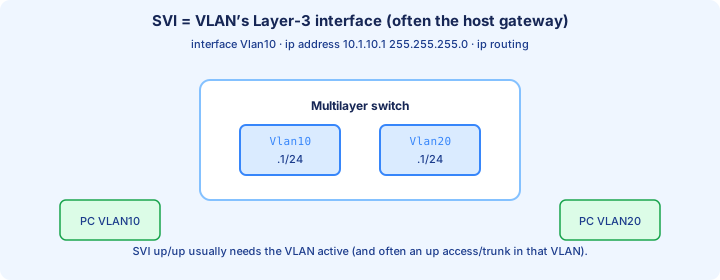
A switched virtual interface is the Layer 3 interface for a VLAN. It is the gateway address hosts ARP for. Create the VLAN first, then the SVI:
`interface vlan 10`, `ip address 192.168.10.1 255.255.255.192`, `no shutdown`. VLAN 20 gets `interface vlan 20` and `ip address 192.168.10.65 255.255.255.224`. The mask must match the hosts. One SVI per VLAN is the normal design; a second address on the same SVI is a secondary, not a second VLAN.
Line protocol tracks the VLAN. The SVI stays up/down when the VLAN does not exist or when no port in that VLAN is up and forwarding. up/up needs the VLAN in the database, at least one active member (access port or a trunk that allows it), and `no shutdown`. `show ip interface brief` is the quick state check.
Exam trap: `interface vlan 10` does not create a working gateway by itself. The VLAN must exist, a port must be forwarding in it, and the SVI must be no shutdown.
no switchport
`no switchport` turns a switch interface into a routed port. It leaves every VLAN. You then address it like a router interface. This is the point-to-point uplink between Layer 3 devices, not a place you hang PCs.
`interface GigabitEthernet0/1`, `no switchport`, `ip address 10.1.1.1 255.255.255.252`, `no shutdown`. The /30 (or /31) matches Day 15’s link blocks. There is no `switchport access vlan` and no trunk allowed list on this port. `show vlan brief` will not list it.
Layer 2-only switches reject `no switchport`. You need an MLS image and platform (a 2960-class switch will not grow routed ports). After the command, `show interfaces gi0/1 switchport` reports Switchport: Disabled. `show ip interface brief` shows the address and line status.
Exam trap: `no switchport` is the command that makes a physical port routed. `switchport mode trunk` is the opposite direction. You cannot combine them on one interface.
Routed port vs SVI
An SVI is one gateway IP for many hosts in a VLAN. The physical ports stay access or trunk members. The SVI goes up/down if every member port is down, because autostate tracks the VLAN. Hosts share that broadcast domain on purpose.
A routed port is one subnet on one physical link and belongs to no VLAN. It goes down when that cable goes down. Use it for switch-to-router or switch-to-switch Layer 3 links where you do not want STP or a stretched VLAN. Both kinds show up as connected routes.
Do not put the SVI subnet on a routed port, and do not leave a port in VLAN 10 while also trying to route on it. Pick. Access and voice ports stay switchports. Uplinks that are pure transit become routed ports or become trunks into an SVI on a different device.
Exam trap: “`interface vlan 10` makes Gi0/1 routed.” It does not. Gi0/1 becomes routed only with `no switchport`. The SVI is a virtual interface named Vlan10.
Inter-VLAN routing paths
On an MLS the path stays inside the chassis. A VLAN 10 host ARPs for the VLAN 10 SVI MAC and sends the packet with destination IP still equal to the VLAN 20 host. The switch routes, decrements TTL, and builds a new frame out the VLAN 20 port with the destination host’s MAC. Source and destination IP do not become the SVI addresses.
Three classic builds do that job. Router-on-a-stick: one trunk, router subinterfaces. SVI: `interface vlan` on the MLS. Legacy: a separate router interface per VLAN, which wastes ports. Hosts always target their own gateway; they never ARP across the VLAN boundary.
Same-VLAN traffic must not hit the router. If two VLAN 10 hosts bounce off the SVI, their masks are wrong or someone pointed them at a gateway for a local peer. Watch TTL in a capture: switched frames keep TTL; routed inter-VLAN packets lose one.
Exam trap: the destination IP is rewritten to the next-hop at each router. It stays the far host. Only the Layer 2 header is rebuilt, which is the Day 12 rule applied to SVIs.
show ip route on MLS
After the SVIs are up, `show ip route` should list a connected route per VLAN subnet. VLAN 10 appears as `C 192.168.10.0/26` on Vlan10. VLAN 20 appears as `C 192.168.10.64/27` on Vlan20. Newer IOS also shows an L local /32 for each SVI address. Packet Tracer sometimes prints only the C routes.
A missing C route means the SVI is not up/up or `ip routing` is off. `show ip interface brief` distinguishes administratively down from up/down. `show ip route connected` filters the noise. The gateway of last resort is still a default route you add on purpose; connected subnets do not create one.
Ping from the switch: `ping 192.168.10.10` sources from the SVI when that subnet owns the route. Then ping host to host across VLANs. If the switch can ping both hosts and the hosts cannot ping each other, check host masks and whether they use the SVI as gateway.
Exam trap: connected routes alone do not prove `ip routing` is forwarding between them on every platform. If inter-VLAN pings fail while both SVIs are up/up, check that `ip routing` is in the running config.
CEF glance
CEF (Cisco Express Forwarding) is how a modern IOS router or MLS actually forwards. The routing table is the control-plane source. CEF builds a FIB (forwarding information base) of prefixes and an adjacency table of Layer 2 rewrites: next-hop IP to MAC and outbound interface.
You rarely turn CEF on; it is the default. `show ip cef` shows the prefixes the data plane will use. `show adjacency` shows the rewrite. After you change an SVI address or a static route, those tables update from the RIB. A host ARP entry becoming an adjacency is why the second ping is the clean one.
Packets that cannot be CEF-switched are punted to the CPU: expired TTL, some IP options, packets that need process-level features. That is a trickle, not the path for ordinary inter-VLAN traffic. If every packet were process-switched, the MLS would stop being a hardware router.
Exam trap: CEF replaces the routing table. It is built from the routing table. `show ip route` still tells you which prefix wins; `show ip cef` tells you the forwarding copy.
Hardware vs process switching
Process switching walks the CPU for every packet: find the route, ARP if needed, build the frame. It is the slow path and the one you can imagine step by step. Fast switching was a route cache on older IOS. CEF precomputes the FIB so the data plane does not ask the CPU per packet.
On an MLS, ordinary inter-VLAN packets are hardware-CEF switched. The CPU still handles control traffic: routing protocols, STP, ARP for the SVIs, SSH. A broadcast storm still hurts, because flooded frames are a Layer 2 problem CEF does not filter. `show processes cpu` spiking during “simple” pings is a hint you are punting or bridging a storm.
You do not pick the switching path in a CCNA lab command-by-command. You recognize the names and the symptom. Disabling CEF (`no ip cef` where the command exists) is a troubleshooting experiment, not a design. Turn it back on.
Exam trap: “multilayer switches process-switch every inter-VLAN packet.” They hardware-forward with CEF. Process switching is the exception path, not the campus plan.
Design: distribution layer
Classic three-tier design keeps access switches at Layer 2. They trunk VLANs up to a distribution MLS, and the SVIs — the gateways — live there. The core is routed transit between distribution blocks and does not host user VLANs. Hosts default-gateway to the distribution SVI, not to the core.
That puts one broadcast domain per VLAN across the access closets that trunk it, and one routing hop between VLANs. Later, FHRP (HSRP or VRRP) puts a virtual gateway IP on a pair of distribution SVIs so one switch can die. Today, one distribution SVI per VLAN is enough to see the path.
Routed access is the other pattern: `no switchport` uplinks, no VLAN stretched to the distribution, a small routing domain per closet. Fewer STP surprises, more subnets. CCNA still expects you to draw the classic trunk-up, SVI-at-distribution picture and to say when a routed uplink is the better cut.
Exam trap: putting every user VLAN SVI on the core “because it is the most powerful box.” Gateways belong where the VLANs terminate. The core should route between distribution blocks, not ARP for every PC.
Troubleshooting SVI down
`show ip interface brief` tells you which down you have. administratively down means the SVI is shutdown: `interface vlan 10` then `no shutdown`. up/down means the VLAN has no line protocol. Create the VLAN, or bring up a member port, before you renumber the address.
Check `show vlan brief` for the ID and `show interfaces status` for an access port that is up in that VLAN. A trunk counts as a member only when it allows the VLAN and is forwarding it. Wrong mask on the SVI does not make the line down; it makes hosts fail. Compare the SVI mask to the host mask digit by digit.
Autostate is why the last port in the VLAN dropping takes the SVI down. `no autostate` under `interface vlan` can force the SVI up with no members. That is a special case, not the lab default. If the SVI is up/up and pings still fail, move on to the host gateway and `ip routing`.
Exam trap: a shutdown access port is not why the SVI is administratively down. Admin down is `shutdown` on the SVI itself. No active members makes it up/down.
VLAN not up/up
When Vlan10 is not up/up, walk a short list. The VLAN is missing from `show vlan brief`. Every access port in it is down or inactive. The only trunks that carry it have VLAN 10 removed from the allowed list. STP is not forwarding any port in that VLAN, so autostate still sees no member. The SVI itself is shutdown.
`show spanning-tree vlan 10` shows whether any port is forwarding. `show interfaces trunk` shows whether VLAN 10 is in the forwarding-and-not-pruned line. `show vlan brief` shows whether the ID exists. Fix the first miss and recheck `show ip interface brief` before you add static routes.
A VLAN that exists only on one access switch will not bring up an SVI on the distribution switch. Create VLAN 10 where the SVI lives, and allow it on the trunk. Then a host link coming up is enough for line protocol.
Exam trap: the SVI name Vlan10 in `show ip interface brief` does not mean VLAN 10 exists in the database. The interface can be configured while `show vlan brief` has no row 10, and the line stays down.
Lab: router-on-a-stick vs MLS
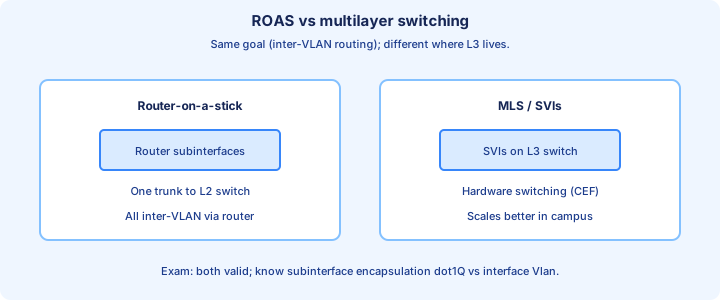
Build both pictures against the same subnets so the only change is where Layer 3 sits. Router-on-a-stick: on the switch, trunk the link to the router and allow 10 and 20. On the router, `interface g0/0` with `no shutdown` and no IP, then subinterfaces.
`interface g0/0.10` with `encapsulation dot1Q 10` and `ip address 192.168.10.1 255.255.255.192`. `interface g0/0.20` with `encapsulation dot1Q 20` and `ip address 192.168.10.65 255.255.255.224`. Hosts gateway to those addresses. If a subinterface rides the native VLAN, the keyword is `encapsulation dot1Q 99 native`.
MLS: `ip routing`, `vlan 10`, `vlan 20`, then `interface vlan 10` and `interface vlan 20` with the same two addresses. Access ports go in 10 or 20. No router subinterfaces. Pass criteria are the same: cross-VLAN ping works, `show ip route` shows both connected subnets, and a same-VLAN ping does not need the router.
Exam trap: the physical router interface needs `no shutdown`, and the subinterface encapsulation number must equal the VLAN ID. Encapsulation 10 on VLAN 20 is a silent black hole with an up/up subinterface.
When to use each
Use router-on-a-stick when the only Layer 3 device is a router, the site is small, and a few VLANs fit on one trunk. The trunk and the router CPU are the bottleneck. Every inter-VLAN packet crosses that link twice, up and back.
Use SVIs on an MLS when many VLANs and many hosts need wire-speed routing inside the campus. The gateway sits on the distribution switch, and access switches only trunk. This is the default mental model for CCNA campus questions.
Use a routed port for point-to-point links between Layer 3 devices: distribution to core, or a WAN handoff. You gain a small subnet, no STP on that link, and no stretched broadcast domain. A dedicated router interface per VLAN is legacy; it works and it wastes hardware.
Exam trap: choosing ROAS for a large campus because “the router is the gateway.” The trunk becomes the choke point. Choose the tool that matches scale, then make the host gateway the address you actually configured.
Exam comparison table
Keep one table in your head. Router-on-a-stick: switch port is a trunk; router uses subinterfaces and `encapsulation dot1Q <vlan>`; bottleneck is that trunk; proof is `show ip route` on the router and `show interfaces trunk` on the switch.
SVI: `interface vlan <id>` plus `ip routing` on an MLS; many access ports share the gateway; forwarding is hardware CEF; proof is `show ip interface brief` and `show ip route` showing Vlan interfaces. The SVI is up only while the VLAN has a forwarding member.
Routed port: `no switchport` then an IP address; the port is in no VLAN; `show interfaces switchport` says switchport disabled; the connected route points at the physical interface, not at Vlan10. A /30 or /31 is the usual mask.
Exam trap: mixing the verbs. `encapsulation dot1Q` belongs on a router subinterface. `no switchport` belongs on an MLS physical port. `interface vlan` is the SVI. Using the wrong verb on the wrong box is the question.
Key ideas
- An SVI comes up when the VLAN exists, the VLAN is active, the interface is not shut, and at least one access port or forwarding trunk in that VLAN is up.
- ip routing is off by default on many Layer 3 switches. Hosts can ping their own gateway and still fail to reach the other VLAN.
- no switchport makes a routed port: an IP address on the physical interface, no VLAN, and no spanning tree.
- An SVI is shared by every port in the VLAN. A routed port belongs to one interface, which is the right tool for a /30.
- Router-on-a-stick is a subinterface, encapsulation dot1Q, and an IP in that subnet. The untagged VLAN uses encapsulation dot1Q vlan-id native.
- Once routing is on, an up SVI appears in show ip route as a connected route. You do not static-route that subnet to itself.
- CEF forwards from the FIB and the adjacency table. A packet that cannot be switched in hardware is processed by the CPU.
Self-check
- Troubleshooting SVI down: Vlan20 is up/down, the VLAN exists, and no port in VLAN 20 is up. Why is the line protocol down?
- Inter-VLAN routing paths: both SVIs answer pings inside their own VLAN, and show ip route has no connected subnets. Which command is missing?
- no switchport: write the interface commands for 10.0.0.1/30 on Gi0/2 with no VLAN membership.
- Lab: router-on-a-stick vs MLS: which encapsulation line matches untagged native VLAN 99?
- Routed port vs SVI: why is an SVI the wrong gateway for a single point-to-point /30?
- show ip route on MLS: what route code appears for an up SVI subnet after ip routing is enabled?