Day 14
DTP & VTP
dtp-and-vtp
At a glance
Day 19 is the negotiation you usually turn off. DTP forms a trunk only when at least one side asks, so dynamic auto on both ends stays an access link. VTP trusts the highest revision in the domain, a used server can delete VLANs on every client, and transparent mode keeps local VLANs without installing those advertisements. Maps to CCNA v2.0 objective(s) 2.1.b.
Deep chapter
Long-form companion reading (original prose).
DTP modes
DTP administrative modes are access, trunk, dynamic auto, and dynamic desirable. Access never trunks. Trunk wants to trunk and still sends DTP unless you disable it. Dynamic auto is passive. Dynamic desirable actively asks to trunk. Many current Catalyst switches default to dynamic auto; some older platforms defaulted to dynamic desirable. Trust `show interfaces switchport`, not a memory of one model.
The operational result is a small table. Auto + auto = access. Desirable + auto = trunk. Desirable + desirable = trunk. Trunk + auto = trunk. Trunk + desirable = trunk. Access + auto and access + desirable stay access. Access + trunk is a mismatch: the trunk side encapsulates, the access side does not, and VLAN tags die.
`show interfaces gi0/1 switchport` lists Administrative Mode, Operational Mode, and Negotiation of Trunking. You forward on the operational mode. Two factory switches linked together stay access because auto does not ask. A desirable or static trunk neighbor will pull an auto port into a trunk, including a port you thought was “just a user jack.”
Exam trap: trunk + access does not “meet in the middle.” One side is trunk, the other is access, and the link is not a working multi-VLAN trunk. Also remember auto + auto stays access.
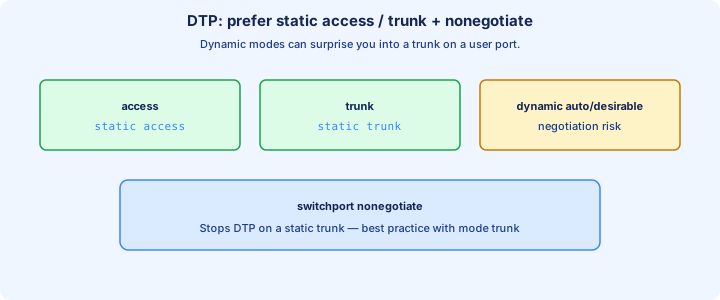
switchport nonegotiate
`switchport nonegotiate` turns DTP off on that port. It is legal only with a static mode: `switchport mode access` or `switchport mode trunk`. Dynamic auto and dynamic desirable reject it, because those modes exist to negotiate. After the command, `show interfaces switchport` shows Negotiation of Trunking: Off.
Use it on every user port and every intentional trunk. The user-port pair is `switchport mode access` plus `switchport nonegotiate`. The uplink pair is `switchport mode trunk` plus `switchport nonegotiate`, then native VLAN and allowed list. The port no longer offers to become the other thing because a neighbor asked.
There is a lab trap inside the hardening step. A static trunk with nonegotiate will not bring up a neighbor that is still dynamic auto, because that neighbor is waiting for a DTP message that will never arrive. Both ends must be static trunk (or you leave DTP on). Access plus nonegotiate simply stays access.
Exam trap: nonegotiate on one side and dynamic auto on the other does not form a trunk. Set both ends to `switchport mode trunk` before you disable DTP.
VTP versions overview
VTP (VLAN Trunking Protocol) advertises VLAN names and IDs inside a domain so you do not type `vlan 10` on every switch. It does not advertise access-port assignments, allowed lists, or IP addresses. Versions on the exam are 1, 2, and 3. Version 1 is the old default. You set the version with `vtp version 2` or `vtp version 3`.
Version 2 adds token-ring support details you can ignore, consistency checks, and a forwarding rule: a v2 transparent switch relays VTP messages even when domain or version would have stopped a v1 transparent switch. v1 and v2 still use server, client, and transparent, and they do not advertise extended VLANs.
Version 3 can carry extended-range VLANs, supports a hidden password, and adds a primary server. Only the primary may originate VLAN changes (`vtp primary`). Other servers hold the database but do not publish edits until promoted. `vtp mode off` drops participation entirely. Not every lab image runs v3; `show vtp status` shows the capable version and the operating version.
Exam trap: changing the version does not by itself create VLANs or fix a domain mismatch. Domain, password, and mode still have to agree before a revision is accepted.
VTP domains
A VTP domain is a name string, case-sensitive, set with `vtp domain CAMPUS`. Switches exchange VLAN databases only when the domain matches and the password’s MD5 matches. Two domains on one campus are two separate VLAN lists, even if a trunk links them. The trunk still carries tags; VTP just will not sync the names.
A switch with a null domain adopts the domain name in the first advertisement it hears. A new switch, domain unset, plugged into production, joins that domain and then compares revision numbers. That is how an innocent lab switch becomes a member of CAMPUS before anyone typed the name.
`show vtp status` prints VTP Domain Name. Set the domain on purpose, after you have chosen transparent or off, and do it before the switch is cabled in. Changing the domain name later resets the configuration revision to 0, which is useful and also a surprise if you did not mean to leave the domain.
Exam trap: trunks do not require matching VTP domains to pass tagged frames. Domain mismatch blocks VTP updates, not 802.1Q. A null domain is not “protected”; it is waiting to join whoever speaks first.
VTP modes
Server is the default. It can create, change, and delete VLANs, it advertises them, and it listens. A higher revision from another server or client in the domain overwrites this server. “Server” does not mean “protected source of truth.”
Client cannot create VLANs; the `vlan` command is rejected. It still stores what it learned in vlan.dat, it still advertises, and a client that holds a higher revision can update a server. Clients are not read-only on the wire. Transparent keeps a local database, does not install received VLAN lists, stays at revision 0, and in version 2 forwards ads. Off does not participate and does not forward.
Pick one mode per switch and write it down. A campus that still uses VTP should have a planned server (or a v3 primary) and everyone else client — or, the usual CCNA recommendation, everyone transparent or off. Mixing “I will just add a server for this lab” is the outage in the next section.
Exam trap: clients do not originate a safer database. Any switch with a higher revision, client or server, can replace the domain. Transparent is the mode that refuses the install.
VTP pruning
VTP pruning stops flooded traffic for VLANs a neighbor does not need. Enable it on a server with `vtp pruning`; the setting propagates through the domain. `show vtp status` then shows pruning Enabled. Pruned VLANs disappear from the last line of `show interfaces trunk`: forwarding state and not pruned.
Pruning does not remove the VLAN from the database, and it does not override `switchport trunk allowed vlan`. VLAN 1 and the reserved 1002–1005 are not pruned. A downstream switch that gains a VLAN 20 access port advertises the need, and the flood should return. Until that join happens, VLAN 20 broadcasts stop at the prune.
Transparent switches and manual allow lists make pruning harder to reason about. For CCNA designs, prefer an explicit allowed list on each trunk and treat VTP pruning as an extra you can name. If a transit switch has no local access port in a VLAN, pruning must still permit that VLAN toward the switches that do. When it does not, you have a black hole with a healthy `show vlan brief`.
Exam trap: VTP pruning does not prune VLAN 1, and it does not delete VLANs. A VLAN missing from the trunk’s forwarding line may be pruned even though `show vlan brief` lists it active.
VTP password
A VTP password authenticates advertisements. `vtp password SecretLab` must match on every switch that should sync. The value is hashed into the MD5 digest shown by `show vtp status`. A mismatch means updates are ignored. VLAN databases drift, and nothing in `show vlan brief` says “bad password.”
`show vtp password` displays the current secret on v1/v2. Version 3 can store it hidden: `vtp password SecretLab hidden`. The password is not encryption of user frames on the trunk. Tagged traffic still flows. The password only decides whether a VTP update is trusted.
Set the password before the switch joins the domain, and set the same string on the servers you intend to keep. Adding a password later on only one side looks exactly like a domain split. Clear a lab password with `vtp password` and no string, or set a new one everywhere in one change window.
Exam trap: a password mismatch does not block the trunk. It blocks VTP. Compare MD5 digests in `show vtp status` when VLANs refuse to sync and the domain name already matches.
Danger of VTP server
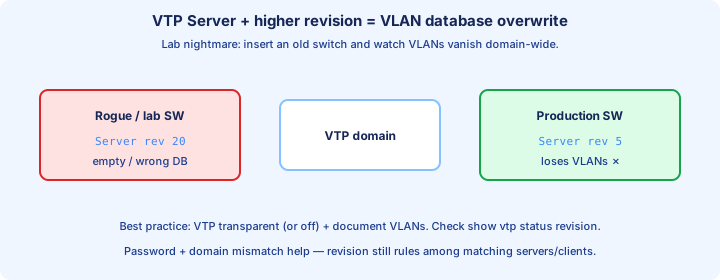
VTP trusts the highest configuration revision, not the switch you think is in charge. A server — the factory mode — that has been creating and deleting lab VLANs can sit at revision 50. Production may be at revision 10. Cable the lab switch in with the same domain and password, and the domain replaces its VLAN list with the lab list. Access ports go inactive for VLANs that no longer exist.
Clients are not a safe exception. A client advertising a higher revision updates servers too. The wipe is not “the new switch deleted them by hand.” It is one advertisement. `show vtp status` after the event shows the new revision and a short VLAN count. `show vlan brief` shows the damage.
Before a switch touches a live domain, set `vtp mode transparent` or `off`, or reset the revision. The classic reset is `delete flash:vlan.dat` and reload, which returns revision 0 and the default VLANs. Do that on the bench, not after the cable is in. Take `show vlan brief` from production first so you can rebuild.
Exam trap: “only servers can overwrite the domain.” A higher revision wins from a server or a client. Default mode server plus a used lab switch is the usual trigger.
Best practice transparent
The CCNA-safe habit is `vtp mode transparent` on every switch, or `vtp mode off` where the image has it. Create VLANs where they are needed. Let automation or your cut sheet be the source of truth. Revision stays 0, so a new closet switch cannot erase the campus by being plugged in.
Transparent still gives you extended VLANs on v1/v2, and v2 will forward other people’s advertisements if you are mid-migration. Off will not forward them, which is cleaner when the whole campus has left VTP. Either mode beats an accidental server. Write the mode into the standard build so the next switch does not boot as a server and sit on the bench accumulating revisions.
You pay for that safety by typing `vlan` commands more than once, or by pushing them from a tool. That is a fair trade. A VTP domain with one careless server is a single revision number away from an outage that `show interfaces trunk` will not explain, because the VLANs themselves are gone.
Exam trap: transparent does not mean the switch ignores trunks or refuses local VLANs. It means received VTP VLAN lists are not installed. You can still `vlan 10` locally, and you should.
show vtp status
`show vtp status` is the whole VTP story on one screen. Read VTP Operating Mode, VTP Domain Name, Configuration Revision, and the number of existing VLANs. Then read VTP Pruning Mode, whether V2 mode is enabled, and the MD5 digest. Capable version and operating version are both listed; they are not always the same number.
A revision that jumped, a domain you did not set, or an MD5 that does not match the neighbor explains a VLAN list that “changed by itself.” `show vtp password` checks the secret. `show vtp counters` shows advertisements sent and received, useful when you suspect updates are not arriving at all. Follow any surprise with `show vlan brief` before you create anything new.
On a transparent standard build you want: mode transparent, domain set on purpose or blank by policy, revision 0, pruning off unless you meant it. If mode says Server on a switch you just unboxed, stop and change it before the uplink goes in.
Exam trap: a matching domain name with different MD5 digests will not sync. The digest is the password check `show vtp status` actually gives you.
show dtp interface
`show dtp interface gi0/1` is the detailed DTP view. It shows administrative and operational trunk status, the encapsulation in use, the neighbor, and whether hello timers are running. If negotiation is off, the timers are stopped and the operational state should match the static mode you set.
Day to day, `show interfaces gi0/1 switchport` is faster: Administrative Mode, Operational Mode, Negotiation of Trunking, Access Mode VLAN, Trunking Native Mode VLAN, Voice VLAN. Negotiation On means DTP is still willing. Negotiation Off means nonegotiate (or a platform that is not offering DTP).
Use the DTP command when operational mode is not what you configured. A port you set to trunk that still shows operational access is usually a neighbor stuck in dynamic auto while you already disabled DTP, or a neighbor hard-set to access. The show output names the neighbor MAC so you know which switch answered.
Exam trap: administrative trunk with operational access is a failed negotiation, not a VLAN database problem. Fix the two modes, then recheck `show interfaces trunk`.
Attack and ops risks
Two risks share this chapter. DTP switch spoofing: a host on a dynamic port speaks DTP, becomes a trunk, and receives every VLAN the port will allow. VTP revision overwrite: a switch with a higher revision and the same domain replaces the VLAN database. A null domain makes the second risk easier, because the new switch adopts the first domain it hears.
Neither attack needs a clever VLAN ID if the defaults are still in place. Dynamic auto on a wall port, no VTP password, mode server, domain unset: that is the before picture. The after picture is `switchport mode access`, `switchport nonegotiate`, an unused native, a short allowed list, `vtp mode transparent` or off, a domain set on purpose, and a password if any server still exists.
Operational mistakes look identical to the attacks. Someone adds a bench switch to “borrow” a VLAN and wipes a floor. Someone turns on desirable “so the trunk comes up” on a conference jack. Treat both as change-control failures. `show vtp status` and `show interfaces switchport` are the audits.
Exam trap: the VTP password does not stop DTP, and nonegotiate does not stop a revision overwrite. They are different protocols. Harden both or you hardened half the chapter.
Migration tips
Adding one switch: on the bench, `show vtp status` and write down the revision. Set `vtp mode transparent` (or off) before any domain command if you are not joining VTP. If you must join, `delete flash:vlan.dat` and reload so revision is 0, then set domain and password, then cable it. Never cable a server-mode switch in and hope.
Leaving VTP: take `show vlan brief` everywhere first. Move clients to transparent, then servers, in a window. Clients keep the last vlan.dat they learned, so the VLANs do not vanish just because you stopped advertising. Confirm each switch still has VLAN 10 before you change the next one. Turning the last server transparent does not delete remote databases.
Changing the domain name resets revision to 0, which is a blunt way to stop a high revision from winning, and it also partitions the switch from the old domain. Do it on purpose, on all members, with the password ready. Match `vtp version` or updates between v1 and v2 neighbors will confuse you while you are already changing modes.
Exam trap: a brand-new switch is not revision 0 if it spent a week in a lab as a server. Look at the number. “New hardware” is not “empty vlan.dat.”
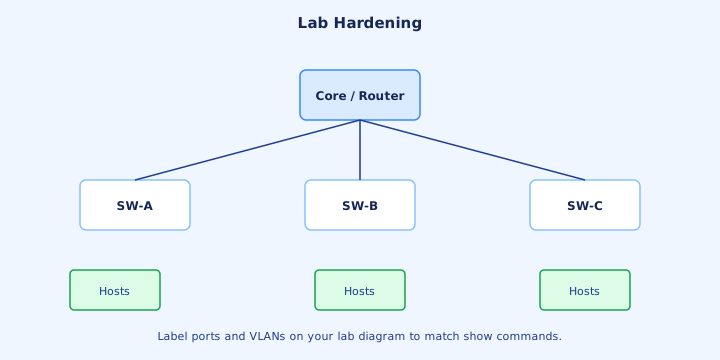
Lab hardening
On SW-A, SW-B, and SW-C set the VTP stance first: `vtp mode transparent`, `vtp domain LAB`, `vtp password SecretLab`. Confirm `show vtp status` says transparent and revision 0. Create VLAN 10, VLAN 20, and unused native VLAN 99 locally on each switch. Do not leave any switch as server.
Uplinks: `interface range gi0/1 - 2`, `switchport mode trunk`, `switchport nonegotiate`, `switchport trunk native vlan 99`, `switchport trunk allowed vlan 10,20,99`. Both ends. Access ports: `switchport mode access`, `switchport nonegotiate`, `switchport access vlan 10` or `20`. `shutdown` anything unused. Descriptions name the neighbor or the host.
Verify in order. `show vtp status`. `show interfaces trunk` for native 99 and the allowed list, on every uplink. `show interfaces gi0/1 switchport` and confirm Negotiation of Trunking: Off and operational trunk. `show dtp interface gi0/1` if negotiation still says On. `show vlan brief` for access ports only. Then the Day 16 pings: same VLAN across switches works, cross-VLAN waits for Day 18’s gateway.
Exam trap: nonegotiate on the trunk while the neighbor is still dynamic auto. The operational mode stays access and the allowed list never matters. Make both ends static trunk, then disable DTP, then ping.
Key ideas
- dynamic desirable starts a trunk negotiation. dynamic auto waits. auto plus auto does not trunk, and mode access never trunks.
- switchport nonegotiate is legal only on a static access port or a static trunk. A dynamic mode rejects the command.
- Server creates VLANs and synchronizes. Client synchronizes and cannot create. Transparent keeps a local database and still forwards advertisements. Off does neither.
- The higher configuration revision wins inside a matching domain and password. VTP replaces the VLAN list rather than merging it.
- A wiped switch can still carry a high revision. Change it to transparent and back, or change the domain away and back, before it joins the network.
- The domain name is case-sensitive. An empty domain adopts the first name it hears. A password mismatch means updates are ignored.
- show vtp status shows version, domain, mode, and revision. show dtp interface shows whether a port is still negotiating.
Self-check
- DTP modes: both ends are dynamic auto. Does the link become a trunk, and which mode would have to change?
- switchport nonegotiate: why does IOS reject it on a dynamic auto port, and which mode do you set first?
- Danger of VTP server: a lab switch at revision 42 joins a domain that is at revision 7. Whose VLAN list survives?
- VTP modes: which mode creates local VLANs, does not install received advertisements, and still forwards them?
- show vtp status: which fields do you read before connecting a used switch?
- VTP domains: one switch uses domain ccna and the other uses CCNA. Do their VLAN databases synchronize?