Day 15
Spanning Tree & Rapid PVST+
spanning-tree-rapid-pvst
At a glance
Merged STP Parts 1–2 + Rapid STP; PortFast / BPDU / root / loop guard included. Day 20 is the loop and the tree that stops it. The root is the lowest bridge ID: configured priority, plus the VLAN number when the extended system ID is on, then the MAC address. Every other switch gets one root port, every segment gets one designated port, and an indirect failure with the default 802.1D timers takes about 50 seconds. Day 21 is the election arithmetic and the features that keep the root where you placed it. Path cost is a sum of the classic short costs, and a tie walks the neighbor bridge ID before the local port number. PVST+ runs a separate tree per VLAN, root primary writes 24576 when that beats the current root, and BPDU Guard err-disables an edge port that hears a BPDU. Day 22 replaces the 30-second wait with a handshake. RSTP uses discarding, learning, and forwarding, and a full-duplex link comes up by proposal and agreement. An edge port is PortFast, a link to a legacy STP switch falls back to slow timers on that port only, and an alternate port still discards. Maps to CCNA v2.0 objective(s) 2.5.
Deep chapter
Long-form companion reading (original prose).
Spanning Tree & Rapid PVST+ — consolidated study day
This day merges former Days 20, 21, 22 into one CCNA v2.0-aligned segment.
Read straight through; use the practice hub (subnetting / CLI) to drill the verbs Troubleshoot, Diagnose, Configure, and Interpret.
From former Day 20
Source material retained from the previous Day 20 chapter for continuity.
Why loops hurt
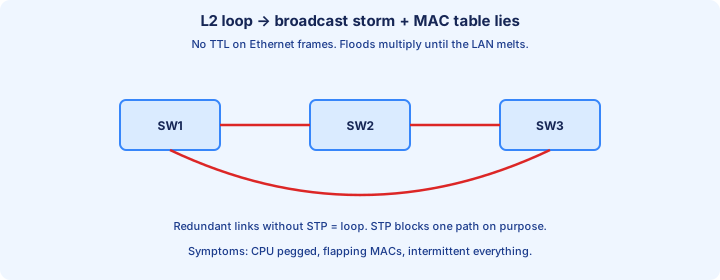
Ethernet has no TTL. A router decrements hop count and kills a routing loop; a switch flooding a frame does not. Plug a second cable between two switches and the same broadcast can circulate forever.
The fuel is anything the switch floods inside the VLAN: broadcasts, unknown unicasts, and multicasts. Each lap is copied out every other port. A fork in the loop multiplies the frames instead of wearing them out.
Hosts keep sending ARP and DHCP while the storm runs, so the loop feeds itself. Unicast pings fail too: links are full, and the CAM table learns the right MAC on the wrong port.
Exam trap: “Layer 2 loops age out the way MAC entries do.” They do not. You break the topology — STP, or pull the extra cable. Waiting does not drain the storm.
Broadcast storm
A broadcast storm is that loop with the volume up. One ARP request is flooded, returns on the other link, and is flooded again. Copies grow every lap until the VLAN is unusable.
You can see it without a protocol analyzer. Link LEDs peg, `show interfaces` shows input rate near line rate, and `show processes cpu sorted` sits high. PCs cannot resolve their gateway.
A capture shows the same frame thousands of times. The source MAC is often an ordinary host. The path is broken, not the NIC. Adding bandwidth does not fix a multiplication problem.
Break the redundant path. STP’s job is to block one end of that path on purpose, before a storm starts, and to keep the spare cable for a real failure.
MAC flapping
MAC flapping means one source MAC is learned on two ports in rapid succession. IOS logs a flap (often MACFLAP) and rewrites the CAM entry each time. Unicast to that host follows the latest port and misses.
In a loop, the host’s frames arrive on the correct access port and also come back from the uplink. Watch `show mac address-table` and the port column will not sit still.
A VM move, a wireless roam, or a duplicate MAC can flap too, but those events are occasional. A loop flaps continuously and shows up next to a broadcast spike.
Exam trap: flapping proves two NICs were configured with the same MAC. It proves the switch saw one MAC on two ports. Fast flaps plus full links are a loop until the cabling says otherwise.
STP job
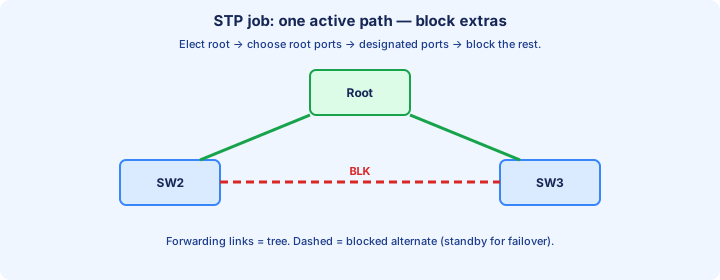
Spanning Tree Protocol (STP), IEEE 802.1D, keeps the spare cables and builds one active path. It blocks ports so a VLAN is a tree: one logical path between any two switches.
Switches exchange bridge protocol data units (BPDUs). From those they elect a root bridge, choose a best port toward it, and put losing ports into blocking. Blocked ports stay link-up. They are not `shutdown`.
Classic STP does not load-balance one VLAN across two parallel links. The backup is idle until something fails. Per-VLAN trees and EtherChannel, on later days, are how you actually use more than one link.
Exam trap: “STP removes redundant links.” It stops *forwarding* on the loser. The cable stays so a failure can promote that port. Without the spare, a cut uplink is just an outage.
Root bridge election
Every switch boots claiming to be root and sends BPDUs that name its own bridge ID as the root ID. When it hears a better (numerically lower) BID, it stops claiming and advertises that root instead.
There is no vote and no “highest priority wins.” Lowest BID wins. Leave everything at defaults and the lowest MAC usually becomes root — often an old access switch that happens to sort first.
The root is the zero point. Every other switch measures path cost toward it, so a closet root drags traffic onto closet uplinks and cooks an access-layer CPU. You want the core to be root.
Set it: `spanning-tree vlan 10 priority 4096`, or `spanning-tree vlan 10 root primary` (a macro that writes a priority below today’s root, commonly 24576). Confirm Root ID and Bridge ID match in `show spanning-tree vlan 10`.
BID and priority
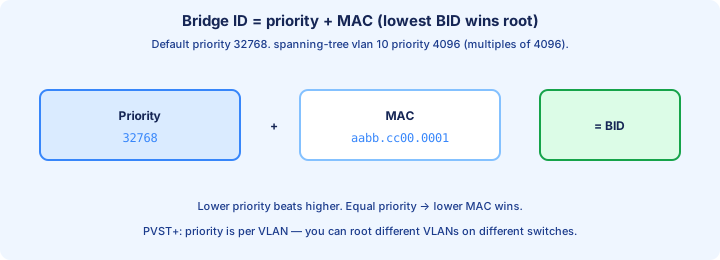
The bridge ID is a priority plus a MAC address. Lower priority wins; equal priority, lower MAC wins. The default priority is 32768.
Cisco enables the extended system ID. The VLAN number is added into the priority you see, so VLAN 10 at the default prints 32778: `priority 32768 sys-id-ext 10`. Compare that full value, not a mental 32768, when you read a capture of show output.
With the extension on, priority must be a multiple of 4096 (0, 4096, 8192, … 61440). IOS rejects 32769 because the low 12 bits belong to the VLAN ID.
Exam trap: a higher priority number is “more root,” or the MAC is compared before the priority. Lower number wins both fields, and priority is compared first.
Root port
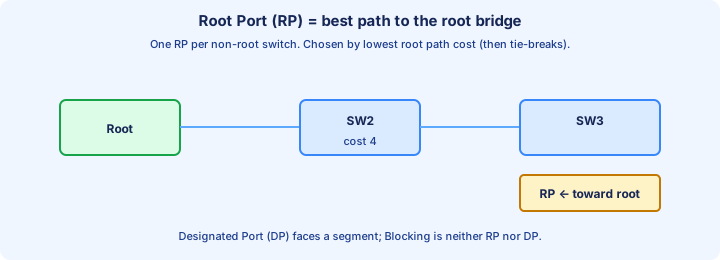
Each non-root switch picks exactly one root port: the port with the lowest root path cost toward the root. That port forwards user traffic upstream.
The root bridge has no root port. Its up ports are designated. If `show spanning-tree` lists a root port, this switch lost the election. Read that line before you congratulate the wrong box.
Cost is not hop count. “Closest to the root” means cheapest, and a direct Fast Ethernet uplink can lose to a longer Gigabit path. Day 21 puts the standard costs on those links.
The root port is also where the best BPDU arrives. If that link dies, another port can take the role — after classic STP’s timers, not instantly.
Designated port
Each link gets one designated port: the port on the switch that can reach the root at the lowest cost for that segment. Designated ports forward.
On the root, every port is designated. Between two non-root switches, the switch with the better path to the root owns the designated role. The other end is a root port or a blocking port.
An access port facing a PC is designated. The PC sends no BPDUs, so the switch wins that segment and the port forwards. That is normal, not a sign that the PC “joined STP.”
Exam trap: “both ends of a switch-to-switch link are designated.” One end only. Two designated ports on one segment means both sides forward, which is how loops come back.
Blocking port
The port that loses on a redundant link goes blocking. It does not forward user frames and does not learn source MACs from them. The link can still be up/up.
A blocking port has to keep receiving BPDUs. Those messages are how it knows the better path is alive. If they stop, Max Age expires and the port can leave blocking — sometimes straight into a loop.
Blocking is not err-disable and not admin down. `show spanning-tree` shows the role and state; `show interfaces status` still says connected. Do not shut the backup unless you mean to delete the redundancy.
Exam trap: “blocked ports drop every frame, including BPDUs.” They drop data. They listen for BPDUs. An ACL that filters BPDUs is a self-inflicted loop.
Timers overview
Three timers travel in the root’s BPDUs. Hello is 2 seconds. Max Age is 20 seconds, the lifetime of a stored BPDU. Forward Delay is 15 seconds.
Classic STP spends two forward delays moving a port from blocking to forwarding: listening, then learning. About 30 seconds. If an indirect failure must also expire the old BPDU, add Max Age — up to about 50 seconds.
The root owns the timers. Hello or forward-delay configured on a non-root is ignored until that switch becomes root. Read the timer lines in `show spanning-tree vlan 10` and treat them as the root’s values.
Leave the defaults unless you can defend the network diameter. Cutting Max Age on a big tree can make switches forget a live root and open blocked ports. Faster failover is an RSTP topic, not a reckless timer change.
show spanning-tree
Start with `show spanning-tree vlan 10`. Compare Root ID and Bridge ID. Same address means this switch is root. Otherwise the Cost and Port under Root ID name the root port and what that path costs.
On Cisco IOS, `protocol ieee` means classic PVST+, not Rapid STP. A priority line like `32778 (priority 32768 sys-id-ext 10)` is the extended system ID, not a mysterious second priority.
Narrow the question. `show spanning-tree root` is one line per VLAN. `show spanning-tree interface gi0/1` is one port. `show spanning-tree vlan 10 detail` adds timers and the bridge that sent the BPDU.
When a question pastes this output, it wants “who is root?” and “which port is blocking?” Answer from Root ID versus Bridge ID, then from the role column. Do not pick the interface you hoped was root.
Portfast preview
PortFast skips listening and learning on an access port and goes straight to forwarding. A PC can DHCP and ARP immediately instead of waiting 30 seconds and timing out.
Put it only on end hosts: interface command `spanning-tree portfast`, or global `spanning-tree portfast default` for access ports. Never on a link to another switch.
PortFast does not disable STP. The port still sends BPDUs. If a BPDU arrives, operational PortFast drops off and the port joins the tree — which can still loop if someone plugged a switch in.
Day 21 adds BPDU Guard so that unexpected BPDU err-disables the port. For today: PortFast is an edge speed feature, not permission to skip STP on uplinks.
Classic failure modes
Wrong root. Lowest MAC, or a lab priority of 0 left on an access switch. Distribution root ports point downhill and the closet hairpins the VLAN. Set the core priority and confirm the Root ID moved.
Unidirectional fiber. Transmit works, receive does not. The blocking switch stops hearing BPDUs, Max Age expires, and it forwards into a loop. UDLD and Loop Guard are the tools aimed at that symptom.
PortFast between switches, or BPDUs dropped by an ACL or BPDU Filter. Both ends forward. Filter is not Guard: filter silences STP, guard err-disables the port. Silencing the detector hides the loop.
An unmanaged switch patched into two wall ports loops underneath your Cisco tree. STP between the closets looks healthy. Continuous MAC flaps on two access ports are the clue.
Diagram: one VLAN loop
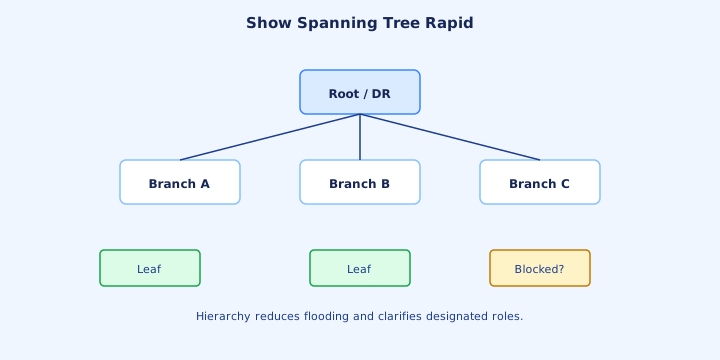
Draw three switches, one VLAN. Make SW1 root with priority 4096. Both of SW1’s links are designated and forwarding. SW2 and SW3 each put a root port on the uplink toward SW1.
The SW2–SW3 cable is the spare. If both reach the root at the same cost, the lower BID wins designated on that segment. SW2’s end forwards; SW3’s end blocks. One blocking port is the whole point of the triangle.
Traffic from a host on SW3 to a host on SW2 goes SW3 → SW1 → SW2, not across the blocked link. Pull SW3’s uplink and that blocking port must transition before anyone uses the spare. On classic STP that is the 30-to-50-second story.
Label role, state, and cost on the drawing from memory. If you can place the single blocking port without guessing, Day 21 is only a finer rulebook for the same picture.
From former Day 21
Source material retained from the previous Day 21 chapter for continuity.
Path cost
Root path cost is the sum of the ingress port costs from the root down to you. Lower total wins. It is not a hop count: two cheap links beat one expensive link.
Cisco’s default short costs: 10 Mb/s = 100, 100 Mb/s = 19, 1 Gb/s = 4, 10 Gb/s = 2. A Gigabit hop (4) plus another Gigabit hop (4) totals 8, which still beats a single Fast Ethernet hop at 19.
The receiving switch adds its port cost to the cost in the BPDU it hears. To prefer an uplink, lower `spanning-tree vlan 10 cost` on that local interface. Raising cost pushes the root port somewhere else.
Exam trap: the interface `bandwidth` statement changes STP cost the way it changes OSPF cost. It does not. STP follows port speed (or the cost you set). `bandwidth 10` on a Gigabit port leaves the STP cost at 4.
Priority tie-breaks
When two paths have the same root path cost, STP does not flip a coin. It walks a fixed list. First, lower sender bridge ID (the upstream switch’s priority, then its MAC).
If the same upstream switch is heard on two ports, the lower sender port ID wins. Port ID is port priority (default 128) plus the port number, shown as `128.1`. Lower is better.
The last resort is the lower local port ID on your switch. Change the upstream choice with `spanning-tree vlan 10 port-priority 64` on that switch’s interface. Steps are 16, from 0 to 240.
Exam trap: mixing this list up with root election. Root election is BID only. These tie-breaks pick a root port or a designated port after a root already exists.
Port roles deep dive
Root port: one per non-root switch, best BPDU, forwarding. Designated port: one per segment, forwarding, all of them on the root. Alternate: the loser on a redundant link, state blocking. Modern IOS prints `Altn BLK` even on classic PVST.
A PC port is designated and forwarding because the PC sends no BPDUs. That role is not a problem to “fix.” The problem to fix is two designated ends on one switch-to-switch link.
Backup is the RSTP name for a second port on the *same* switch into one shared segment (a hub). You will barely see it on point-to-point Gigabit. Alternate is the role that shows up in a normal triangle.
Roles are not states. A root port can be listening, learning, or forwarding while it comes up. Read both columns in `show spanning-tree` before you declare the link “blocked” or “open.”
States listening learning
Classic 802.1D uses five states. Blocking receives BPDUs only. Listening sends and receives BPDUs, learns no MACs, forwards nothing, for one forward delay (15s). Learning fills the CAM table and still does not forward, for another 15s. Then forwarding.
Disabled is admin down or broken, and it is not in the election. Do not call a `shutdown` port “blocking.” Blocking is an STP choice on a live link.
The order from a blocked spare to traffic is blocking → listening → learning → forwarding. Direct failure of your root port still pays the 30 seconds of listening plus learning. Indirect failure can add Max Age first.
Exam traps: “listening learns source MACs” and “learning already forwards.” Neither is true. Learning exists so the first seconds of forwarding are not an unknown-unicast flood.
Topology change
A topology change notification (TCN) tells the tree that a forwarding path moved. The switch that saw the change sends a TCN BPDU out its root port. Each upstream switch acks with the TCA bit and passes the TCN toward the root.
The root then sets the TC flag on its configuration BPDUs for Max Age plus forward delay. Switches that see TC cut MAC aging from 300 seconds down to the forward delay (15s) so stale CAM entries flush.
That flush is the point. After a link moves, a MAC may be reachable on a different port. Waiting five minutes to age it out black-holes the host. TCN does not by itself elect a new root.
PortFast edges do not generate a TCN when a PC links up or down. Without PortFast, every desk power-on looks like a topology change, the CAM table flushes all day, and the VLAN floods. That is an operational reason for PortFast, not just a DHCP timer trick.
BPDU guard preview
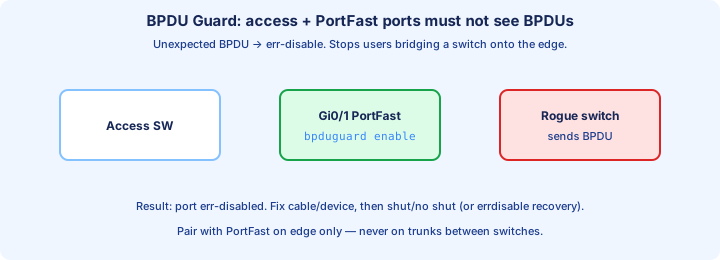
BPDU Guard is for ports that should never hear a switch. Enable it per interface with `spanning-tree bpduguard enable`, or globally with `spanning-tree portfast bpduguard default` so every PortFast port inherits it.
If any BPDU arrives, the port goes err-disabled. It stops forwarding. A visitor who plugs a switch into a wall jack cannot become root and cannot loop the closet back on itself.
Recovery is `shutdown` then `no shutdown`, or `errdisable recovery cause bpduguard` if you accept automatic return. Check `show interfaces status` for err-disabled and `show errdisable recovery` for the timer.
Exam trap: confusing guard with BPDU Filter. Filter stops sending and processing BPDUs, which can hide a loop. Guard treats a BPDU as a fault and kills the port. On access ports you want guard.
Root guard preview
Root Guard protects a designated port that should never point toward a new root. Command: `spanning-tree guard root` on the downlink toward access switches, not on your own uplink to the core.
If a superior BPDU shows up (someone advertising a better BID), the port becomes root-inconsistent. It stops forwarding until those BPDUs stop. It does not err-disable. `shut`/`no shut` is not the cure; removing the rogue switch is.
See it with `show spanning-tree inconsistentports`. The state looks stuck short of forwarding, which is the feature working. Loop Guard is a different tool: it reacts when BPDUs *stop* on a port that should be receiving them.
Exam trap: putting Root Guard on the root port toward the real root. That superior BPDU is legitimate, so the uplink goes inconsistent and you cut yourself off. Guard the edge of your authority, not the path to the root you chose.
PVST+ idea
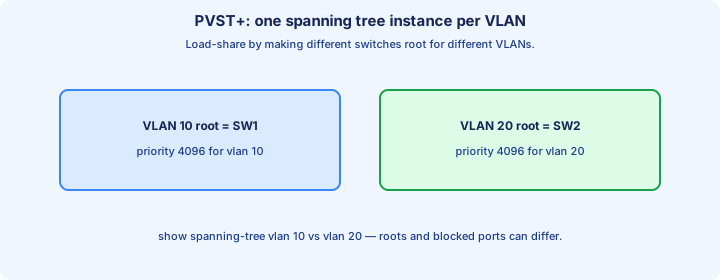
Classic 802.1D builds one tree for the whole bridge. Cisco PVST+ builds a separate tree per VLAN, which is the default on IOS switches. `spanning-tree mode pvst` is that mode.
`show spanning-tree` then says `protocol ieee`. That word means classic PVST+ on Cisco, not “Rapid” and not “one CST tree for every VLAN.” Rapid will say `rstp` after Day 22.
Each VLAN sends its own BPDUs. VLAN 1 on an 802.1Q trunk rides untagged; other VLANs ride tagged. A trunk is many STP conversations, not one.
The payoff is crude load sharing: VLAN 10 can block a different link than VLAN 20. The cost is more BPDUs and a root election you must win once per VLAN, not once per switch.
Per-VLAN roots
Put Dist-1 root for VLAN 10 and Dist-2 root for VLAN 20. On the access switch, VLAN 10’s root port is the Dist-1 uplink and VLAN 20’s root port is the Dist-2 uplink. Both cables forward — different VLANs.
Commands: on Dist-1, `spanning-tree vlan 10 root primary`. On Dist-2, `spanning-tree vlan 20 root primary`. Make the other switch `root secondary` for that VLAN so a failure has an obvious heir.
VLANs you forget stay on the MAC lottery. A pretty plan for VLAN 10 does nothing for VLAN 30. List every VLAN that should not follow the lowest MAC, and set those priorities too.
Exam trap: “PVST load-balances a single VLAN across both uplinks.” It does not. One VLAN still has one root and one blocked spare. The split is between VLANs.
Tuning priority safely
Set explicit multiples of 4096. A common pair is 24576 for the primary root and 28672 for the secondary, which is what the `root primary` / `root secondary` macros write when everyone else is still at 32768.
`root primary` is not always 24576. If it finds a root already at 24576 or lower, it drops 4096 below that root. Afterward, look at the running priority. Do not assume the macro’s first-day number.
Priority 0 wins against everything and leaves you nowhere lower to go during an incident. Prefer 4096 or 24576 so you still have a lever. Changing priority reconverges that VLAN; do it in a window, then verify.
Two switches with the same priority fall through to MAC. Replace the winner’s supervisor and the root can move. Equal priorities are not a design; they are a tie you have not broken.
Verification commands
The daily set: `show spanning-tree vlan 10`, `show spanning-tree root`, `show spanning-tree summary`, `show spanning-tree interface gi1/0/1 detail`, and `show spanning-tree inconsistentports`.
On the switch that should be root, Root ID address equals Bridge ID, the line says this bridge is the root, and there is no root port. On every other switch, name the root port and its cost out loud.
`show spanning-tree root` is the fast multi-VLAN check: root MAC, root cost, and which local port faces it. Use it after you set several VLAN priorities so you do not “verify” only VLAN 1.
Inconsistent ports should be empty in steady state. Err-disabled access ports belong in `show interfaces status` when you are hunting BPDU Guard, not in the root-inconsistent list.
Common mis-root
The usual accident: a new or lab switch with priority 0, or simply a lower MAC, lands on an access port. It wins. Every distribution switch points a root port down toward the closet. Traffic hairpins through a box that was sized for a dozen phones.
Symptoms: the access switch CPU climbs, `show spanning-tree` on the core shows a root port on a downlink, and that access MAC is the Root ID for more VLANs than you intended.
Stop the class of bug, not only today’s switch. BPDU Guard on access ports err-disables the intruder. Root Guard on downlinks keeps a superior BPDU from moving the root even if guard was missed on one jack. Explicit core priorities mean your own new switch cannot win by MAC.
A switch returned from a lab with `priority 0` still in the config is the same outage wearing an asset tag. Read the priority before it hits the floor.
Lab election
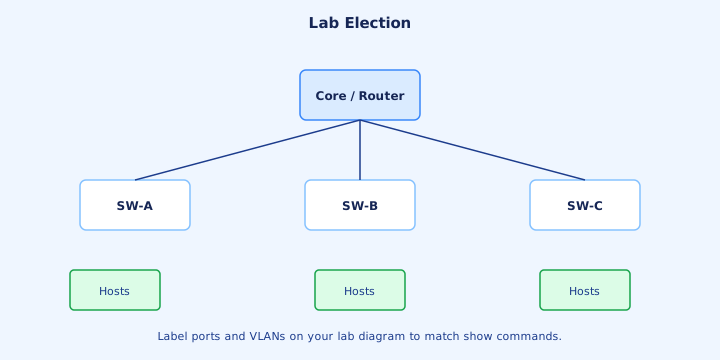
Three switches, all defaults, one VLAN. Record each MAC from `show spanning-tree vlan 1` and predict the root before you look at roles. Lowest MAC should win. Then find the blocking port on the triangle and say which tie-break put it there.
Move the root on purpose: `spanning-tree vlan 1 priority 4096` on the switch you actually want. Wait through listening and learning. Root ID on the other two must change, and their root ports must face the new root.
Next, with costs equal, set `spanning-tree vlan 1 cost 12` on one uplink and watch the root port or the blocking end move. Put the cost back. The picture from Day 20 should change for a reason you can name.
If the block does not move, you edited `bandwidth`, or you edited cost on the wrong VLAN, or you are looking at `show spanning-tree` without a VLAN while another VLAN is the one you changed.
Exam traps
Lower BID wins, not higher. The root has no root port. Path cost is a sum of port costs, and lower total wins. `bandwidth` does not set STP cost. Displayed priority includes the VLAN when the extended system ID is on, and the configured value steps by 4096.
Listening does not learn. Learning does not forward. A TCN shortens MAC aging; it is not a fresh root election. PortFast ports do not emit TCNs on link up, and they still send BPDUs.
BPDU Guard err-disables. Root Guard goes root-inconsistent and does not err-disable. Filter is not either of those. Blocking ports still receive BPDUs.
PVST+ is one tree per VLAN (`protocol ieee`). One VLAN still blocks one end of a loop. Load sharing means different VLANs pick different roots, not one VLAN using two forwarding uplinks.
From former Day 22
Source material retained from the previous Day 22 chapter for continuity.
RSTP vs STP
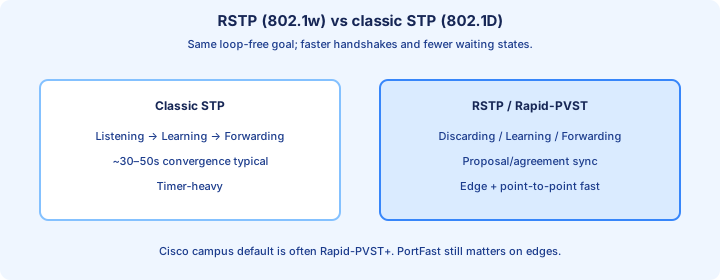
Rapid Spanning Tree Protocol (RSTP), IEEE 802.1w, keeps the same job as STP: one active tree, backups blocked. It changes how fast a port may go forwarding, and it renames the machinery you stare at in show output.
States collapse. Discarding covers classic blocking, listening, and disabled. Learning and forwarding remain. Roles you must say out loud: root, designated, alternate, backup.
Cisco’s per-VLAN version is Rapid PVST+: `spanning-tree mode rapid-pvst`. `show spanning-tree` then reads `protocol rstp`. You still have one instance per VLAN, not one tree for the whole switch.
Exam trap: “RSTP forwards on every link.” It still blocks alternate and backup ports. What it drops is the habit of waiting 30 to 50 seconds when a point-to-point neighbor can handshake.
Proposal agreement
On a point-to-point link, a designated port that wants to forward sends an RSTP BPDU with the proposal bit set. It does not sit in listening for 15 seconds first.
The downstream switch checks that this BPDU is the best path. If it agrees, it syncs: it blocks its other non-edge ports so it cannot create a loop, then returns an agreement.
The upstream port can go forwarding as soon as the agreement arrives. Sync is what makes “immediate” safe. Edge ports are left forwarding; they do not lead to other bridges.
No agreement — shared media, or an old 802.1D neighbor — and the port falls back to timer-based transition. The handshake is a permission slip, not a promise that every link on earth is rapid.
Edge ports
An edge port is RSTP’s name for a PortFast port: a port that should face an end host, not a bridge. The Cisco command is still `spanning-tree portfast`. The port goes forwarding immediately.
Link up and down on an edge does not generate a topology change, so a floor full of PCs does not flush the CAM table all morning. `spanning-tree portfast default` applies this to access ports.
If an edge port receives a BPDU, it loses edge status and becomes a normal RSTP port. That is the switch admitting the far end might be a bridge. Pair it with BPDU Guard if a switch on that jack should be a fault, not a new neighbor.
Exam trap: a new edge command replaces PortFast, or edge means “STP off.” Same feature, new word. It still sends BPDUs. It does not belong on switch-to-switch uplinks.
Link types
RSTP only handshakes on point-to-point links. Full duplex is taken as point-to-point. The type shows up as P2p in `show spanning-tree`. Half duplex is shared (`Shr`) and behaves much more like classic STP.
You can force it: `spanning-tree link-type point-to-point` or `spanning-tree link-type shared` under the interface. Auto, based on duplex, is right unless someone has locked a full-duplex link to half.
A duplex mismatch does double damage. The half-duplex side looks shared, so you lose the proposal/agreement path, and the link is already a collision mess. Fix duplex before you blame the STP mode.
Exam trap: “every Ethernet link is shared, so RSTP cannot be rapid.” Modern switch-to-switch links are full duplex and point-to-point. Shared is the hub case, or a port you forced to half.
Faster convergence
If the root port fails and an alternate port has been receiving BPDUs, RSTP can make that alternate the new root port and move it to forwarding without a 30-second listen/learn. It already knew the backup path.
When a neighbor goes quiet rather than the link going down, RSTP ages the info in three hello times (about 6 seconds at the default), not Max Age of 20 — and only while that neighbor is also speaking RSTP.
Proposal/agreement then cleans up the neighborhood in about a second or a few seconds on a small point-to-point tree. Users notice a short hit, not a minute of dead DHCP and frozen phones.
You still need a second physical path. RSTP does not invent an alternate port. A single-uplink access switch has nothing to promote, and a legacy or shared neighbor will not give you the fast path on that port.
show spanning-tree rapid
After `spanning-tree mode rapid-pvst`, the header must say `Spanning tree enabled protocol rstp`. If it still says `ieee`, you are on classic PVST+ and the rest of this day is theory.
Read the type column, not just role and state. `Root FWD … P2p` is an uplink that can handshake. `Altn BLK … P2p` is the spare. `Desg FWD … P2p Edge` is a PortFast host port.
`show spanning-tree vlan 10 detail` adds link type, whether the port is edge, and how many times it has transitioned. A port that transitions hundreds of times is flapping, not “rapid.”
Exam habit: `BLK` in an RSTP table is discarding, not a return to 802.1D listening. Role `Altn` plus state `BLK` on a P2p link is a healthy spare, not a misconfiguration.
Compatibility
RSTP and classic STP can share a LAN. When a rapid port hears a legacy BPDU, that port drops back to 802.1D behavior and uses the old timers. The rest of the switch can stay RSTP.
Show output marks the boundary. You will see a peer type along the lines of P2p Peer(STP) instead of a normal rapid neighbor. Failover on that link is the 30-to-50-second kind again.
One forgotten access switch in `pvst` mode is enough to slow every uplink that faces it. It does not flip the whole campus back to `ieee`. Check the mode per switch, then the type per port.
Exam trap: “Rapid PVST and PVST cannot be connected.” They can. You pay for it on the mixed ports. Do not expect a one-second failover in a question whose diagram still has an 802.1D neighbor.
BPDU roles
An RSTP BPDU carries the sender’s port role: designated, root, or alternate/backup. Neighbors use that, plus the proposal and agreement flags, instead of inferring everything from timers.
Other flags you should recognize: proposal, agreement, learning, forwarding, and TC (topology change). Version 2 is the RSTP BPDU. Classic configuration BPDUs do not carry this handshake.
Topology change is more direct than Day 21’s TCN relay. A switch sets TC when a non-edge port moves to forwarding, and it floods that information out its other ports. Neighbors flush CAM entries immediately on the ports that see TC.
Edge link-ups do not set TC. Exam trap: every BPDU with TC means “re-elect the root.” TC means “flush MACs, the forwarding tree moved.” The root BID is a different field.
When RSTP still blocks
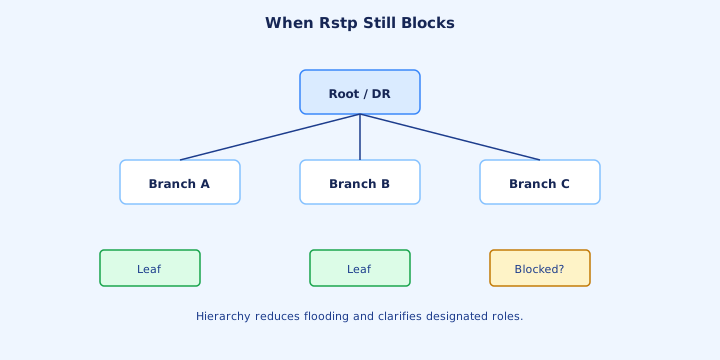
Alternate ports stay discarding. They are the backup path to the root via some other switch. Backup ports stay discarding too: two links from one switch into the same shared segment, one designated, one backup.
“Rapid” describes convergence, not the steady-state picture. A triangle still has one blocking end. If both uplinks on one VLAN show forwarding between three switches, you do not have a tree.
To use both physical cables at once you change the design, not the STP flavor. EtherChannel makes two cables one logical port so STP has nothing to block between them. Or use two VLAN roots so each cable forwards different VLANs.
Exam trap: replacing PVST with rapid-pvst “unblocks” the redundant uplink. It does not. It only promotes that uplink faster when the primary actually fails.
Design with PortFast
Turn on edge behavior everywhere it is true, and nowhere it is not. Global `spanning-tree portfast default` covers access ports. Global `spanning-tree portfast bpduguard default` err-disables them if a BPDU appears.
An access port with a voice VLAN is still an edge. Phones and PCs are not bridges. A trunk to another switch is not an edge, even if you like the idea of faster forwarding.
`spanning-tree portfast trunk` exists for a router-on-a-stick or a server that truly trunks. It is a loaded command: the far end of a trunk is often a switch. Use it only when you can name the host.
Without PortFast, every PC link event is a topology change. RSTP then floods TC and flushes MACs, and the VLAN spends the morning flooding. The handshake cannot save a tree you keep invalidating from the edge.
Troubleshooting slow failover
Pull a link, count seconds, then read. If failover took half a minute, `show spanning-tree vlan 10` probably still says `protocol ieee`, or the port that should have been fast says Peer(STP).
Next look at link type. Shr means no handshake. Fix duplex. Then confirm an Altn port existed before the failure. RSTP cannot fail over to a path you never cabled.
A bundle that never formed leaves two individual links, and STP blocks one of them. Failover then waits on STP instead of on EtherChannel hashing. Day 23’s `show etherchannel summary` belongs in this checklist.
`detail` shows a transition counter. Hundreds of transitions mean a flapping link or a neighbor resetting, which feels like “STP is slow” while the protocol is busy starting over.
Timers that still matter
Hello is still 2 seconds, and the root still originates it. RSTP treats three missed hellos as a dead neighbor — about six seconds — instead of waiting Max Age 20 when the peer is rapid.
Max Age and forward delay are not deleted. Shared ports and ports that fell back to 802.1D still transition on those timers. Questions that mix a hub into an RSTP diagram are asking about that fallback.
Timer values are still the root’s values. `spanning-tree vlan 10 hello-time 2` on a non-root does nothing until that switch is root. Confirm the numbers in show output after you move the root.
Do not set hello to 1 across the campus to “make RSTP faster.” You buy CPU and BPDU load. The speed already came from the handshake and from using three hellos instead of Max Age.
Migration notes
Set root priorities before you change mode, so the election is already won by the core. Then `spanning-tree mode rapid-pvst`. Mixed PVST and Rapid PVST is allowed while you roll; the boundary ports are the slow ones.
Afterward, every switch that you touched should show `protocol rstp`. Access ports that face hosts should show P2p Edge. Uplinks should show P2p and, where you built a spare, an alternate in discarding.
Do not enable PortFast on uplinks as a migration shortcut. Add BPDU Guard on the edge in the same change. MST is the later tool when VLAN count makes a tree-per-VLAN expensive; you do not need MST just to leave classic STP.
Prove it. Continuous ping across the VLAN, pull the root port, and read a clock. Seconds means the handshake worked. Thirty to fifty seconds means a legacy peer, a shared link, or a switch still in `pvst`.
Checklist
Mode is `rapid-pvst` and show says `rstp`. The root for each important VLAN is the switch you named, with an explicit priority, and a secondary is ready. MAC lottery is not a root plan.
Every non-root switch that should survive an uplink failure has an alternate port. Access ports are P2p Edge. None of the switch-to-switch links are edge, and none of them are Shr unless a hub is really there.
BPDU Guard is on the edge. Root Guard is on downlinks where a new root must not appear. Inconsistent ports are empty. You can point at `show spanning-tree root` and defend every VLAN.
You know what still blocks, and you know the two honest ways to use both cables: per-VLAN roots, or an EtherChannel that STP treats as one port. That is the door into Day 23.
Key ideas
- Merged STP Parts 1–2 + Rapid STP; PortFast / BPDU / root / loop guard included.
- Ethernet frames have no TTL. A loop multiplies broadcasts and moves one source MAC between ports, which is MAC flapping.
- Lowest bridge ID wins the root. Priority 32768 on VLAN 1 is advertised as 32769, and the lowest MAC breaks a priority tie.
- The configured priority is a multiple of 4096. The VLAN number is added into the priority that BPDUs compare.
- Root port order is lowest root path cost, then lowest neighbor bridge ID, then neighbor port ID, then local port ID.
- Classic short costs are 100 for 10 Mbps, 19 for 100 Mbps, 4 for 1 Gbps, and 2 for 10 Gbps. The cost counted is the receiving port.
- Each segment has one designated port, the sender of the best BPDU. The other end blocks. The root bridge's ports are designated.
- Default timers are hello 2, max age 20, and forward delay 15. An indirect failure is about 50 seconds, and a direct link-down is about 30.
Self-check
- Root bridge election: three switches use priority 32768. Which MAC becomes root, and what priority does show spanning-tree display for VLAN 1?
- Root port: a 1 Gbps uplink costs 4 and a 100 Mbps uplink costs 19. Which one is the root port?
- Blocking port: SW1 is root, SW2 has the lower MAC, and every link costs 19. Which end of the SW2-SW3 link blocks?
- Timers overview: BPDUs stop arriving and the root-port link stays up. How long until the alternate port forwards?
- MAC flapping: the same host MAC moves between Gi0/1 and Gi0/2 many times a second. What Layer 2 failure produces that?
- BID and priority: why is spanning-tree vlan 10 priority 4097 rejected, and what does priority 4096 display as?