Day 16
EtherChannel & LACP
etherchannel-lacp
At a glance
Day 23 bundles parallel links so spanning tree sees one logical interface and both cables can forward. LACP active initiates and passive waits, PAgP desirable initiates and auto waits, and mode on matches only mode on. show etherchannel summary shows which member is bundled, and the load-balance hash keeps a single flow on one link. Maps to CCNA v2.0 objective(s) 2.1.c, 2.2.
Deep chapter
Long-form companion reading (original prose).
EtherChannel goals
EtherChannel bundles two to eight physical links between the same pair of devices into one logical interface, a Port-channel. You get more bandwidth, and one member can die without tearing the logical link down.
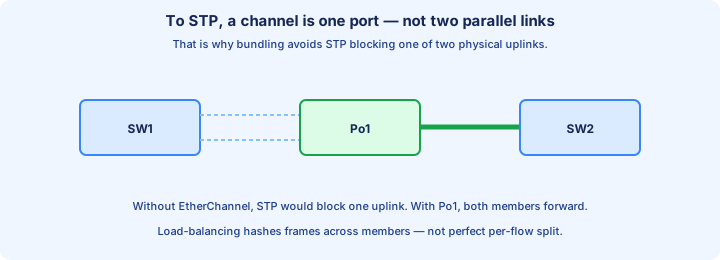
STP sees one port, not two to eight. It has no reason to block the “extra” members, because they are not extra topology. That is the design win people confuse with “STP is off.”
The bundle does not replace STP. A triangle of three switches can still loop. Channel parallel cables; leave STP in charge of paths that still reach a different neighbor.
Exam trap: one EtherChannel from an access switch up to two independent distribution switches. Classic IOS will not do that. Both members must land on the same neighbor, or on a stack that presents one logical switch.
Bundling rules
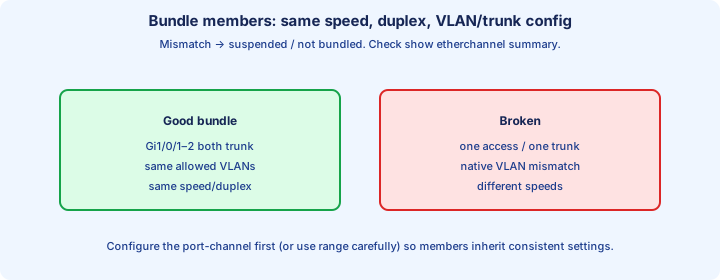
Members must match or the bundle refuses them. Same speed, same duplex, all Layer 2 or all Layer 3. Access ports must sit in the same VLAN. Trunks must agree on allowed VLANs and native VLAN, and both ends must actually be trunks.
The channel modes have to be compatible too: both sides LACP, both sides PAgP, or both sides forced `on`. A perfect trunk config with mismatched protocols still will not bundle.
When a rule fails under LACP or PAgP, the odd port is suspended or left standing alone. That looks like a failure. It is the safety that keeps a half-matched pair from looping.
Configure the logical interface so members cannot drift. Set trunk mode and allowed VLANs on `interface port-channel 1`, then add physical ports with `channel-group` only.
PAgP vs LACP
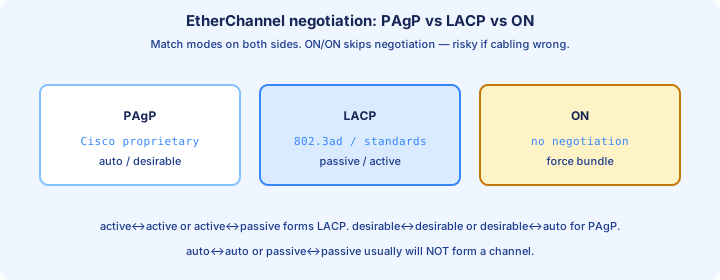
PAgP is Cisco-proprietary. Modes are desirable (speaks first) and auto (waits). Desirable plus auto bundles. Desirable plus desirable bundles. Auto plus auto does not — both sides wait.
LACP is the IEEE standard (802.3ad / 802.1AX). Modes are active and passive. Active plus passive bundles. Active plus active bundles. Passive plus passive does not. Prefer LACP when the other vendor might not speak PAgP.
IOS: `channel-group 1 mode active` or `mode passive` for LACP; `mode desirable` or `mode auto` for PAgP. The group number is local. Port-channel 1 on one switch may face Port-channel 5 on the other.
Exam trap: desirable plus active “meets in the middle.” They are different protocols and will not form a channel. Same for auto plus passive. Match the protocol, then match a mode that actually starts the conversation.
On mode risks
`channel-group 1 mode on` forces a bundle and sends no PAgP or LACP packets. The other side must also be `on`. There is no negotiation to discover that it is not.
If the far side treats the cables as ordinary ports, your switch still hashes across them as one logical link and will not block between members. The far side may forward on both. That is a loop, or a black hole, depending on how STP lands.
`on` plus `active`, or `on` plus `desirable`, does not negotiate a channel. The forced side bundles anyway; the negotiating side does not. Suspended-port protection is a LACP/PAgP behavior you just opted out of.
Use `on` only when both ends are under your control and the neighbor cannot speak LACP. For everything else, `mode active` on both sides. Forcing the bundle is how labs melt.
Load balancing methods
EtherChannel does not spray one flow across every member. It hashes fields you choose and pins that conversation to a single link, which also keeps packets in order.
The command is global on Catalyst: `port-channel load-balance src-dst-ip`. Options include source or destination MAC, IP, and (on newer code) ports. `show etherchannel load-balance` prints what is actually in effect.
A default of src-mac punishes a router-on-a-stick or a single gateway MAC: every frame from that MAC picks the same member, and the other links sit idle. src-dst-ip spreads many clients; it still will not split one backup job.
Exam trap: “four gigabit members equal 4 Gb/s for a single TCP transfer.” They equal 4 Gb/s of *possible* capacity across many hashes. One flow tops out at one member’s speed.
show etherchannel summary
Start every bundle question with `show etherchannel summary`. A healthy Layer 2 channel looks like `Po1(SU)` with protocol `LACP` and members `Gi0/1(P) Gi0/2(P)`.
Flags: S Layer 2, R Layer 3, U in use, D down. On the members, (P) means bundled in the port-channel, (s) suspended, (I) stand-alone, (D) down. Protocol `-` means `mode on`, not “protocol unknown.”
Go deeper only after the summary. `show etherchannel 1 detail` explains a refusal. `show lacp neighbor` or `show pagp neighbor` proves the other side is speaking. `show interfaces port-channel 1` is the logical link STP and routing will use.
If you do not see the physical ports listed under the Po, you do not have a bundle yet. Check STP against `Po1`, not against Gi0/1, or you will “troubleshoot” a block that is really two unbundled links.
Misconfig suspended
Suspended means LACP or PAgP looked at a member, disliked the parameters, and refused to forward on it. You will see `(s)` in the summary, `suspended` in `show interfaces status`, and a log like `%EC-5-CANNOT_BUNDLE2`.
Usual causes: one side access and the other trunk, allowed-VLAN lists that differ, native VLAN mismatch, speed or duplex mismatch, or one side still not in the channel. The physical link can be up while the member is unusable.
Fix the mismatch. Do not “solve” a suspend by switching both sides to `mode on`. That removes the check that just saved you from a loop. After the configs match, the port should move from `(s)` to `(P)` without a reload.
Exam trap: suspended means the cable is dead, so replace it. The cable is often fine. Read the bundle reason before you pull fiber that is doing its job by staying out of the channel.
Layer 2 vs L3 channel
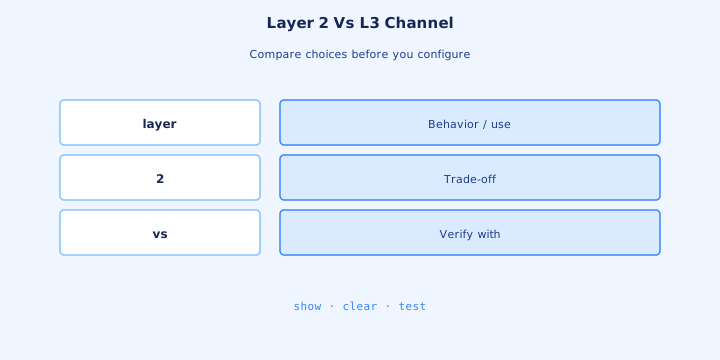
A Layer 2 channel is a switchport. `interface port-channel 1`, then `switchport mode trunk` (or access). No IP address on the Port-channel. SVIs, if you need them, stay on the VLAN interfaces. STP runs on Po1.
A Layer 3 channel is a routed port. `no switchport` on the Port-channel and on every member, `channel-group 1 mode active` on the members, and the IP only on `interface port-channel 1`: for example `ip address 10.1.1.1 255.255.255.252`.
Putting the IP on Gi0/1 while Po1 also has an address, or leaving one member as a switchport, breaks the bundle or the routing. Members of a Layer 3 channel should not be in a VLAN and should not run STP as access ports.
Exam trap: “Layer 3 EtherChannel still blocks via STP inside the subnet.” Routed ports are not in the VLAN tree. You use a Layer 3 channel in the core when you want the links up without an STP block between those two routers.
Member consistency
Range-configure the members so they cannot disagree: same mode, same trunk allowed list, same native VLAN, then the same `channel-group 1 mode active`. One port left in access mode will sit suspended beside a healthy partner.
Prefer to hang ongoing changes on the Port-channel interface. Editing allowed VLANs on Gi0/1 alone and not on Gi0/2 is how a bundle that worked on Monday is half-dead on Tuesday.
The `channel-group` number does not have to match the neighbor. Matching numbers are for humans. What must match is speed, VLAN parameters, and a compatible mode. Mismatched group numbers are not why a port suspended.
After any change, `show etherchannel summary` again. Both members `(P)` and the Po `(SU)` or `(RU)` is the bar. A config that “should” match is not the same as a summary that does match.
Troubleshooting one link
One member down and the others `(P)`: the Port-channel stays up, capacity drops, and STP does not reconverge. `show etherchannel summary` shows a mix of `(D)` and `(P)`. Users on hashes that used the dead link blip; everyone else does not.
Look at that physical port alone. Cable, `show interfaces gi0/2`, err-disable, speed/duplex forced differently from its partner. Suspended `(s)` is a config mismatch. Down `(D)` is usually layer 1 or a shutdown.
When the last member dies, Po1 goes down and STP must use another path if one exists. That event feels like a switch failure. A single-member failure should not.
Do not remove `channel-group` on one side while the links are still up “to test.” You turn one logical port into several STP ports and can loop. `shutdown` the bad member. Restore the config, then `no shutdown`.
Design dual-homed
An access switch with one uplink to Dist-1 and one uplink to Dist-2 is dual-homed. Those are two neighbors. STP forwards one uplink and blocks the other, unless the two distribution switches are a single logical switch (stack, VSS, or similar).
Two cables from that access switch into one distribution switch are an EtherChannel candidate. Both members forward. You survive a cable or optic failure without an STP event, and you do not survive a whole distribution switch failure.
Use both ideas for different jobs. Dual-home when you need the second switch. Channel when you need the second cable to the same switch. Per-VLAN roots are the CCNA way to make both uplinks carry traffic without a stack.
Exam trap: “EtherChannel is how an access switch actively uses two independent distribution switches.” Not on classic gear. Draw the far ends. If they are different boxes, you are in the STP picture from Day 20, not the bundle picture.
STP interaction
STP runs on the Port-channel, not on each member. `show spanning-tree vlan 10` should list `Po1`. If it lists Gi0/1 and Gi0/2 separately, the bundle did not form and STP will block one of them.
The Port-channel’s cost follows the aggregate bandwidth of the members that are up, so a healthy bundle is a cheaper root path than a single gigabit link. Override with `spanning-tree vlan 10 cost` on the Port-channel interface, not on one member.
A one-sided bundle is worse than no bundle. The side in `mode on` (or the side that formed) will not block between members; the side that did not form might forward more than one physical link. That is a loop with green LEDs.
When you pull one member of a healthy channel, STP should not move the root port. Po1 never went down. If a root-port change shows up in the log, you were not bundled and you just failed a normal uplink.
Lab bundle
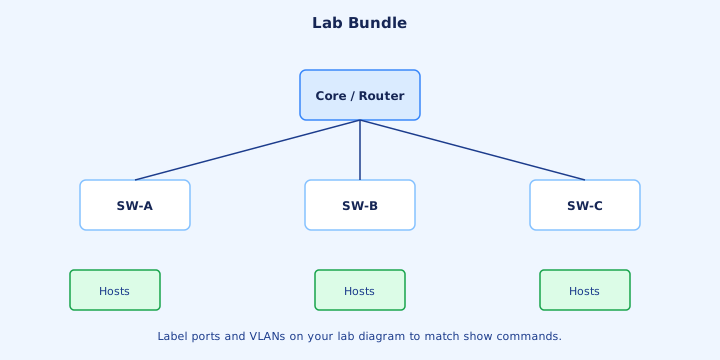
On both switches: `interface range g0/1-2`, `switchport mode trunk`, `channel-group 1 mode active`. Then `show etherchannel summary`. You want `Po1(SU)`, protocol LACP, and both members `(P)`.
`show spanning-tree vlan 1` should name Po1, not the two Gigabit ports. Ping across the trunk. `shutdown` Gi0/2 on one side. The ping continues and the summary shows one `(D)` and one `(P)`. `no shutdown` and both return to `(P)`.
Break it on purpose. Set both sides to `mode passive` and the channel disappears — waiting plus waiting. Or mismatch the native VLAN and watch a member go `(s)`. Put the configs back and confirm `(P)` before you call the lab done.
If one side is `mode active` and the other is still `mode on`, read the summary before adding VLANs. That mismatch brings the Day 20 loop back.
Exam gotchas
Auto plus auto does not channel. Passive plus passive does not channel. `on` plus active does not negotiate, and desirable plus active mixes PAgP with LACP. `on` plus `on` channels, and it can loop if the rest of the config is wrong.
Eight active members is the usual exam maximum. Load balancing is a global hash, and one flow stays on one link. All members go to the same neighbor. The channel-group number is local and does not have to match.
Layer 3 addressing goes on the Port-channel, with `no switchport` on the members. Healthy output is `(SU)` or `(RU)` and member `(P)`. Suspended is a parameter mismatch, not a reason to force `mode on`.
EtherChannel does not delete STP. It gives STP one port to cost and, if you built it on both sides, no block between those members. PAgP is Cisco. LACP is the open protocol you should default to.
Key ideas
- Spanning-tree cost and forwarding apply to the port-channel. If one member fails, the bundle can stay up.
- LACP uses active and passive. passive plus passive does not bundle. PAgP uses desirable and auto. auto plus auto does not bundle.
- mode on forms a channel only with mode on. Mixing on with active or passive does not negotiate, and it will not suspend a mismatched peer.
- Members must match on speed, duplex, access or trunk mode, allowed VLANs, and native VLAN. LACP suspends the member that does not match.
- In show etherchannel summary, SU is a Layer 2 channel in use and RU is Layer 3. P is bundled, s is suspended, and I is stand-alone.
- port-channel load-balance hashes fields such as src-mac or src-dst-ip. One flow stays on one member, so one source MAC can fill a single link.
- Both links of one channel must end on one logical neighbor. Two independent switches need spanning tree, or a stack, VSS, or vPC pair that shares a system ID.
Self-check
- PAgP vs LACP: both sides are mode passive. Does a channel form, and which mode has to change on at least one side?
- show etherchannel summary: the line shows Po1(SU), Gi0/1(P), and Gi0/2(s). Which leg is forwarding, and what does s mean?
- Load balancing methods: the hash is src-mac and one server fills a single member. Which fields would spread flows toward different clients?
- On mode risks: one side is mode on and the other is mode active. Why can that black-hole or loop traffic?
- Design dual-homed: why does channel-group 1 fail when Gi0/1 goes to switch A and Gi0/2 goes to independent switch B?
- Member consistency: name three settings that must match or LACP suspends a member.