Day 17
Dynamic Routing Concepts
dynamic-routing-concepts
At a glance
Merged dynamic routing + RIP/EIGRP overview (not exam-weighted; contrast with OSPF). Dynamic routing automates reachability so routers adapt when links fail. Master why protocols exist, IGP vs EGP, metric vs administrative distance, neighbors, convergence, and when a static route is still the right tool. RIP is the hop-count teaching baseline; EIGRP is Cisco’s DUAL-based IGP with successors and feasible successors. Know RIPv2 vs v1, hop-count limits, EIGRP AS/neighbors, feasibility, and the show commands that prove adjacency. Maps to CCNA v2.0 objective(s) 3.1, 3.3.
Deep chapter
Long-form companion reading (original prose).
Dynamic Routing Concepts — consolidated study day
This day merges former Days 24, 25 into one CCNA v2.0-aligned segment.
Read straight through; use the practice hub (subnetting / CLI) to drill the verbs Troubleshoot, Diagnose, Configure, and Interpret.
From former Day 24
Source material retained from the previous Day 24 chapter for continuity.
Dynamic routing need
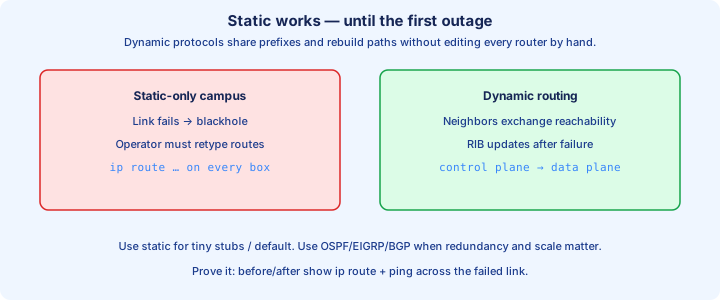
Dynamic routing lets routers share prefixes and rebuild paths when a link fails. Static routes work until the first outage forces you to edit every box by hand. A protocol keeps the RIB current without that walk across the closet.
Routers exchange reachability on the control plane. The data plane still forwards with the best route it installed. You care about both: wrong control-plane input installs a dead next hop; a healthy protocol still needs a working Layer 3 path for Hellos and updates.
Scale tips the choice. Three stubs and one default can stay static. A dozen sites with redundant links need OSPF, EIGRP, or BGP so failover is automatic. After a neighbor dies, `show ip route` should still list the same destinations with a different next hop. Document the intended next hop for each critical prefix before you trust failover.
Exam trap: dynamic routing does not replace addressing. Bad masks and missing `no shutdown` still black-hole traffic while the protocol looks busy.
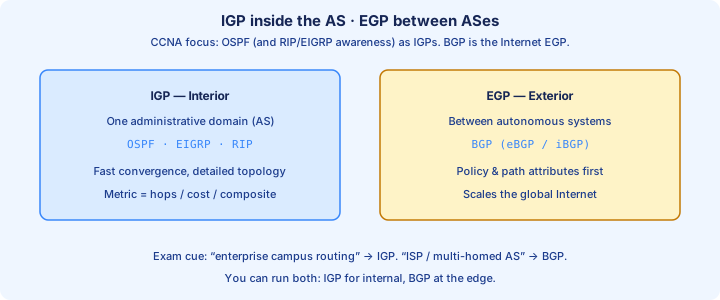
IGP vs EGP
An IGP runs inside one administrative domain: OSPF, EIGRP, and RIP on CCNA. An EGP exchanges routes between autonomous systems; BGP is the exam EGP. The boundary is policy and ownership, not how many cables you counted.
IGPs optimize for fast convergence and simple metrics inside the campus or WAN core. BGP optimizes for path control with attributes and filters at the edge. Do not run BGP as your closet IGP, and do not expect RIP to stitch two ISPs together on the exam.
`show ip protocols` and `show ip bgp summary` answer different questions. Inside the AS you want neighbors and LSAs or topology tables. At the edge you want peer state and which prefixes were accepted under policy.
Exam trap: “EGP means exterior” is correct; inventing a second modern EGP besides BGP is not. On 200-301, EGP means BGP.
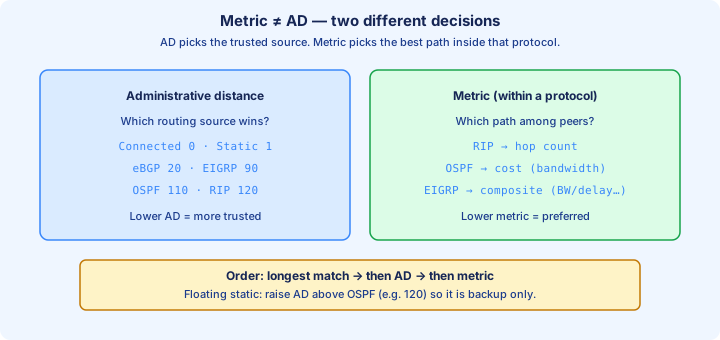
Metrics vs AD
A metric compares paths inside one protocol. OSPF uses cost, EIGRP a composite, RIP hop count. Lower is better unless that protocol says otherwise. Metrics never cross protocol boundaries to pick a winner.
Administrative distance (AD) ranks sources when two protocols offer the same prefix. Connected is 0, static 1, eBGP 20, EIGRP 90, OSPF 110, RIP 120, iBGP 200, unknown 255. The lowest AD owns the RIB entry.
`show ip route` prints codes and the AD/metric pair in brackets, like `[110/2]`. The first number is AD; the second is metric. A floating static uses a raised AD so the dynamic route wins until that dynamic path disappears.
Exam trap: a better OSPF metric cannot beat EIGRP for the same prefix. AD decides first; metric only breaks ties inside one source.
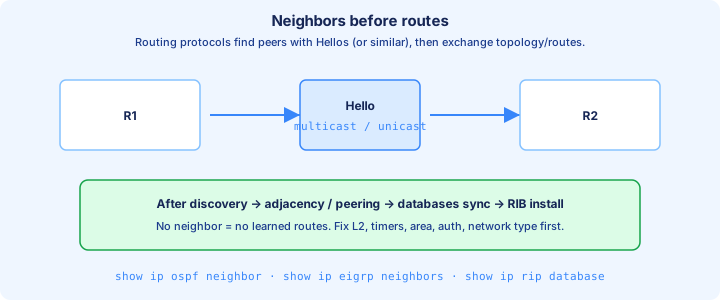
Neighbor discovery
Most IGPs discover peers before they trust routes. OSPF and EIGRP send Hellos; RIP listens for updates and may not keep a rich neighbor table the same way. No neighbor usually means no new learned prefixes from that peer on the wire.
Discovery needs a live Layer 3 path, matching timers or parameters, and often a shared AS or area. Multicast groups matter: OSPF uses 224.0.0.5/6, EIGRP 224.0.0.10, RIPv2 224.0.0.9. ACLs that drop those groups kill adjacency quietly.
`show ip eigrp neighbors` and `show ip ospf neighbor` prove who answered. Empty output after you configured `network` statements means Layer 2/3 reachability or a parameter mismatch, not a metric problem yet.
Exam trap: two routers can ping and still refuse to neighbor. Ping proves IP; adjacency proves protocol parameters match.
Topology database idea
Distance-vector and link-state keep different databases. RIP and classic EIGRP distance-vector thinking care about vectors learned from neighbors. OSPF floods LSAs into a topology map and runs SPF. EIGRP also keeps a topology table of feasible successors for fast backup.
The RIB (`show ip route`) is the installed best path. The protocol database is richer: OSPF’s LSDB, EIGRP’s topology table, RIP’s database. A prefix can sit in the database and still lose to a better AD source in the RIB. Treat the protocol database as the source of truth for what the IGP knows.
Link-state routers must agree on the map before they agree on paths. A missing LSA or stuck Exchange state means the databases never synced. Distance-vector problems often look like poisoned metrics or stale routes instead of SPF stalls.
Exam trap: clearing the RIB does not rebuild OSPF’s LSDB by itself. Know which table each `show` command reads.
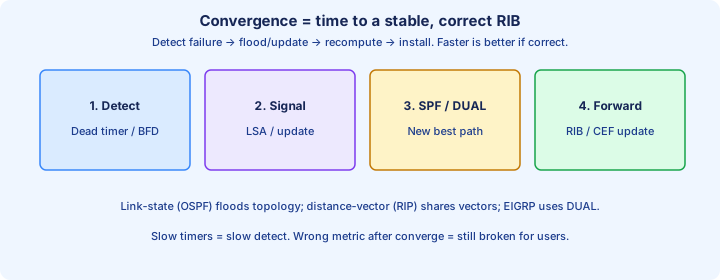
Convergence
Convergence is the time from a topology change until every router has a stable, loop-free forwarding set again. Fast failure detection plus a ready backup path beats a slow timer waiting on holddowns and periodic updates.
EIGRP can switch to a feasible successor without recomputing everything. OSPF detects a dead neighbor, floods, and runs SPF. RIP waits on update and timeout timers and is usually the slowest story on exams.
Tune carefully. Shorter Hello/Dead speeds detection but raises churn on flaky links. Capture `show ip route` before and after a shut to prove the backup next hop appeared without a human edit.
Exam trap: “fastest protocol” without context is weak. Feasible successors and LSA flood scope matter more than brand loyalty.
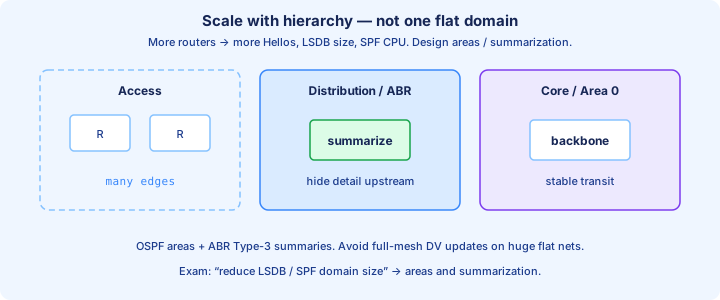
Scalability
Protocols scale differently. RIP’s hop limit and periodic floods waste bandwidth on large meshes. OSPF uses areas to bound LSA flood domains. EIGRP scales with queries and summarization but still needs a clean hierarchical addressing plan.
Summarization and stub features cut prefix count. A flat /24 everywhere advertises noise across the core. Hierarchical addressing lets an ABR or EIGRP summary hide dozens of leaf subnets behind one aggregate that the backbone can carry cheaply.
CPU and memory follow database size. A single OSPF area with hundreds of routers SPF-churns together on every flap. Split areas or shrink the domain before you blame the hardware platform.
Exam trap: more routers is not always “use BGP.” Inside one enterprise AS, OSPF or EIGRP with summarization is the usual scale answer.
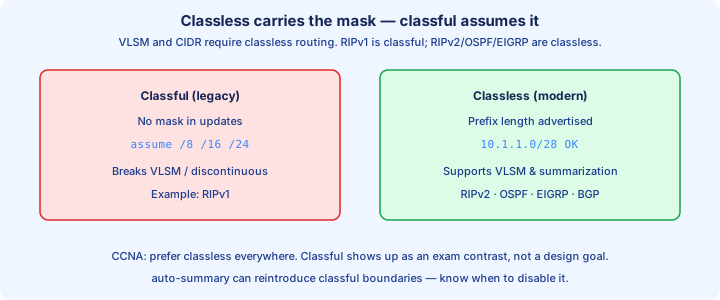
Classful vs classless
Classful protocols ignore VLSM and do not send masks with routes. RIPv1 is the classic example: it assumes Class A/B/C boundaries. Classless protocols carry the prefix length—RIPv2, OSPF, EIGRP, and BGP on the exam.
A classful update can merge or drop subnets that do not match the major network. Two /27s inside 172.16.0.0/16 may never install cleanly under RIPv1. Classless peers advertise `172.16.10.0/27` and `172.16.10.32/27` as separate prefixes.
Enable classless behavior where the CLI still offers it (`no auto-summary` in EIGRP/RIP contexts on older IOS). Modern exams assume VLSM everywhere and punish classful assumptions in the stem.
Exam trap: RIPv1 is classful; RIPv2 is classless. “RIP” on a question without a version usually wants the v2 behavior you should configure.
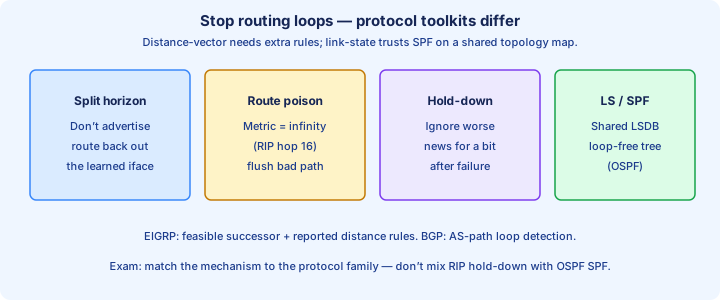
Loop prevention themes
Distance-vector tools include split horizon, route poisoning, poison reverse, and holddown. Do not advertise a route back out the interface you learned it on; mark a dead prefix unreachable (metric 16 in RIP) so the bad news spreads.
Link-state loop control is different: consistent LSDBs plus SPF yield a shortest-path tree. EIGRP’s feasibility condition blocks a neighbor that might loop back through you from becoming a backup next hop.
Redistribution and mismatched summarization create loops that no single protocol feature fixes alone. Filter and set seed metrics when domains meet. A `traceroute` that circles is a control-plane design bug, not a cable fault.
Exam trap: split horizon helps distance-vector; it is not OSPF’s main loop story. Match the mechanism to the protocol family.
Redistribution preview
Redistribution injects routes from one source into another—OSPF into EIGRP, static into OSPF, connected into RIP. The border router becomes the translator and must set a seed metric the destination protocol understands.
Without filters, every prefix crosses and can bounce back as a routing loop. Route-maps and distribute-lists bound what enters each domain. AD and metrics on the far side decide what wins once those prefixes arrive.
CCNA depth is awareness: know why two IGPs meet, that mutual redistribution is risky, and that `show ip route` codes like O E2 or D EX mark external paths. Deep tuning waits for later OSPF and redistribution days. Know the route codes so external paths jump out in `show ip route`.
Exam trap: redistribution does not “merge metrics.” Each protocol needs its own metric language at the boundary.
Choosing a protocol
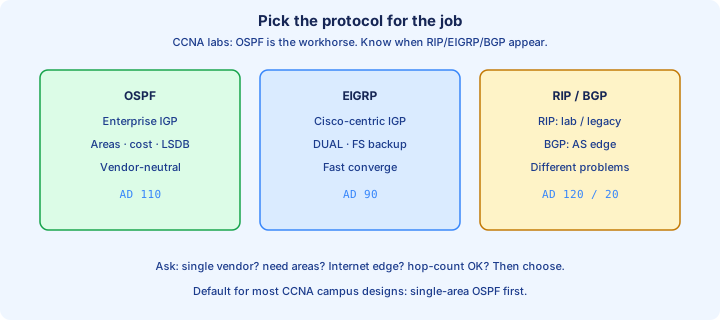
Pick for the job. Single-vendor campus with fast failover → EIGRP is still fair game on exams. Multi-vendor or a standards mandate → OSPF. Tiny lab or legacy leaf → RIP only when the stem forces it. Internet edge → BGP.
Operational fit beats theory. Staff who already run OSPF should not invent EIGRP for one closet. Address plan, area design, and summarization matter more than which logo is printed on the Hellos.
Write constraints first: OSPF needs Area 0 discipline in multi-area designs. EIGRP needs matching K-values and AS numbers. RIP needs tiny diameter. Those constraints come before you type `router` in the lab.
Exam trap: “newest” is not a valid reason. Match vendor mix, scale, and the feature the question highlights.
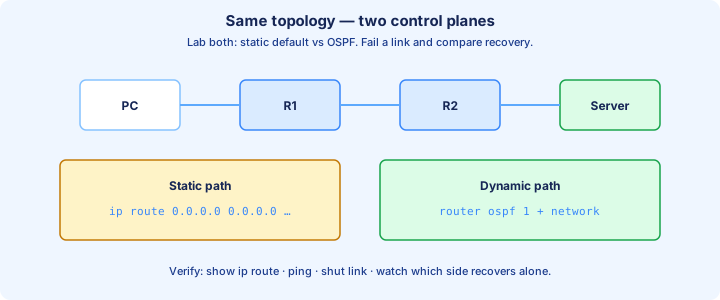
Lab compare static vs dynamic
Build three routers in a triangle. First install only statics for each remote LAN. `show ip route` shows S entries. Shut one link and watch the path die until you add another static by hand on every affected box.
Clear the statics (or raise AD) and enable one IGP—OSPF single area or EIGRP AS 1—with matching `network` statements. Confirm neighbors, then `show ip route` for O or D codes to the same LANs you reached statically.
Shut the same link again. Dynamic should install the alternate next hop without a config edit. Time how long pings fail; that interval is your rough convergence feel for this lab topology.
Exam trap: leaving a static with AD 1 overrides the IGP forever. Remove it or float it above the protocol AD.
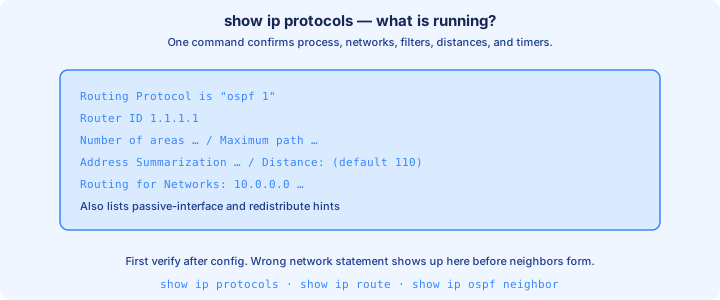
show ip protocols
`show ip protocols` is the control-plane inventory. It lists each running routing process, router ID, networks advertised, passive interfaces, filters, and distance values. Start here before diving into deep `show ip ospf` or `show ip eigrp` output.
Confirm the process you think you started actually exists. A mistyped AS or missing `network` statement shows up as empty routing data or interfaces that never joined. Passive lists explain why a LAN interface stays silent on Hellos. Read the passive list every time you wonder why Hellos never left a LAN.
Compare AD lines with what you expect in the RIB. If OSPF is on but RIP still owns a prefix, something else has a better AD or a more specific match. Cross-check `show ip route` for that prefix next.
Exam trap: `show ip protocols` does not prove a neighbor is up. It proves the local process config; neighbor tables prove the peer.
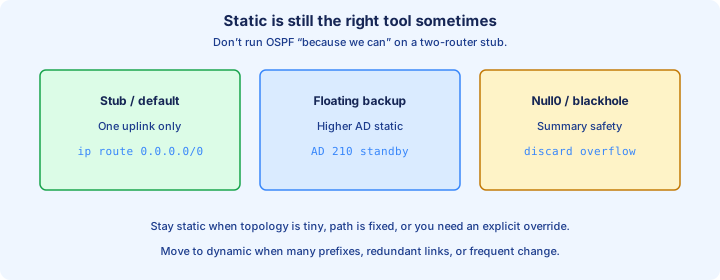
When to stay static
Stay static for stub edges with one uplink, management VRFs, and floating backups. A branch with one default toward the hub does not need OSPF Hellos on the WAN if policy is simply “always use this circuit.”
Static defaults (`ip route 0.0.0.0 0.0.0.0 next-hop`) are common at Internet edges when BGP is out of scope for the course. Document the next hop; a DHCP-changed WAN IP orphans the route overnight.
Mix carefully: dynamic inside the campus, static toward a firewall or partner link you refuse to peer with. Redistribute only the defaults you mean to inject into the IGP.
Exam trap: “always prefer dynamic” is wrong. Tiny stubs and deliberate backups are still static territory.
From former Day 25
Source material retained from the previous Day 25 chapter for continuity.
RIP overview
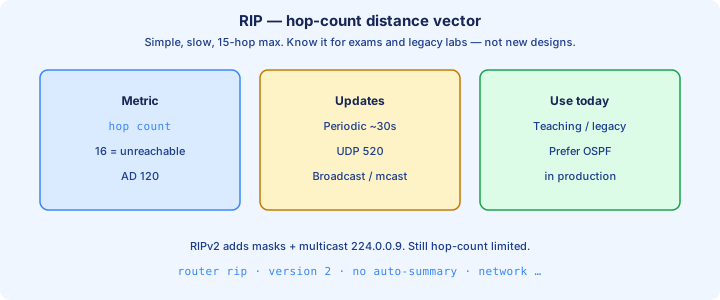
RIP is a classic distance-vector IGP. Routers advertise their best routes to neighbors; each hop adds to the metric. CCNA keeps RIP as a teaching protocol and an occasional exam distractor, not as a modern campus design choice you would defend in production.
Enable with `router rip`, then `version 2`, `no auto-summary`, and `network` statements for the major nets you want to run. `show ip protocols` should list RIP and those networks. `show ip route` marks learned RIP paths with the R code.
Updates go every 30 seconds by default. That chatter plus slow timers make RIP noisy and slow compared with OSPF or EIGRP on the same topology. Use it when the lab or stem names it, then verify with the RIP-specific show commands. Keep `show ip rip database` in the same verification pass as `show ip route`.
Exam trap: typing `router rip` alone often leaves version 1. Force version 2 whenever VLSM is in play.
RIP hop count
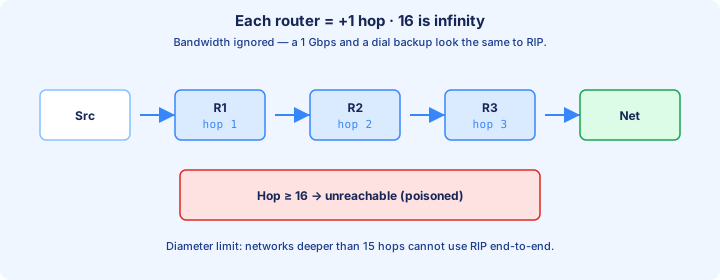
RIP’s metric is hop count. Directly connected is counted as 0 from the originator’s view; each router crossed adds one for receivers. The maximum usable metric is 15. A metric of 16 means unreachable (infinity) and is how RIP poisons a dead route.
Fifteen hops caps diameter hard. A path that needs sixteen routers never installs as a usable RIP route in the RIB. That limit is why RIP fails large enterprises even before bandwidth or delay math enters the discussion.
`show ip rip database` and `show ip route` show the hop values in play. Equal hop counts can load-share depending on platform defaults; unequal hops simply lose. Bandwidth is completely invisible to this metric.
Exam trap: a 1 Gbps link three hops away loses to a 10 Mbps link one hop away. Hop count ignores speed.
RIPv2 vs v1
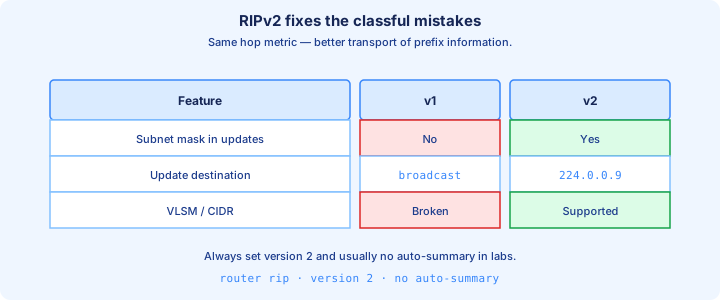
RIPv1 is classful, broadcasts updates to 255.255.255.255, and carries no subnet mask. RIPv2 is classless, multicasts to 224.0.0.9, supports VLSM, and can use simple authentication. Always prefer v2 in labs and sims.
Config under `router rip`: set `version 2` and `no auto-summary`. Auto-summary on a classful boundary can hide subnets even when version 2 is running. Confirm with `show ip protocols` that version 2 is the active send/receive version.
Interoperability fails when one side speaks only v1. Subnets disappear or install against the wrong major network. Packet captures show broadcast versus multicast as a quick tell between the versions.
Exam trap: RIPv2 still needs `no auto-summary` on many IOS trains or it behaves classful at major network edges.
EIGRP overview
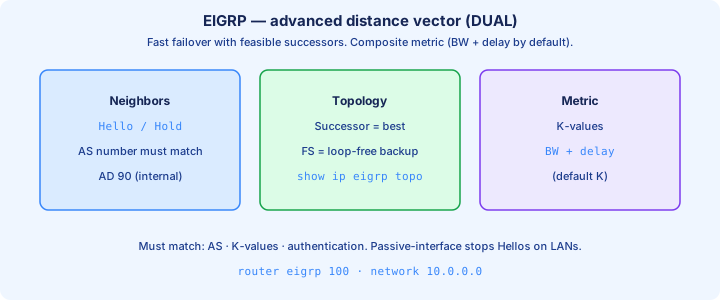
EIGRP is Cisco’s advanced distance-vector protocol (often called hybrid). It uses the DUAL algorithm, keeps a topology table, and forms reliable neighbor adjacencies over AS numbers that must match on both ends of every link.
Classic config: `router eigrp 100`, `network 10.0.0.0`, `no auto-summary`. Named mode exists on newer IOS; exams still love classic AS syntax. Multicast 224.0.0.10 carries Hellos and reliable updates between peers.
`show ip eigrp neighbors` proves adjacency. `show ip route` shows D for internal and D EX for external. Fast failover via feasible successors is the operational selling point versus RIP on the same dual-homed site. Confirm D versus D EX so you know whether a path is internal or redistributed.
Exam trap: mismatched AS numbers never neighbor. The AS is local to EIGRP, not a BGP autonomous system number you must register.
EIGRP metric themes
Classic EIGRP metric weights bandwidth and delay by default (K1 and K3). Load and reliability exist in the full formula but stay off unless you change K-values. Lowest composite metric wins the successor election for that prefix.
Reported delay is cumulative along the path; bandwidth uses the minimum hop along that path. A single slow serial interface ruins an otherwise gigabit path in the calculation. `show interface` bandwidth and delay values feed what EIGRP advertises. Memorize that min bandwidth and cumulative delay dominate the default formula.
All neighbors must share identical K-values or adjacency fails with a logged mismatch. Do not “tune” Ks casually on a live exam sim. Prefer interface bandwidth or delay fixes, or touch `metric weights` only when the stem demands it.
Exam trap: changing delay on one interface changes EIGRP path choice more safely than inventing new K-values.
Successor / FS
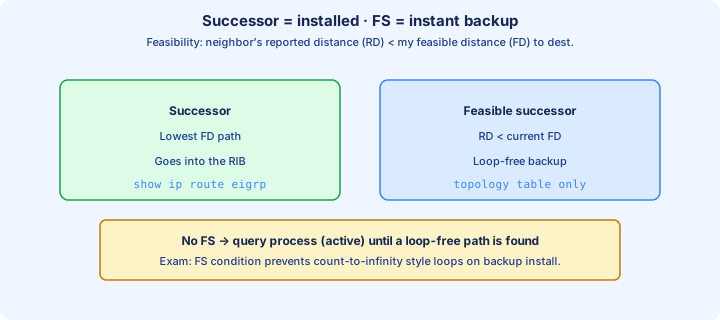
The successor is the best next hop—lowest feasible distance (FD)—and is installed in the RIB. A feasible successor (FS) is a loop-free backup that passes the feasibility condition and waits ready in the topology table.
`show ip eigrp topology` lists successors and feasible successors for each prefix. `show ip eigrp topology all-links` reveals neighbors that failed feasibility and therefore are not loop-free backups you can promote instantly.
When the successor dies, EIGRP can promote an FS immediately with almost no query delay. Without an FS it goes active, queries neighbors, and converges more slowly. Design dual-homed sites so critical prefixes keep an FS.
Exam trap: a lower advertised distance alone does not create an FS. Feasibility must pass, or that neighbor stays a non-backup.
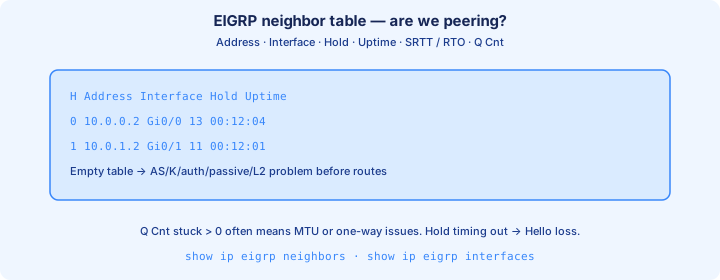
show ip eigrp neighbors
`show ip eigrp neighbors` is the adjacency health check. Columns include peer address, local interface, hold time, uptime, SRTT, and queue counts. A stable hold time that refreshes means Hellos are still flowing on that segment.
An empty table after config means AS mismatch, passive interface, ACL drop, or Layer 3 path failure. High Q counts or neighbors that bounce repeatedly hint at congestion or a unidirectional forwarding problem.
Pair with `show ip eigrp interfaces` to see which interfaces actually run EIGRP. A LAN you expected to peer on but marked passive will never appear as a neighbor-forming interface.
Exam trap: neighbors up does not guarantee every prefix is learned. Check topology and RIB next for the missing network.
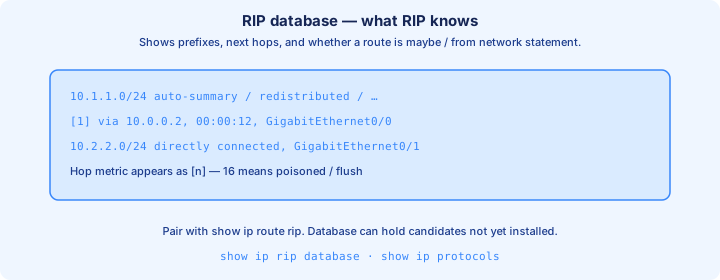
show ip rip database
`show ip rip database` lists prefixes RIP knows, including possibly multiple sources and aging timers. Connected networks that are RIP-enabled appear; learned routes show the advertising neighbor and the hop-count metric.
Use it when `show ip route` lacks an R entry you expected. The prefix may be in the RIP database but lose to a better AD source, or sit poisoned at metric 16 after a withdrawal. That split between database and RIB is a favorite exam trick.
Timers in the database explain aging behavior. Routes that vanish every few minutes point to unstable neighbors, mismatched versions, or an interface flapping under the `network` statement.
Exam trap: database presence is not RIB installation. AD and longer matches still decide `show ip route`.
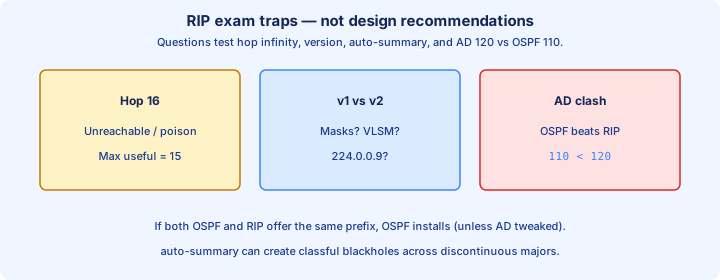
When RIP appears on exams
RIP shows up to test hop-count limits, v1 versus v2, auto-summary traps, and AD 120. Stems may ask which path RIP chooses or why a /30 never appears under classful v1 behavior.
Simulators still ask you to enable RIPv2, advertise specific networks, and verify with `show ip route` plus `show ip protocols`. Keep the config short, version-explicit, and free of surprise auto-summary.
Do not redesign a whole campus in RIP because a question mentions it once. Answer the RIP mechanic the stem cares about, then move on. Production muscle memory should still default toward OSPF or EIGRP.
Exam trap: a scenario with unequal bandwidth and RIP almost always wants the hop-count answer, not the “faster link.”
EIGRP feasibility
The feasibility condition: a neighbor’s reported distance (RD) to the destination must be less than your current feasible distance (FD). If RD < FD, that neighbor cannot be looping through you, so it may become an FS.
RD is the neighbor’s metric to the destination as it reports it. FD is your best metric via the current successor. Memorize “RD must be strictly less than FD,” not “less than or equal.” Equal fails the test on exams.
Work a numeric stem carefully: successor FD 30, neighbor RD 20 → FS. Neighbor RD 35 → not feasible, even if a drawing makes that cable look shorter than the successor path. Drill RD < FD with two or three numeric examples before the exam.
Exam trap: drawing a shorter cable does not grant feasibility. Compare RD to FD with the numbers the question gives.
Passive interfaces
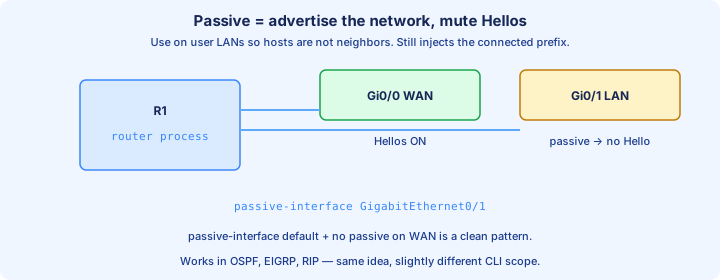
A passive interface advertises the connected network but does not send Hellos or routing updates out that interface. Use it on access LANs so user PCs never see EIGRP or RIP multicast chatter.
Under the routing process: `passive-interface GigabitEthernet0/0`, or `passive-interface default` then `no passive-interface` on the links that must peer. `show ip protocols` lists which interfaces are passive. Prefer `passive-interface default` in large access layers, then reopen only peer links.
Accidentally passiving a WAN peer kills adjacency while the network may still appear in advertisements out other interfaces. Symptom: no neighbor on that interface, with routes maybe still partially present from other peers.
Exam trap: passive still includes the subnet in updates out other interfaces. It is not the same as omitting the `network` statement.
Network statements
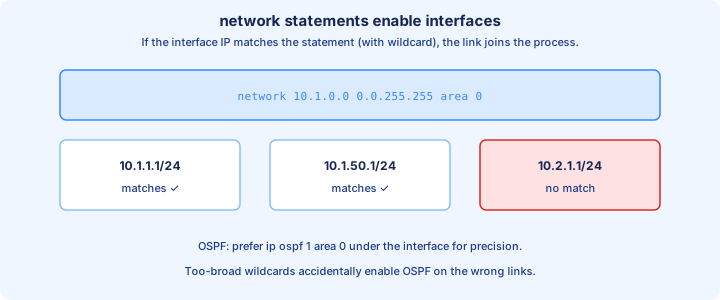
The `network` statement selects which local interfaces run the protocol, based on whether the interface address falls in the stated range. It is not a wishlist of remote subnets you hope will magically appear in the RIB.
EIGRP classic examples: `network 10.1.1.0 0.0.0.255` or classful `network 10.0.0.0`. RIP uses the same idea to enable interfaces. Oversized statements can enable extra interfaces you meant to leave quiet—pair them with passive interfaces.
`show ip protocols` and `show ip eigrp interfaces` (or RIP interface output) confirm what actually matched. If Gi0/1 never joins the process, the statement did not cover that interface’s IP address.
Exam trap: advertising a remote LAN requires the protocol path to learn it from a neighbor, not a local `network` statement that merely lists the remote prefix.
Troubleshooting adjacency
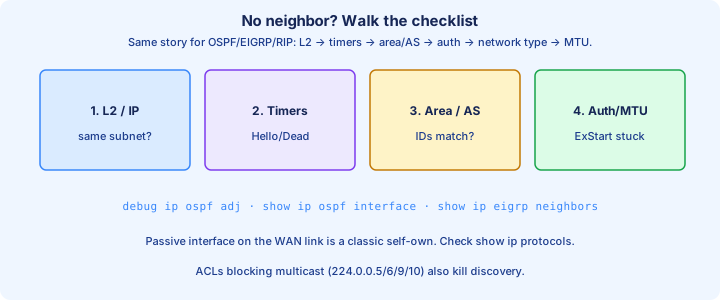
Work top down: link up/up, matching IP subnet, correct AS/area/process, not passive, timers and K-values aligned, multicast allowed through any ACL. `ping` the peer, then re-check the neighbor table before you touch metrics.
EIGRP-specific failures: AS mismatch, K-value mismatch, authentication mismatch. RIP-specific failures: version mismatch, `auto-summary` surprises, ACL dropping UDP 520. Keep `debug` for a controlled lab only. Authentication and ACL misses show up here more often than metric mistakes.
One-way adjacency often means an ACL or wrong passive on one side only. Compare `show ip protocols` on both routers line by line before changing bandwidth or delay values.
Exam trap: fixing bandwidth will not create a missing neighbor. Restore Hellos first; tune metrics after adjacency is up.
Design notes
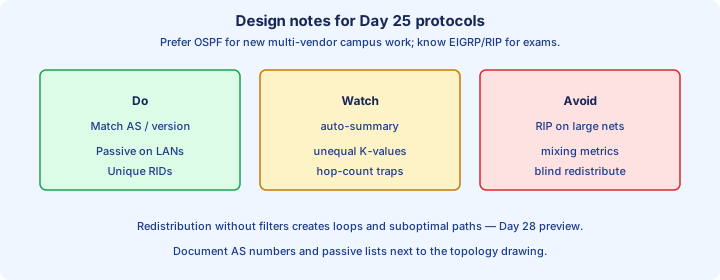
Prefer EIGRP or OSPF for real campus cores. Leave RIP for edge cases, migrations, and exam mechanics. Keep addressing hierarchical so summaries and stub features can actually shrink the tables.
On EIGRP, plan for feasible successors on dual-homed sites, set passives on user LANs, and keep AS numbering consistent across the domain. Avoid random K-value experiments in production or in a scored lab.
Document redistribution points if RIP must meet EIGRP during a migration. Seed metrics and filters belong in the design note before you flip the redistribute command and create a loop.
Exam trap: “EIGRP is always better than OSPF” is opinion. The stem’s constraints—vendor mix, area rules, and named features—pick the winner.
Key ideas
- Merged dynamic routing + RIP/EIGRP overview (not exam-weighted; contrast with OSPF).
- Dynamic protocols exchange prefixes and react to topology changes; static does not.
- IGPs (OSPF, EIGRP, RIP) run inside an AS; BGP is the classic EGP between ASes.
- Metric picks among routes from the same protocol; AD picks among routing sources.
- Neighbors / adjacency must form before routes are trusted.
- Convergence = time to a consistent forwarding view after a change.
- Classless protocols carry masks (VLSM); classful ones assume class boundaries.
- show ip protocols + show ip route prove what is running and what won.
Self-check
- Metric vs AD in one sentence each — which question does each answer?
- Name one IGP and one EGP and where each typically runs.
- When would you keep a static default instead of full dynamic routing?
- What does show ip protocols tell you that show ip route does not?
- Floating static: primary OSPF AD 110 — what AD should the backup use?
- Why is hop count 16 “unreachable” in RIP?